Wayback Machinekoobas.hobune.stream
May JUN Jul
Previous capture 13 Next capture
2021 2022 2023
2 captures
13 Jun 22 - 14 Jun 22
sparklines
Close Help
  • Products
  • Solutions
  • Made with Unity
  • Learning
  • Support & Services
  • Community
  • Asset Store
  • Get Unity

UNITY ACCOUNT

You need a Unity Account to shop in the Online and Asset Stores, participate in the Unity Community and manage your license portfolio. Login Create account
  • Blog
  • Forums
  • Answers
  • Evangelists
  • User Groups
  • Beta Program
  • Advisory Panel

Navigation

  • Home
  • Products
  • Solutions
  • Made with Unity
  • Learning
  • Support & Services
  • Community
    • Blog
    • Forums
    • Answers
    • Evangelists
    • User Groups
    • Beta Program
    • Advisory Panel

Unity account

You need a Unity Account to shop in the Online and Asset Stores, participate in the Unity Community and manage your license portfolio. Login Create account

Language

  • Chinese
  • Spanish
  • Japanese
  • Korean
  • Portuguese
  • Ask a question
  • Spaces
    • Default
    • Help Room
    • META
    • Moderators
    • Topics
    • Questions
    • Users
    • Badges
  • Home /
avatar image
0
Question by Brad-Lee · May 27, 2014 at 12:04 PM · 2drotationspritescamera-movement2.5d

Sprites always face the camera, Camera freely rotates

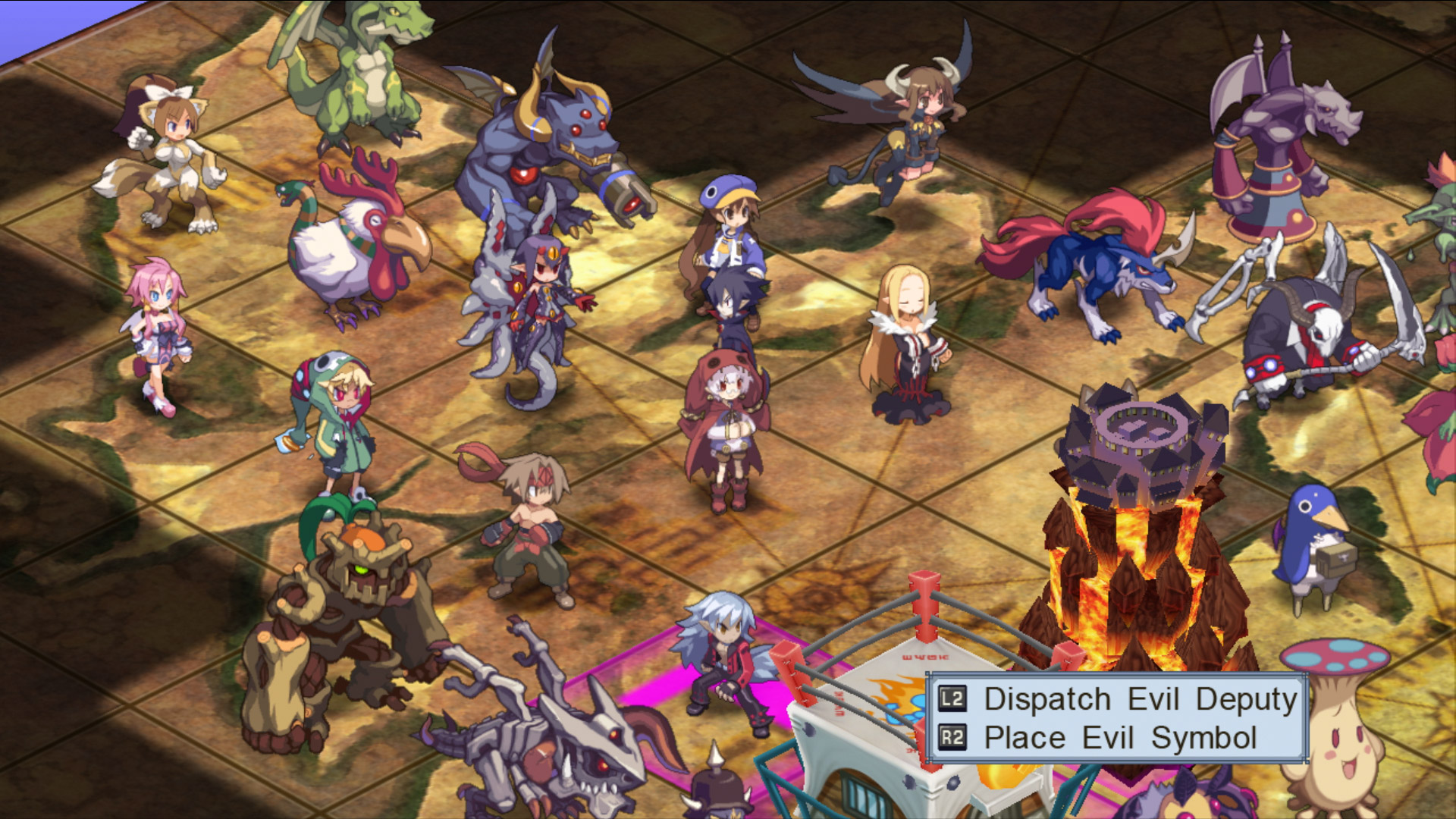
I'm trying to achieve sprite billboarding like these games: alt text

Ragnarok Online alt text

Disgaea

Basically the player can freely rotate, pan and zoom the camera however he wishes, and the sprites will always look the same from any angle.

I've tried simply using LookAt, but for some reason that reverses the rotation of the sprites as well. I also need the sprites to not rotate 'sideways' when the sprite is not centered on the screen. - Although that could just be because of the perspective camera - I'm not sure.

Comment
Add comment
10 |3000 characters needed characters left characters exceeded
▼
  • Viewable by all users
  • Viewable by moderators
  • Viewable by moderators and the original poster
  • Advanced visibility
Viewable by all users

3 Replies

· Add your reply
  • Sort: 
avatar image
0
Best Answer

Answer by Seerix · May 27, 2014 at 12:14 PM

I use this simple script to achieve that. You can set the target to be the camera.

 public class FaceTargetScript : MonoBehaviour 
 {
     public Transform target;
 
     void Update () {
         if (target != null)
             transform.rotation = target.rotation;
     }
 }

Edit: I was too fast in answering and ignored you requirement to prevent them to angle when they're not in the center of the screen. I'll look further into it.

Edit 2: Code updated with working example.

Comment
Add comment · Show 3 · Share
10 |3000 characters needed characters left characters exceeded
▼
  • Viewable by all users
  • Viewable by moderators
  • Viewable by moderators and the original poster
  • Advanced visibility
Viewable by all users
avatar image Brad-Lee · May 27, 2014 at 12:29 PM 0
Share

I actually managed to solve it, but your one line solution beats $$anonymous$$e by heaps, thanks xD

avatar image Brad-Lee · May 27, 2014 at 12:29 PM 0
Share

In case anyone is interested, here is the monstrosity I concocted


     Vector3 oppositeCamera = transform.position - Camera.main.transform.position;
     Quaternion faceCamera = Quaternion.LookRotation(oppositeCamera);
     Vector3 euler = faceCamera.eulerAngles;
     euler.y = 0f;
     faceCamera.eulerAngles = euler;
     transform.rotation = faceCamera;
avatar image Seerix · May 27, 2014 at 12:40 PM 0
Share

Yours will probably serve your needs better though. $$anonymous$$y solution mimics the camera's viewing plane, so characters won't appear to be standing upright when viewing from high angles and that might look weird in your case.

avatar image
0

Answer by MrScottyPieey · May 26, 2018 at 02:37 PM

It works in Unity 5.6.3

Comment
Add comment · Show 1 · Share
10 |3000 characters needed characters left characters exceeded
▼
  • Viewable by all users
  • Viewable by moderators
  • Viewable by moderators and the original poster
  • Advanced visibility
Viewable by all users
avatar image MrScottyPieey · Jun 16, 2019 at 09:50 PM 0
Share

Billboarding.

avatar image
0

Answer by Oris · Apr 19, 2020 at 06:23 PM

  • You can create a Particle and set it up to loop with static positions. By default, this particle is facing to the cam and it's extremly cheap.

Check out my Games&Assets: https://oris-romero.itch.io/

Comment
Add comment · Share
10 |3000 characters needed characters left characters exceeded
▼
  • Viewable by all users
  • Viewable by moderators
  • Viewable by moderators and the original poster
  • Advanced visibility
Viewable by all users

Your answer

Hint: You can notify a user about this post by typing @username

Up to 2 attachments (including images) can be used with a maximum of 524.3 kB each and 1.0 MB total.

Follow this Question

Answers Answers and Comments

23 People are following this question.

avatar image avatar image avatar image avatar image avatar image avatar image avatar image avatar image avatar image avatar image avatar image avatar image avatar image avatar image avatar image avatar image avatar image avatar image avatar image avatar image avatar image avatar image avatar image

Related Questions

Sprite sheets? Unity for 2D ? 1 Answer

Block Perspective in Top-Down 2D Games 2 Answers

Point an arrow at the mouse position, 2.5D 1 Answer

How do I flip a 3D object to look towards left or right on a 2D plane 0 Answers

Making sprites just rotate and not tilt. 3 Answers


Enterprise
Social Q&A

Social
Subscribe on YouTube social-youtube Follow on LinkedIn social-linkedin Follow on Twitter social-twitter Follow on Facebook social-facebook Follow on Instagram social-instagram

Footer

  • Purchase
    • Products
    • Subscription
    • Asset Store
    • Unity Gear
    • Resellers
  • Education
    • Students
    • Educators
    • Certification
    • Learn
    • Center of Excellence
  • Download
    • Unity
    • Beta Program
  • Unity Labs
    • Labs
    • Publications
  • Resources
    • Learn platform
    • Community
    • Documentation
    • Unity QA
    • FAQ
    • Services Status
    • Connect
  • About Unity
    • About Us
    • Blog
    • Events
    • Careers
    • Contact
    • Press
    • Partners
    • Affiliates
    • Security
Copyright © 2020 Unity Technologies
  • Legal
  • Privacy Policy
  • Cookies
  • Do Not Sell My Personal Information
  • Cookies Settings
"Unity", Unity logos, and other Unity trademarks are trademarks or registered trademarks of Unity Technologies or its affiliates in the U.S. and elsewhere (more info here). Other names or brands are trademarks of their respective owners.
  • Anonymous
  • Sign in
  • Create
  • Ask a question
  • Spaces
  • Default
  • Help Room
  • META
  • Moderators
  • Explore
  • Topics
  • Questions
  • Users
  • Badges