
Wayback Machinekoobas.hobune.stream
May JUN Jul
Previous capture 12 Next capture
2021 2022 2023
1 capture
12 Jun 22 - 12 Jun 22
sparklines
Close Help
  • Products
  • Solutions
  • Made with Unity
  • Learning
  • Support & Services
  • Community
  • Asset Store
  • Get Unity

UNITY ACCOUNT

You need a Unity Account to shop in the Online and Asset Stores, participate in the Unity Community and manage your license portfolio. Login Create account
  • Blog
  • Forums
  • Answers
  • Evangelists
  • User Groups
  • Beta Program
  • Advisory Panel

Navigation

  • Home
  • Products
  • Solutions
  • Made with Unity
  • Learning
  • Support & Services
  • Community
    • Blog
    • Forums
    • Answers
    • Evangelists
    • User Groups
    • Beta Program
    • Advisory Panel

Unity account

You need a Unity Account to shop in the Online and Asset Stores, participate in the Unity Community and manage your license portfolio. Login Create account

Language

  • Chinese
  • Spanish
  • Japanese
  • Korean
  • Portuguese
  • Ask a question
  • Spaces
    • Default
    • Help Room
    • META
    • Moderators
    • Topics
    • Questions
    • Users
    • Badges
  • Home /
avatar image
0
Question by AndreaBrag · Apr 10, 2017 at 12:39 PM · animationframerateblender animation

Weird frame numbers in imported animations

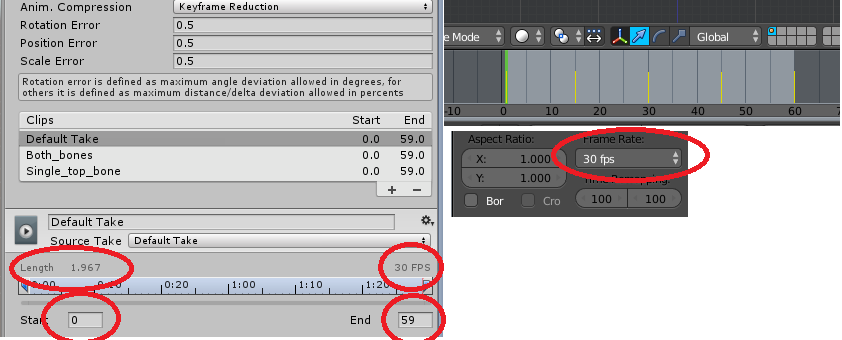
I'm currently importing a simple 2 bones animation from Blender into Unity and I found a weird behaviour occourring.

As can be seen in the images in Blender I'm using a frame rate of 30 fps with a 60 frames (1 to 60) animation giving a length of 2 seconds. In Unity the same clip is imported with frames going from 0 to 59 (why is that?) still with 30 fps but a lenght of 1.967, this doesn't add up.
alt text

Am I missing something in the import settings or is this behaviour intended?

immagine.png (43.1 kB)
Comment
Add comment
10 |3000 characters needed characters left characters exceeded
▼
  • Viewable by all users
  • Viewable by moderators
  • Viewable by moderators and the original poster
  • Advanced visibility
Viewable by all users

3 Replies

· Add your reply
  • Sort: 
avatar image
0

Answer by theANMATOR2b · Apr 10, 2017 at 01:05 PM

Is the last animated keyframe of the bones in the blender file on frame 59? In Max the fbx export can default to the last frame where the last animated keyframe sits on the timeline.

To fix the artist can duplicate the keyframes on frame 59 and place them on frame 60.

Comment
Add comment · Share
10 |3000 characters needed characters left characters exceeded
▼
  • Viewable by all users
  • Viewable by moderators
  • Viewable by moderators and the original poster
  • Advanced visibility
Viewable by all users
avatar image
0

Answer by AndreaBrag · Apr 10, 2017 at 03:07 PM

A friend of mine suggested that Unity might need to interpolate between the keyframes in order to create the animation frame (does it sound crazy?), so to make a 60 frame animation (meaning that if played at 30 fps it lasts 2 seconds) a 61st keyframe is needed in Blender.

That worked and I have now a 0 to 60 frame in Unity lasting 2 seconds at 30 fps. A official statement would be usefull anyway.

Comment
Add comment · Show 2 · Share
10 |3000 characters needed characters left characters exceeded
▼
  • Viewable by all users
  • Viewable by moderators
  • Viewable by moderators and the original poster
  • Advanced visibility
Viewable by all users
avatar image theANMATOR2b · Apr 10, 2017 at 04:01 PM 0
Share

3D $$anonymous$$ax is similar in respect to frame numbers. The timeline begins at frame zero, so to get a 2 second clip, animation keyframes will go up to frame 59 when animating at 30fps.

Unity does interpolate between keyframes but that has no effect on duration of the animation afaik. I'm not an official Unity person - and probably shouldn't expect an official statement in the 'Answers' section. The documentation is 'official'.

avatar image AndreaBrag theANMATOR2b · Apr 10, 2017 at 04:41 PM 0
Share

Unfortunately the docs are lacking, or at least missing this information.

I still find weird that a animation going from 0 to 59 last ~1.9 seconds at 30 fps ins$$anonymous$$d of 2. Since you need at least 2 point to interpolate one can imagine that Unity uses those 60 keyframes in pairs (meaning 59 couples and 59/30 is equals to 1.96666... exactly the length that Unity shows) so adding one more keyframe result in 60 2-points pairs.

I don't know if I explained my self, I can try to clarify if needed.

avatar image
0

Answer by Kamil1064 · Apr 10, 2017 at 05:31 PM

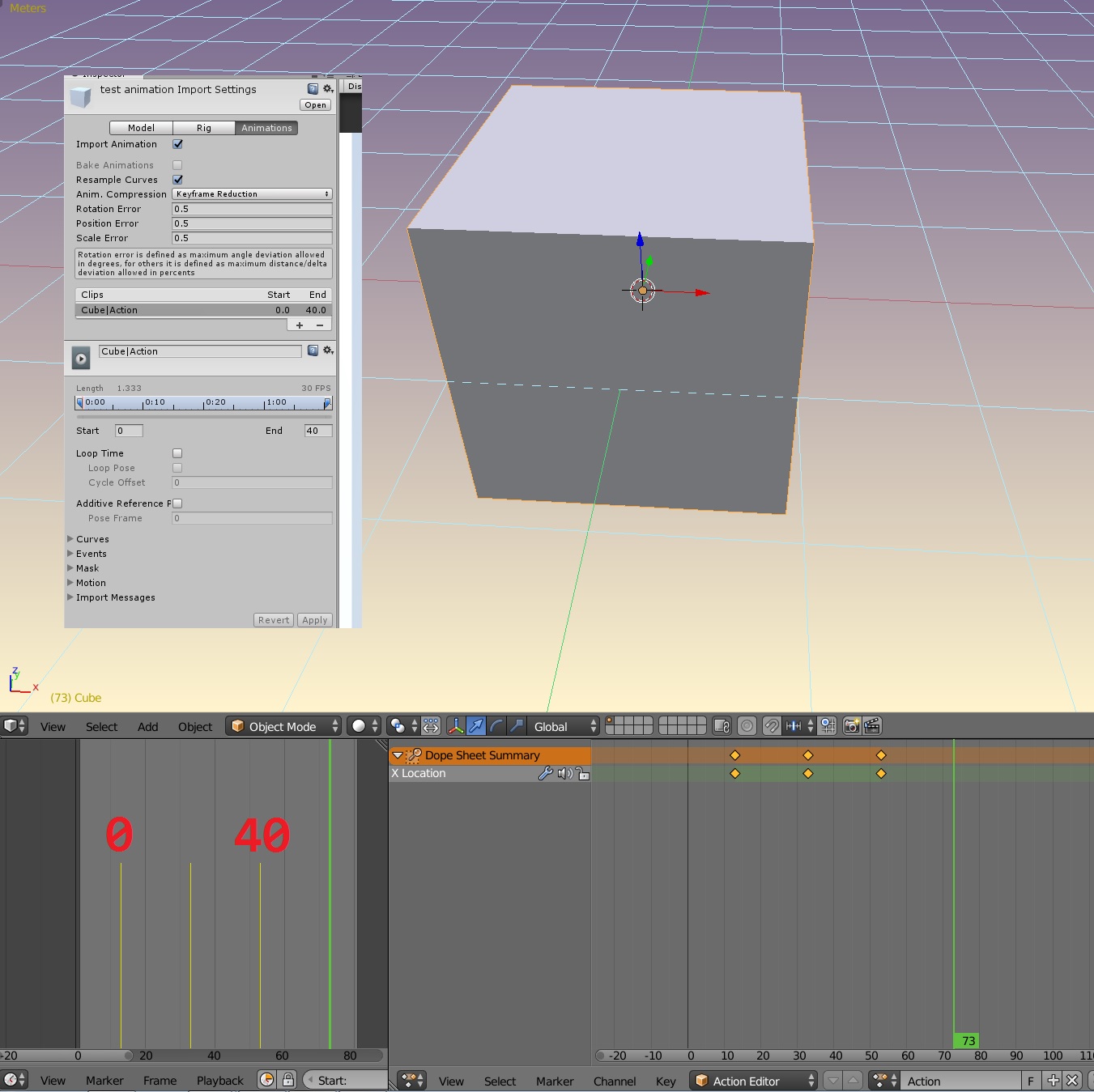
Hi @AndreaBrag, everything is ok, that may look weird but your first keyframe in blender is on frame 1, and last on frame 60 which mean your animation is 59 frames length. That's no matter which frame you set up in blender's timeline on start and end. Unity always takes from first to last keyframe: alt text You may see an issue because first part of your animation is 14 frames length, rest are 15, but that depends what kind your animation is, maybe you want it.

unity-blender-animation-001.jpg (271.3 kB)
Comment
Add comment · Show 1 · Share
10 |3000 characters needed characters left characters exceeded
▼
  • Viewable by all users
  • Viewable by moderators
  • Viewable by moderators and the original poster
  • Advanced visibility
Viewable by all users
avatar image AndreaBrag · Apr 10, 2017 at 06:46 PM 0
Share

There's still something that maybe I can't grasp. I get that left-shifting a 1-60 block is equal to a 0-59, but the total length shouldn't still be 60?

What i picture is a array of 60 elements (being the keyframes) at index 0 is the 1st key and at index 59 is the 60th, meaning a length of 60, while, as seen in the inspector, the length of this "array" is 59 since 59/30 give the clip length showed (1.967 seconds).

Your answer

Hint: You can notify a user about this post by typing @username

Up to 2 attachments (including images) can be used with a maximum of 524.3 kB each and 1.0 MB total.

Follow this Question

Answers Answers and Comments

4 People are following this question.

avatar image avatar image avatar image avatar image

Related Questions

How does Unity import animations from a .blend file? 1 Answer

Set Game to animation frame rate, Why Not? 0 Answers

Animation precision is lost for character's blinking 1 Answer

Blander animation moves differentry in Unity 0 Answers

one animation kills the frame rate 3 Answers


Enterprise
Social Q&A

Social
Subscribe on YouTube social-youtube Follow on LinkedIn social-linkedin Follow on Twitter social-twitter Follow on Facebook social-facebook Follow on Instagram social-instagram

Footer

  • Purchase
    • Products
    • Subscription
    • Asset Store
    • Unity Gear
    • Resellers
  • Education
    • Students
    • Educators
    • Certification
    • Learn
    • Center of Excellence
  • Download
    • Unity
    • Beta Program
  • Unity Labs
    • Labs
    • Publications
  • Resources
    • Learn platform
    • Community
    • Documentation
    • Unity QA
    • FAQ
    • Services Status
    • Connect
  • About Unity
    • About Us
    • Blog
    • Events
    • Careers
    • Contact
    • Press
    • Partners
    • Affiliates
    • Security
Copyright © 2020 Unity Technologies
  • Legal
  • Privacy Policy
  • Cookies
  • Do Not Sell My Personal Information
  • Cookies Settings
"Unity", Unity logos, and other Unity trademarks are trademarks or registered trademarks of Unity Technologies or its affiliates in the U.S. and elsewhere (more info here). Other names or brands are trademarks of their respective owners.
  • Anonymous
  • Sign in
  • Create
  • Ask a question
  • Spaces
  • Default
  • Help Room
  • META
  • Moderators
  • Explore
  • Topics
  • Questions
  • Users
  • Badges
