
Wayback Machinekoobas.hobune.stream
May JUN Jul
Previous capture 13 Next capture
2021 2022 2023
1 capture
13 Jun 22 - 13 Jun 22
sparklines
Close Help
  • Products
  • Solutions
  • Made with Unity
  • Learning
  • Support & Services
  • Community
  • Asset Store
  • Get Unity

UNITY ACCOUNT

You need a Unity Account to shop in the Online and Asset Stores, participate in the Unity Community and manage your license portfolio. Login Create account
  • Blog
  • Forums
  • Answers
  • Evangelists
  • User Groups
  • Beta Program
  • Advisory Panel

Navigation

  • Home
  • Products
  • Solutions
  • Made with Unity
  • Learning
  • Support & Services
  • Community
    • Blog
    • Forums
    • Answers
    • Evangelists
    • User Groups
    • Beta Program
    • Advisory Panel

Unity account

You need a Unity Account to shop in the Online and Asset Stores, participate in the Unity Community and manage your license portfolio. Login Create account

Language

  • Chinese
  • Spanish
  • Japanese
  • Korean
  • Portuguese
  • Ask a question
  • Spaces
    • Default
    • Help Room
    • META
    • Moderators
    • Topics
    • Questions
    • Users
    • Badges
  • Home /
avatar image
0
Question by fernandovt · Aug 29, 2012 at 10:41 AM · triggerenemysound

How an Enemy could activate a Sound?

The thing is that I have made a script that activates a sound when the player gets on its range (it's a trigger). I would like to know if there is a way to make this script works on a different way, I would like that when my enemy gets on the range of object that has this script, the sound gets activated, but at the same time, the player is able to hear it clearly no matters how far away he is from the object and the enemy. This is the script, it's very simple:

 var Sound : AudioClip;
 function OnTriggerEnter(){
     audio.PlayOneShot(Sound);
 }

It's possible?, any ideas?, sorry for the bad english:)

Comment
Add comment · Show 3
10 |3000 characters needed characters left characters exceeded
▼
  • Viewable by all users
  • Viewable by moderators
  • Viewable by moderators and the original poster
  • Advanced visibility
Viewable by all users
avatar image Velketor · Aug 30, 2012 at 02:17 AM 0
Share

are you able to get any sound to play at all? there can only be 1 Audio Listener in your scene, so check that you don't have 2. also, you can only play $$anonymous$$PEG, Ogg Vorbis, WAV, AIF, $$anonymous$$OD, IT, S3$$anonymous$$, X$$anonymous$$ and as Philipp Jutzi said, it must be a 2D sound...one last thing, have you assigned your audio clip in the inspector? i see you've made it a variable but you still need to manually assign it in the inspector.

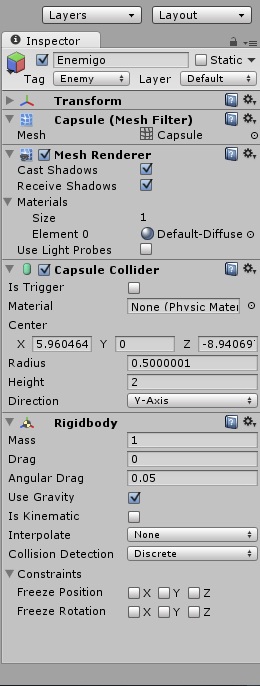
avatar image fernandovt · Aug 30, 2012 at 03:13 AM 0
Share

alt text

enemigo settings.jpg (63.9 kB)
avatar image Bunny83 · Aug 30, 2012 at 03:16 AM 0
Share

@fernandovt: There's an edit button below your question. Don't post answers when you don't answer the question.

3 Replies

· Add your reply
  • Sort: 
avatar image
0

Answer by Piflik · Aug 29, 2012 at 10:58 AM

Check if the object hitting the trigger is an enemy, so it doesn't trigger when anything else walks in there. And make the sound a 2D sound. These have the same volume, no matter how far away.

 function OnTriggerEnter(item : Collider) {
     if(item.tag == "Enemy")
         //do stuff
 }
Comment
Add comment · Show 7 · Share
10 |3000 characters needed characters left characters exceeded
▼
  • Viewable by all users
  • Viewable by moderators
  • Viewable by moderators and the original poster
  • Advanced visibility
Viewable by all users
avatar image fernandovt · Aug 29, 2012 at 08:06 PM 0
Share

Well, I tried but apparently I'm missing something, this is the script I put to the object:

 var Sound : AudioClip;

 function OnTriggerEnter(item : Collider) {
     if(item.tag == "Enemy")
         audio.PlayOneShot(Sound);
 }

The I putted an audio source to that object (the object has a collider, with "Is Trigger" activated), and I also desactivated the option play on awake, and I dragged the sound to the script and to the audio source... The next thing I did was tagging my enemy with the tag Enemy, and I putted a collider to it, with the option "Is Trigger" activated... What I'm missing?, why the sound its not being activated??, Please Help:)

avatar image Piflik · Aug 29, 2012 at 08:18 PM 0
Share

Add some debug lines to your script to see, where the problem is.

 var Sound : AudioClip;

 function OnTriggerEnter(item : Collider) {
     print("hit by " + item.tag);
     if(item.tag == "Enemy") {
         audio.PlayOneShot(Sound);
         print("sound is playing");
     }
 }
avatar image fernandovt · Aug 29, 2012 at 09:18 PM 0
Share

Sorry for making a new answer, I didn't notice:/, The debug lines on the script didn't appear on the screen when I played the game, so I guess it's really wrong... $$anonymous$$aybe the problem it's that the trigger options are activated in both objects?,(enemy and cube) I thank you for your patience, I know it's a tricky question, do you have any ideas?, because if the script is correct, then it's probably a problem with the enemy settings or the cube settings....

avatar image aldonaletto · Aug 29, 2012 at 09:30 PM 0
Share

Turn off Is Trigger in the enemy - let only the cube be a trigger. Does the enemy have a Rigidbody or CharacterController component? The trigger can detect only these two components.

avatar image Piflik · Aug 29, 2012 at 09:36 PM 0
Share

That none of the two lines appear means, that the collision is not detected. This can have different reasons:

1: The enemies trigger missed the sound-object's trigger completely. $$anonymous$$ake sure the enemy walks where the trigger is.

2: You have two mesh colliders, none of which are set to be convex. $$anonymous$$ake sure that at least one collider is convex. Two concave colliders don't hit each other.

3: You are missing RigidBody components. At least one object in a collision needs to be a RigidBody.

Show more comments
avatar image
0

Answer by Boris Media · Apr 02, 2013 at 08:30 AM

Try adding an audiosource

Comment
Add comment · Share
10 |3000 characters needed characters left characters exceeded
▼
  • Viewable by all users
  • Viewable by moderators
  • Viewable by moderators and the original poster
  • Advanced visibility
Viewable by all users
avatar image
0

Answer by CypherGames · Aug 18, 2013 at 01:30 PM

You could use a raycast:

 var Sound : AudioClip;
 
 function Update {
    var hit : RaycastHit;
    var ray : Ray = new Ray(transform.position, Vector3.down);
 
    if (Physics.Raycast(ray, hit, 2)) {
       if (hit.transform.tag = "Enemy") {
          audio.PlayOneShot(Sound);
       }
    }
 }
Comment
Add comment · Share
10 |3000 characters needed characters left characters exceeded
▼
  • Viewable by all users
  • Viewable by moderators
  • Viewable by moderators and the original poster
  • Advanced visibility
Viewable by all users

Your answer

Hint: You can notify a user about this post by typing @username

Up to 2 attachments (including images) can be used with a maximum of 524.3 kB each and 1.0 MB total.

Follow this Question

Answers Answers and Comments

13 People are following this question.

avatar image avatar image avatar image avatar image avatar image avatar image avatar image avatar image avatar image avatar image avatar image avatar image avatar image

Related Questions

Door Opens When Not In Trigger And Sound Help 1 Answer

Enemy trigger for player 1 Answer

animation and sound on collide 1 Answer

Help needed! 1 Answer

Explosion Jumpscare Script ? 1 Answer


Enterprise
Social Q&A

Social
Subscribe on YouTube social-youtube Follow on LinkedIn social-linkedin Follow on Twitter social-twitter Follow on Facebook social-facebook Follow on Instagram social-instagram

Footer

  • Purchase
    • Products
    • Subscription
    • Asset Store
    • Unity Gear
    • Resellers
  • Education
    • Students
    • Educators
    • Certification
    • Learn
    • Center of Excellence
  • Download
    • Unity
    • Beta Program
  • Unity Labs
    • Labs
    • Publications
  • Resources
    • Learn platform
    • Community
    • Documentation
    • Unity QA
    • FAQ
    • Services Status
    • Connect
  • About Unity
    • About Us
    • Blog
    • Events
    • Careers
    • Contact
    • Press
    • Partners
    • Affiliates
    • Security
Copyright © 2020 Unity Technologies
  • Legal
  • Privacy Policy
  • Cookies
  • Do Not Sell My Personal Information
  • Cookies Settings
"Unity", Unity logos, and other Unity trademarks are trademarks or registered trademarks of Unity Technologies or its affiliates in the U.S. and elsewhere (more info here). Other names or brands are trademarks of their respective owners.
  • Anonymous
  • Sign in
  • Create
  • Ask a question
  • Spaces
  • Default
  • Help Room
  • META
  • Moderators
  • Explore
  • Topics
  • Questions
  • Users
  • Badges
