
Wayback Machinekoobas.hobune.stream
May JUN Jul
Previous capture 13 Next capture
2021 2022 2023
1 capture
13 Jun 22 - 13 Jun 22
sparklines
Close Help
  • Products
  • Solutions
  • Made with Unity
  • Learning
  • Support & Services
  • Community
  • Asset Store
  • Get Unity

UNITY ACCOUNT

You need a Unity Account to shop in the Online and Asset Stores, participate in the Unity Community and manage your license portfolio. Login Create account
  • Blog
  • Forums
  • Answers
  • Evangelists
  • User Groups
  • Beta Program
  • Advisory Panel

Navigation

  • Home
  • Products
  • Solutions
  • Made with Unity
  • Learning
  • Support & Services
  • Community
    • Blog
    • Forums
    • Answers
    • Evangelists
    • User Groups
    • Beta Program
    • Advisory Panel

Unity account

You need a Unity Account to shop in the Online and Asset Stores, participate in the Unity Community and manage your license portfolio. Login Create account

Language

  • Chinese
  • Spanish
  • Japanese
  • Korean
  • Portuguese
  • Ask a question
  • Spaces
    • Default
    • Help Room
    • META
    • Moderators
    • Topics
    • Questions
    • Users
    • Badges
  • Home /
avatar image
2
Question by 5argon · Apr 16, 2015 at 08:06 AM · uiunity 4.6layout

I don't understand "Child Force Expand" on uGUI
alt text

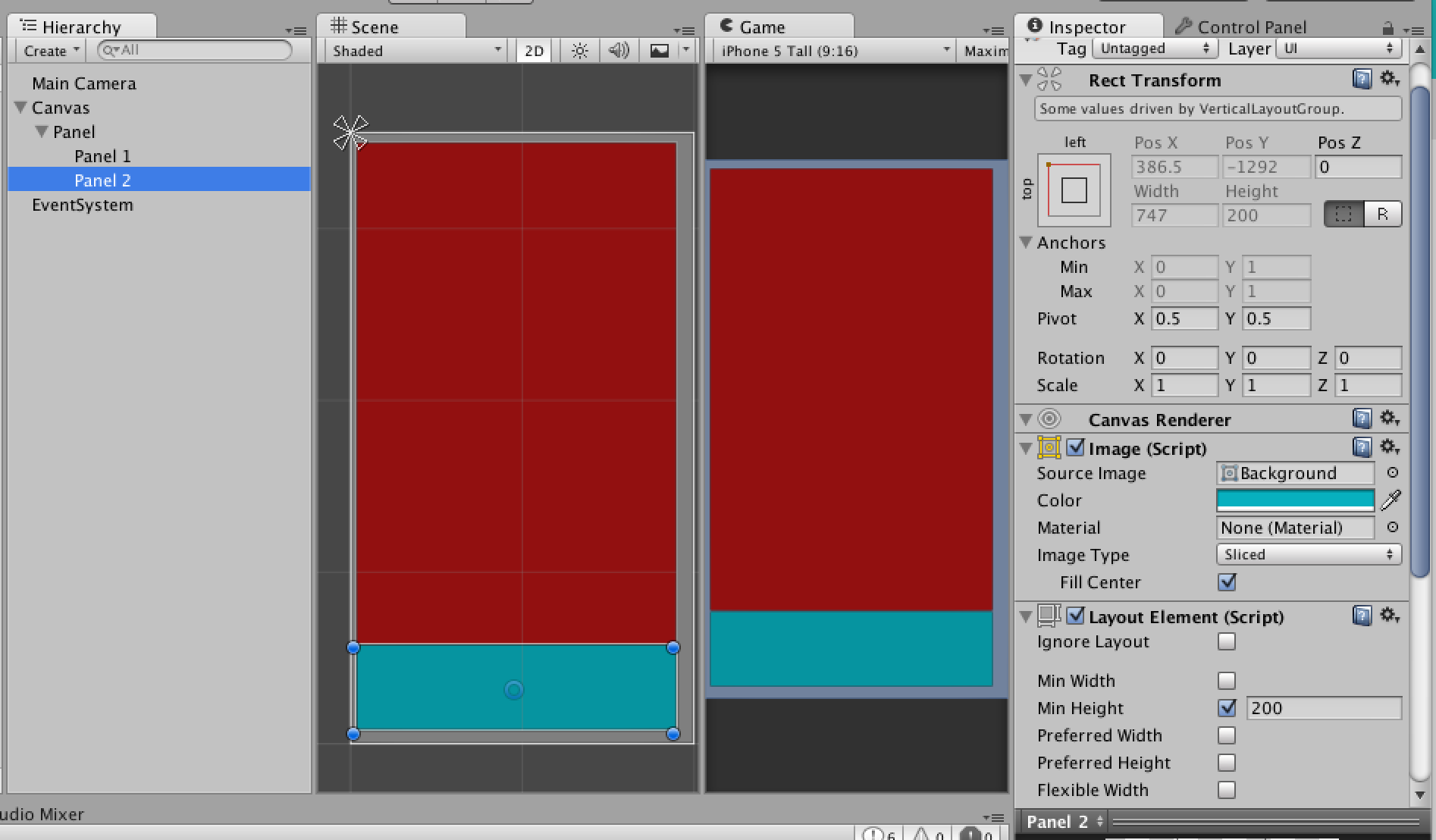
I wanted the area to split into 2 areas, the condition is lower area must be 200 unit tall then any available space is allocated to top area.

So in Panel I used Vertical Layout Group with Child Force Expand Height unchecked. So I can choose how much space will the child take.

Then in Panel1 there is Layout Element with Flexible Height of 1 so it will attempts to fill as much as possible and then in Panel2 I put in Layout Element also but with Min Height of 200. This produce exactly what I wanted.

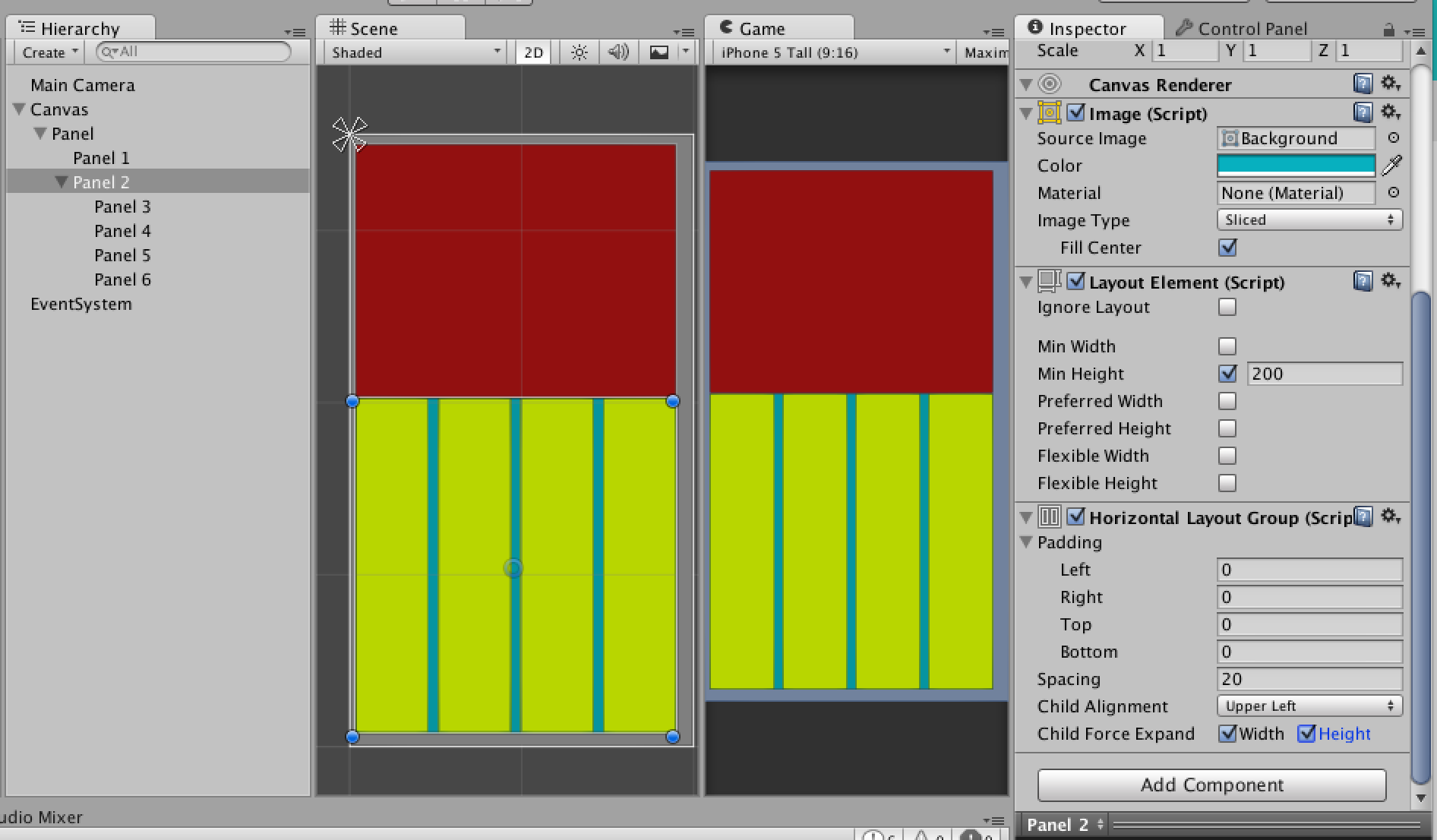
Now the problem is I wanted the Panel2 to be a Horizontal Layout Group too. I wanted all children in this Horizontal Layout Group to completely fill up the vertical space that Panel2 has so I leave Child Force Expand Vertical checked.

Now the unexpected behaviour is these children push Panel2 up to some space which I think is half vertical space PLUS 200 which is Min Height. This does not make sense to me. Why did it 'expand' to that size? Can someone explain why this is happening (Changing Layout Element of Panel2 from Min Height to Preferred Height since I 'prefer' that size does not help, same result.) and how to make it fit the size parent has instead? Thank you.
alt text

screenshot-2015-04-16-165302.png (143.3 kB)
screenshot-2015-04-16-165318.png (148.5 kB)
Comment
Add comment · Show 2
10 |3000 characters needed characters left characters exceeded
▼
  • Viewable by all users
  • Viewable by moderators
  • Viewable by moderators and the original poster
  • Advanced visibility
Viewable by all users
avatar image 5argon · Apr 27, 2015 at 11:18 AM 0
Share

No answer?

avatar image hubatish · Aug 15, 2015 at 08:33 PM 0
Share

I have no idea how to fix your problem, but thanks for the question! I didn't understand Child Force Expand at all, and your example showed me how to do some useful things.

2 Replies

· Add your reply
  • Sort: 
avatar image
2
Wiki

Answer by hubatish · Aug 15, 2015 at 09:19 PM

I'm guessing you already found a workaround, but I just got this working. Thanks for the quick explanation of Flexible Width/Height; I'd never been able to use that and Vertical Layout Groups before!
alt text

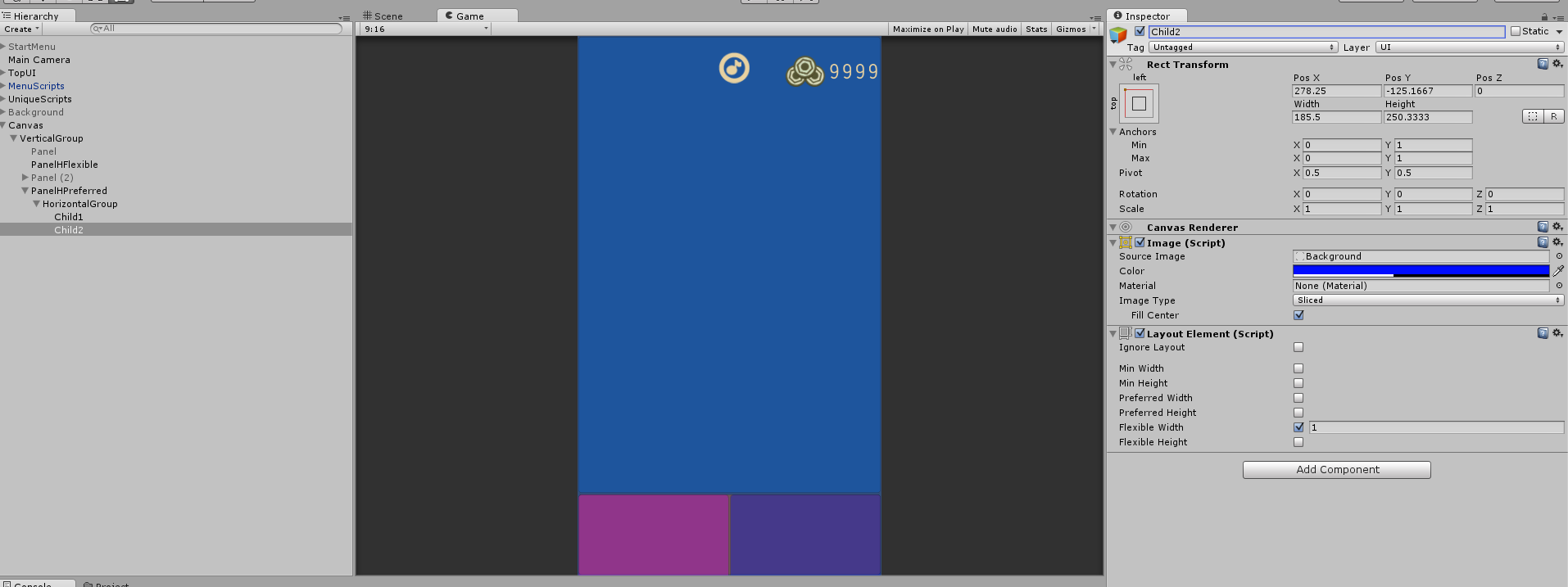
The trick to having the children not expand or go outside the preferred heights bound of the parent was to put the Horizontal Layout Group on a child of the Layout Element with Preferred Height: 100. This doesn't make a ton of sense, but it seems to be working.

In the example above, VerticalGroup has a Vertical Layout Group with Child Force Expand: Width. PanelHFlexible has a Layout Element with Flexible Height: 1, and PanelHPreferred has Layout Elements with Preferred Height: 100. Then HorizontalGroup - the child of PanelHPreferred - has a Horizontal Layout Group with Child Force Expand Height. Finally Child1 and Child2 have Flexible Width 1.

Hopefully this example works for you as well!


horizontalundervertical.png (83.5 kB)
Comment
Add comment · Show 1 · Share
10 |3000 characters needed characters left characters exceeded
▼
  • Viewable by all users
  • Viewable by moderators
  • Viewable by moderators and the original poster
  • Advanced visibility
Viewable by all users
avatar image apelsinex · Sep 08, 2017 at 10:35 AM 0
Share

just tried your soulution, and it didn't work, used unity 2017.1.0p5.

I moved value(100) from "$$anonymous$$imum height" to "preferred heigh" in bottom panel, then if I set either "child force expand - height" in bottom panel or "flexible height = 1" in child elements - bottom panel becomes taller, completely ignoring self "preferred height" setting

avatar image
1

Answer by apelsinex · Sep 08, 2017 at 10:51 AM

Here's solution that worked for me, unity version 2017.1.0.p5

For holder panel: "child controls size" - both checked, "child force expand" both unchecked Got top panel: "flexible width" and "flexible height" = 1 For bottom panel: "preferrd height" = 100, "flexible width" = 1, "child controls size" both checked and "child force expand" both unchecked. In nested elements in bottom panel: "preferred height" to any big value (like 100000) and leave "flexible height" unchecked - thats main thing, width set controlled by "flexible width" = 1

Comment
Add comment · Share
10 |3000 characters needed characters left characters exceeded
▼
  • Viewable by all users
  • Viewable by moderators
  • Viewable by moderators and the original poster
  • Advanced visibility
Viewable by all users

Your answer

Hint: You can notify a user about this post by typing @username

Up to 2 attachments (including images) can be used with a maximum of 524.3 kB each and 1.0 MB total.

Follow this Question

Answers Answers and Comments

21 People are following this question.

avatar image avatar image avatar image avatar image avatar image avatar image avatar image avatar image avatar image avatar image avatar image avatar image avatar image avatar image avatar image avatar image avatar image avatar image avatar image avatar image avatar image

Related Questions

uGUI Vertical Layout Group stretching objects 2 Answers

How do I layout dynamically instantiated UGUI components? 1 Answer

unity ui Layout Element Max Size 0 Answers

Horizontal Layout Group padding update via script 3 Answers

how to extend the GUILayout scrollview's function? 0 Answers


Enterprise
Social Q&A

Social
Subscribe on YouTube social-youtube Follow on LinkedIn social-linkedin Follow on Twitter social-twitter Follow on Facebook social-facebook Follow on Instagram social-instagram

Footer

  • Purchase
    • Products
    • Subscription
    • Asset Store
    • Unity Gear
    • Resellers
  • Education
    • Students
    • Educators
    • Certification
    • Learn
    • Center of Excellence
  • Download
    • Unity
    • Beta Program
  • Unity Labs
    • Labs
    • Publications
  • Resources
    • Learn platform
    • Community
    • Documentation
    • Unity QA
    • FAQ
    • Services Status
    • Connect
  • About Unity
    • About Us
    • Blog
    • Events
    • Careers
    • Contact
    • Press
    • Partners
    • Affiliates
    • Security
Copyright © 2020 Unity Technologies
  • Legal
  • Privacy Policy
  • Cookies
  • Do Not Sell My Personal Information
  • Cookies Settings
"Unity", Unity logos, and other Unity trademarks are trademarks or registered trademarks of Unity Technologies or its affiliates in the U.S. and elsewhere (more info here). Other names or brands are trademarks of their respective owners.
  • Anonymous
  • Sign in
  • Create
  • Ask a question
  • Spaces
  • Default
  • Help Room
  • META
  • Moderators
  • Explore
  • Topics
  • Questions
  • Users
  • Badges
