 koobas.hobune.stream


Character Camera Movement/ShooterGameCamera On planet with Faux
Hello, I have created a sphere/planet with variable terrain along with Faux gravity implemented. I have a character that is able to walk around the planet and maintain an upright state. Currently I am using the ShooterGameCamera script that I have retrieved from Rune's Locomotion System demo. This script works nicely in order to have third person like mouse camera movement for a character. The character turns his body and head towards the mouse direction/aiming reticule assigned. The problem arises when I move the character to some other point of the planet such as the side (away from the traditional XY plane). The camera mouse movement does not adjust for the upright position according to the planet surface. Pictured below. So when I'm moving the mouse to look around its still using the same XY plane which is incorrect.
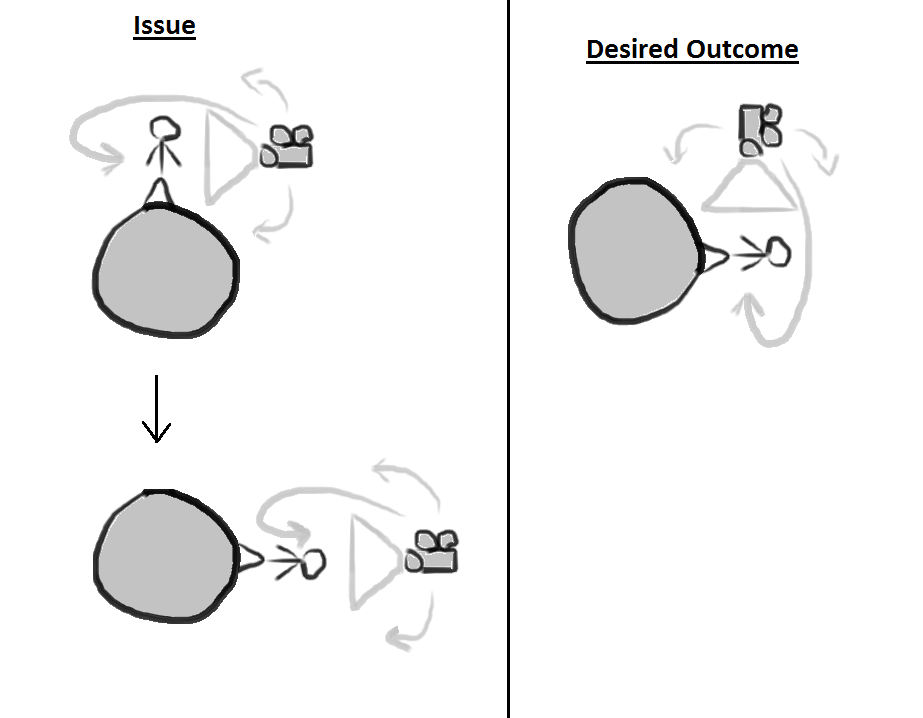
I'm not sure what I need to change in the ShooterGameCamera script to make the camera follow the character upright and have mouse movement work on a XY basis according to the character's position. Any help would greatly be appreciated. I've been working at this for days. The ShooterGameCameraScript is posted below.
 using UnityEngine;
 using System.Collections;

 // 3rd person game-like camera controller
 // keeps camera behind the player and aimed at aiming point
 public class ShooterGameCamera : MonoBehaviour {

     public Transform player;
     public Transform aimTarget;

     public float smoothingTime = 0.5f;
     public Vector3 pivotOffset = new Vector3(1.3f, 0.4f,  0.0f);
     public Vector3 camOffset   = new Vector3(0.0f, 0.7f, -2.4f);
     public Vector3 closeOffset = new Vector3(0.35f, 1.7f, 0.0f);

     public float horizontalAimingSpeed = 270f;
     public float verticalAimingSpeed = 270f;
     public float maxVerticalAngle = 80f;
     public float minVerticalAngle = -80f;

     public float mouseSensitivity = 0.1f;

     public Texture reticle;

     private float angleH = 0;
     private float angleV = 0;
     private Transform cam;
     private float maxCamDist = 1;
     private LayerMask mask;
     private Vector3 smoothPlayerPos;

     // Use this for initialization
     void Start ()
     {
         // Add player's own layer to mask
         mask = 1 << player.gameObject.layer;
         // Add Igbore Raycast layer to mask
         mask |= 1 << LayerMask.NameToLayer("Ignore Raycast");
         // Invert mask
         mask = ~mask;

         cam = transform;
         smoothPlayerPos = player.position;

         maxCamDist = 3;
     }

     // Update is called once per frame
     void LateUpdate () {
         if (Time.deltaTime == 0 || Time.timeScale == 0 || player == null)
             return;

         angleH += Mathf.Clamp(Input.GetAxis("Mouse X") + Input.GetAxis("Horizontal2"), -1, 1) * horizontalAimingSpeed * Time.deltaTime;

         angleV += Mathf.Clamp(Input.GetAxis("Mouse Y") + Input.GetAxis("Vertical2"), -1, 1) * verticalAimingSpeed * Time.deltaTime;
         // limit vertical angle
         angleV = Mathf.Clamp(angleV, minVerticalAngle, maxVerticalAngle);

         // Before changing camera, store the prev aiming distance.
         // If we're aiming at nothing (the sky), we'll keep this distance.
         float prevDist = (aimTarget.position - cam.position).magnitude;

         // Set aim rotation
         Quaternion aimRotation = Quaternion.Euler(-angleV, angleH, 0);
         Quaternion camYRotation = Quaternion.Euler(0, angleH, 0);
         cam.rotation = aimRotation;

         // Find far and close position for the camera
         smoothPlayerPos = Vector3.Lerp(smoothPlayerPos, player.position, smoothingTime * Time.deltaTime);
         smoothPlayerPos.x = player.position.x;
         smoothPlayerPos.z = player.position.z;
         Vector3 farCamPoint = smoothPlayerPos + camYRotation * pivotOffset + aimRotation * camOffset;
         Vector3 closeCamPoint = player.position + camYRotation * closeOffset;
         float farDist = Vector3.Distance(farCamPoint, closeCamPoint);

         // Smoothly increase maxCamDist up to the distance of farDist
         maxCamDist = Mathf.Lerp(maxCamDist, farDist, 5 * Time.deltaTime);

         // Make sure camera doesn't intersect geometry
         // Move camera towards closeOffset if ray back towards camera position intersects something
         RaycastHit hit;
         Vector3 closeToFarDir = (farCamPoint - closeCamPoint) / farDist;
         float padding = 0.3f;
         if (Physics.Raycast(closeCamPoint, closeToFarDir, out hit, maxCamDist + padding, mask)) {
             maxCamDist = hit.distance - padding;
         }
         cam.position = closeCamPoint + closeToFarDir * maxCamDist;

         // Do a raycast from the camera to find the distance to the point we're aiming at.
         float aimTargetDist;
         if (Physics.Raycast(cam.position, cam.forward, out hit, 100, mask)) {
             aimTargetDist = hit.distance + 0.05f;
         }
         else {
             // If we're aiming at nothing, keep prev dist but make it at least 5.
             aimTargetDist = Mathf.Max(5, prevDist);
         }

         // Set the aimTarget position according to the distance we found.
         // Make the movement slightly smooth.
         aimTarget.position = cam.position + cam.forward * aimTargetDist;
     }

     void OnGUI () {
         if (Time.time != 0 && Time.timeScale != 0)
             GUI.DrawTexture(new Rect(Screen.width/2-(reticle.width*0.5f), Screen.height/2-(reticle.height*0.5f), reticle.width, reticle.height), reticle);
     }
 }

Any answer to this? Same question and problem ocurring here http://forum.unity3d.com/threads/67477-Camera-Problem-(When-walking-around-a-sphere)



