 koobas.hobune.stream


OnSerializeNetworkView to only one recipient
Hello everyone !
I am facing a network problem with the legacy network system of Unity (I can't change my whole network system to Unet unfortunately ...)
Context
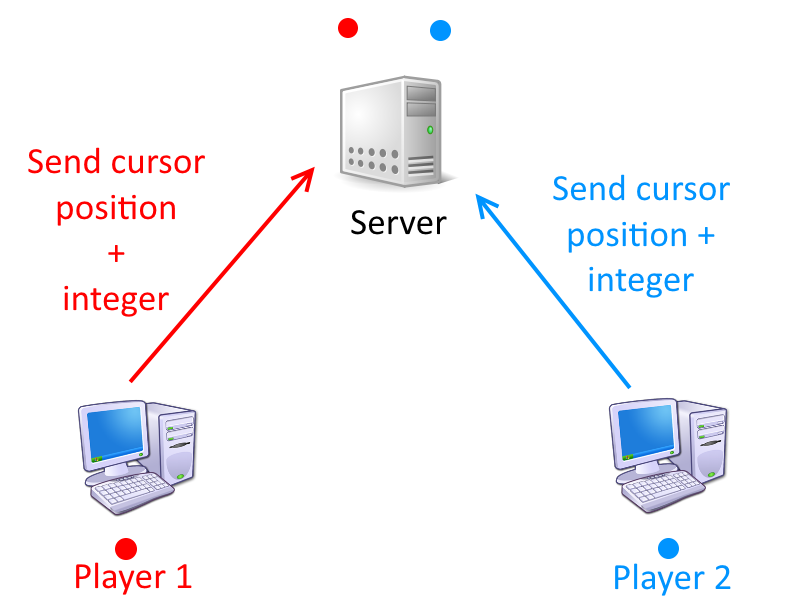
I have two clients and one server. On each client, I instantiate an empty considered as a cursor (I allocate dynamically the NetworkViewID using Network.AllocateViewID()). This instantiation is also done on the server (not on other clients) and I send the allocated NetworkViewID to the server at the same time I ask for the instantiation (using a simple RPC). Then, I update the 3D position of the cursor through a NetworkView with a script as observed entity. This script is simply called Cursor. I also send a simple integer.
Only the clients can change the position of their own cursor.
Since I am using state synchronisation with my Network view, I wrote the OnSerializeNetworkView inside my Cursor script :
 void OnSerializeNetworkView( BitStream stream, NetworkMessageInfo info )
 {
     Vector3 position = Vector3.zero;
     int index = 0;

     if ( stream.isWriting )
     {
         index = particleEffectIndex;
         stream.Serialize( ref index );

         position = Position;
         stream.Serialize( ref position );
     }
     else
     {
         stream.Serialize( ref index );
         if ( index != particleEffectIndex )
         {
             // Do some stuff
             particleEffectIndex = index;
         }

         stream.Serialize( ref position );
         Position = position;
     }
 }
Problem
However, this function serializes the data on all my computers. Since the cursor of a client doesn't exist on the other client, I get the following error :
 View ID AllocatedID: 153 not found during lookup. Strange behaviour may occur
 Received state update for view id' AllocatedID: 153' but the NetworkView doesn't exist
Solutions tried
Since only the client can change the 3D position of the cursor I tried the following :
 void OnSerializeNetworkView( BitStream stream, NetworkMessageInfo info )
 {
     Vector3 position = Vector3.zero;
     int index = 0;

     if ( stream.isWriting && Network.IsClient)
     {
         // Write data
     }
     else if( Network.IsServer )
     {
         // Read data
     }
 }
Though, the position of the cursor isn't correct. It goes to its correct position and then return back to (0,0,0).
Though, I don't have the error anymore when I move the cursor on one client.
Question
Is there any way to prevent the server to send the data to other client / to select the recipient of the
OnSerializeNetworkViewfunction ?

I saw this question :
http://answers.unity3d.com/questions/304295/how-stream-unreliable-data-to-only-one-serverclien.html
But without any answer unfortunately ...
I finally found a very simple way to do what I want ! :D
In my Cursor script, I added the following code :
 void Awake()
 {
     // All network messages and RPC calls go through this group number
     networkView.group = 1;

     // Disable transmission of messages and RPC calls on the network group number 1.
     if( Network.isServer )
     {
         Network.SetSendingEnabled( 1, false );
     }
 }
Thus, the server won't relay the data of my cursor from one client to the other. Thanks for your help @Bunny83 !

I haven't tested it, but if it's possible the only way to achieve this in the old network system (RakNet) is to use "network groups" and enable / disable the sending / receiving for a certain "group-player" pair.
You need to set the NetworkView's group variable for each object to a different value so you can use Network.SetReceivingEnabled and Network.SetSendingEnabled.
You haven't mentioned it, but did you actually set the NetworkViewID of the objects on both sides(server and client)? Did you allocate them manually with AllocateViewID?
Most of the documentation only mentioned RPC calls in relation with network groups. If this doesn't work there's no way to implement this with state synchronisation. In this case you have to use RPCs instead which can be send to specific users.
Thanks for the links ! I will take a look now ! :)
$$anonymous$$y cursor are allocated by my clients using Network.AllocateViewID(). Then, I send the instantiation order to my server and I give the allocated networkviewId.
EDIT : I updated my question mentioning this information :)

Ok, i already thought that you've done it that way ^^. I just wanted to be sure. We frequently have to deal with total beginners here so you never know how much someone understands the system.
If you try this, keep in $$anonymous$$d that the server first receives the value from a client and usually "resends" the information back to the other clients. For this OnSerializeNetworkView is usually called on the server first with "reading" and again with "writing" when forwarding to the other clients (afaik). So SetSendingEnabled most likely has to be used on the server.
It's a good precaution to ask !
Yes, that's what I understood when I read the converation in this thread :
http://answers.unity3d.com/questions/304295/how-stream-unreliable-data-to-only-one-serverclien.html
That's why I tried to prevent the writing by the server with the condition if ( stream.isWriting && Network.IsClient)
I am adding the solution you proposed, I make a little backup, just in case ... ^^
I tried multiple solutions using the functions you provided Bunny83, but none of them works ! >.<
Here is the last I tried :
 private Dictionary<int, ClientInfo> players;
 private int numberOfRequiredPlayers;

 void OnPlayerConnected( NetworkPlayer newPlayer )
 {
     numberOfRequiredPlayers--;

     if ( numberOfRequiredPlayers== 0 )
     {
         // Disable communication between clients
         foreach( $$anonymous$$eyValuePair<int, ClientInfo> player1 in players )
         {
             foreach( $$anonymous$$eyValuePair<int, ClientInfo> player2 in players )
             {
                 if ( player2.Value.PlayerId != player1.Value.PlayerId )
                     networkView.RPC( "Disable$$anonymous$$essagesReception", player1.Value.NetworkPlayer, player2.Value.NetworkPlayer );
             }

         }
         LevelLoader.LoadGame();
     }
 }

 [RPC]
 private void Disable$$anonymous$$essagesReception( NetworkPlayer otherPlayer )
 {
     Network.SetReceivingEnabled( otherPlayer, 0, false );
 }
The ClientInfo class just contains the ID of a player and its NetworkPlayer
The script is attached to my NetworkController which manages network communication.
I have the following error :
SetReceivingEnabled failed because the player is not connected.
Is it because the clients are not directly connected ?



