
Wayback Machinekoobas.hobune.stream
May JUN Jul
Previous capture 13 Next capture
2021 2022 2023
1 capture
13 Jun 22 - 13 Jun 22
sparklines
Close Help
  • Products
  • Solutions
  • Made with Unity
  • Learning
  • Support & Services
  • Community
  • Asset Store
  • Get Unity

UNITY ACCOUNT

You need a Unity Account to shop in the Online and Asset Stores, participate in the Unity Community and manage your license portfolio. Login Create account
  • Blog
  • Forums
  • Answers
  • Evangelists
  • User Groups
  • Beta Program
  • Advisory Panel

Navigation

  • Home
  • Products
  • Solutions
  • Made with Unity
  • Learning
  • Support & Services
  • Community
    • Blog
    • Forums
    • Answers
    • Evangelists
    • User Groups
    • Beta Program
    • Advisory Panel

Unity account

You need a Unity Account to shop in the Online and Asset Stores, participate in the Unity Community and manage your license portfolio. Login Create account

Language

  • Chinese
  • Spanish
  • Japanese
  • Korean
  • Portuguese
  • Ask a question
  • Spaces
    • Default
    • Help Room
    • META
    • Moderators
    • Topics
    • Questions
    • Users
    • Badges
  • Home /
avatar image
1
Question by ownerfate · Jul 20, 2013 at 01:03 PM · delayglitchkey pressed

[CLOSED] how can i get the 'e' key to work on every press?

i have Power boxes that are connected to lights in my game, when i stand at a box and Press the 'E' key it works; it turns them on and off. but there is a horrible delay between them if i keep pressing the key.

it's like the key works, but doesn't work.

what i want to do is make it to where i can click 'e' as many times as i want (with very very little delay as possible)

bare in mind here... this is an example of what happens. the "E" is me actually pressing the button in a fast manner. and the (on) and (off) are the lights.

E-E-E-E-E (on) E- (off) E-E-E (on) E-E-E-E-E-E-E-E-E-E (off) ect.

it's like i'm doing morse code, and my game is communicating through the lights...

this is what they look like, the power boxes are on walls.alt text
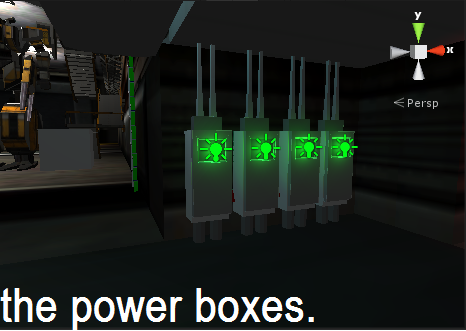
they are marked as trigger, with the " function OnTriggerStay() " only way i could get it to work, without clicking accross the room. then this one is the lights the boxes control. the lights are the ones with the squares around them.
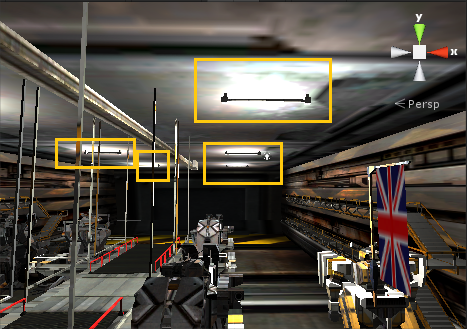
alt text

here is the code i use for the light boxes.

CODE: var linkedLight : Light;

 function OnTriggerStay()
  {
         if(Input.GetKeyDown("e"))
         
         {
             linkedLight.enabled = !linkedLight.enabled;
            }
    
 }
  
 function LightOff (){
  linkedLight.enabled = false;
 } 


i don't know where the problem is, i looked over other unity3D questions couldn't find anything that matched right.

if anyone could help, that would be great.

Thanks.

-Ownerfate.

token 1006.png (297.5 kB)
token 1005.png (109.6 kB)
Comment
Add comment
10 |3000 characters needed characters left characters exceeded
▼
  • Viewable by all users
  • Viewable by moderators
  • Viewable by moderators and the original poster
  • Advanced visibility
Viewable by all users

1 Reply

· Add your reply
  • Sort: 
avatar image
1
Best Answer

Answer by ownerfate · Feb 06, 2014 at 09:01 PM

After a few months of teaching my self and looking on unity and youtube about scripting i have come to one way of doing this. (Not the original way i wanted to)

but the script is something close to this.

 var lights : GameObject; // this is actually the Empty game object that the light is attached to.
 
 function OnTirggerStay (){
 
 if(Input.GetKeyDown(KeyCode.E)){
 
 lights.active = !lights.active; // it's the same has the original code i posted a while back, but instead of using the light, it uses the EmptyGameObject.
 
 }
 
 }
Comment
Add comment · Show 1 · Share
10 |3000 characters needed characters left characters exceeded
▼
  • Viewable by all users
  • Viewable by moderators
  • Viewable by moderators and the original poster
  • Advanced visibility
Viewable by all users
avatar image ownerfate · Feb 06, 2014 at 09:03 PM 0
Share

since this post, i have ditched the light boxes, but may use them in another part of my game. ( which i have done. )

Your answer

Hint: You can notify a user about this post by typing @username

Up to 2 attachments (including images) can be used with a maximum of 524.3 kB each and 1.0 MB total.

Follow this Question

Answers Answers and Comments

15 People are following this question.

avatar image avatar image avatar image avatar image avatar image avatar image avatar image avatar image avatar image avatar image avatar image avatar image avatar image avatar image avatar image

Related Questions

Awkward Projector Stretches 0 Answers

Climb animation is glitchy and isnt working properly 0 Answers

Mecanim random Bugs 1 Answer

Blender to Unity glitch? 3 Answers

Glitches issues (huge world) 20k x 20k 3 Answers


Enterprise
Social Q&A

Social
Subscribe on YouTube social-youtube Follow on LinkedIn social-linkedin Follow on Twitter social-twitter Follow on Facebook social-facebook Follow on Instagram social-instagram

Footer

  • Purchase
    • Products
    • Subscription
    • Asset Store
    • Unity Gear
    • Resellers
  • Education
    • Students
    • Educators
    • Certification
    • Learn
    • Center of Excellence
  • Download
    • Unity
    • Beta Program
  • Unity Labs
    • Labs
    • Publications
  • Resources
    • Learn platform
    • Community
    • Documentation
    • Unity QA
    • FAQ
    • Services Status
    • Connect
  • About Unity
    • About Us
    • Blog
    • Events
    • Careers
    • Contact
    • Press
    • Partners
    • Affiliates
    • Security
Copyright © 2020 Unity Technologies
  • Legal
  • Privacy Policy
  • Cookies
  • Do Not Sell My Personal Information
  • Cookies Settings
"Unity", Unity logos, and other Unity trademarks are trademarks or registered trademarks of Unity Technologies or its affiliates in the U.S. and elsewhere (more info here). Other names or brands are trademarks of their respective owners.
  • Anonymous
  • Sign in
  • Create
  • Ask a question
  • Spaces
  • Default
  • Help Room
  • META
  • Moderators
  • Explore
  • Topics
  • Questions
  • Users
  • Badges