 koobas.hobune.stream


Changing Targets - Smooth Damping X and Z on SmoothFollowCamera
Hi I have searched all over the internet for a straightforward solution this problem. I'm using the SmoothFollowCamera script from the Unity 3D Platformer Tutorial. I edited it a bit so that the target can move and is not only on the player. That's where my problem comes in.
I want to shift the target of the camera when the player hits a trigger. I have the target switching working great, but the problem is the camera quickly jumps in the x and z axis because the distance between target and camera is maintained.
How can I get the camera to smoothly transition between target shifts?
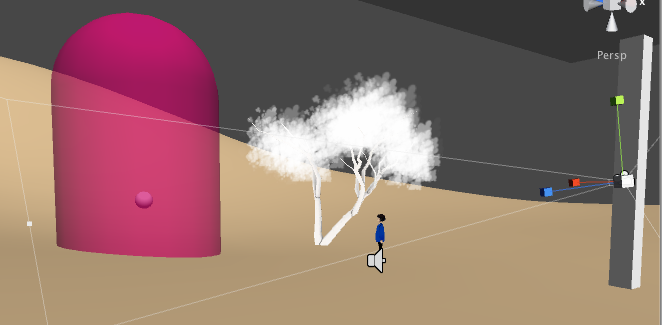
Here are some screenshots to give you a better idea what's happening: Before the trigger( trigger is a sphere). Target is person.
After entering the trigger. The target is now the small sphere inside the capsule. 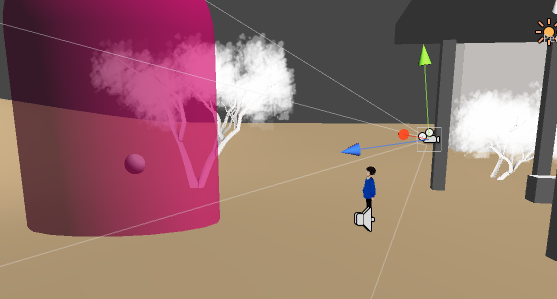
Here is the code I'm using:
/// This camera is similar to the one used in Super Mario 64
/*
"Fire2" snaps the camera
*/ var girl: GameObject; // The target we are following var target : Transform;
// The distance in the x-z plane to the target
var distance = 7.0;
// the height we want the camera to be above the target var height = 3.0;
var angularSmoothLag = 0.3; var angularMaxSpeed = 15.0;
var heightSmoothLag = 0.3;
var snapSmoothLag = 0.2; var snapMaxSpeed = 720.0;
var clampHeadPositionScreenSpace = 0.75;
var lockCameraTimeout = 0.2;
private var headOffset = Vector3.zero; private var centerOffset = Vector3.zero;
private var heightVelocity = 0.0; private var angleVelocity = 0.0; private var snap = false; private var controller : ThirdPersonController; private var targetHeight = 100000.0;
function Awake () {
     controller = girl.GetComponent("ThirdPersonController");


 if (controller)
 {
     var characterController : CharacterController = target.collider;
     centerOffset = target.position;
     headOffset = centerOffset;
     headOffset.y = target.position.y;
 }
 else
     Debug.Log("Please assign a target to the camera that has a ThirdPersonController script attached.");


 Cut(target, centerOffset);
}
function DebugDrawStuff () { Debug.DrawLine(target.position, target.position + headOffset);
}
function AngleDistance (a : float, b : float) { a = Mathf.Repeat(a, 360); b = Mathf.Repeat(b, 360);
return Mathf.Abs(b - a);
}
function Apply (dummyTarget : Transform, dummyCenter : Vector3) { // Early out if we don't have a target if (!controller) return;
 var targetCenter = target.position + centerOffset;
 var targetHead = target.position + headOffset;
// DebugDrawStuff();
 // Calculate the current & target rotation angles
 var originalTargetAngle = target.eulerAngles.y;
 var currentAngle = transform.eulerAngles.y;

 // Adjust real target angle when camera is locked
 var targetAngle = originalTargetAngle;

 // When pressing Fire2 (alt) the camera will snap to the target direction real quick.
 // It will stop snapping when it reaches the target
 if (Input.GetButton("Fire2"))
     snap = true;

 if (snap)
 {
     // We are close to the target, so we can stop snapping now!
     if (AngleDistance (currentAngle, originalTargetAngle) < 3.0)
         snap = false;

     currentAngle = Mathf.SmoothDampAngle(currentAngle, targetAngle, angleVelocity, snapSmoothLag, snapMaxSpeed);
 }
 // Normal camera motion
 else
 {
     if (controller.GetLockCameraTimer () < lockCameraTimeout)
     {
         targetAngle = currentAngle;
     }

     // Lock the camera when moving backwards!
     // * It is really confusing to do 180 degree spins when turning around.
     if (AngleDistance (currentAngle, targetAngle) > 160 && controller.IsMovingBackwards ())
         targetAngle += 180;

     currentAngle = Mathf.SmoothDampAngle(currentAngle, targetAngle, angleVelocity, angularSmoothLag, angularMaxSpeed);
 }


 // When jumping don't move camera upwards but only down!
 if (controller.IsJumping ())
 {
     // We'd be moving the camera upwards, do that only if it's really high
     var newTargetHeight = targetCenter.y + height;
     if (newTargetHeight < targetHeight || newTargetHeight - targetHeight > 5)
         targetHeight = targetCenter.y + height;
 }
 // When walking always update the target height
 else
 {
     targetHeight = targetCenter.y + height;
 }

 // Damp the height
 currentHeight = transform.position.y;
 currentHeight = Mathf.SmoothDamp (currentHeight, targetHeight, heightVelocity, heightSmoothLag);

 // Convert the angle into a rotation, by which we then reposition the camera
 currentRotation = Quaternion.Euler (0, currentAngle, 0);

 // Set the position of the camera on the x-z plane to:
 // distance meters behind the target
 transform.position = targetCenter;
 transform.position += currentRotation * Vector3.back * distance;

 // Set the height of the camera
 transform.position.y = currentHeight;

 // Always look at the target
 SetUpRotation(targetCenter, targetHead);
}
function LateUpdate () { Apply (transform, Vector3.zero);
}
function Cut (dummyTarget : Transform, dummyCenter : Vector3) { var oldHeightSmooth = heightSmoothLag; var oldSnapMaxSpeed = snapMaxSpeed; var oldSnapSmooth = snapSmoothLag;
 snapMaxSpeed = 10000;
 snapSmoothLag = 0.001;
 heightSmoothLag = 0.001;

 snap = true;
 Apply (transform, Vector3.zero);

 heightSmoothLag = oldHeightSmooth;
 snapMaxSpeed = oldSnapMaxSpeed;
 snapSmoothLag = oldSnapSmooth;
}
function GetCenterOffset () { return centerOffset; }
@script AddComponentMenu ("Third Person Camera/Smooth Follow Camera") @script RequireComponent (Camera)


