
Wayback Machinekoobas.hobune.stream
May JUN Jul
Previous capture 13 Next capture
2021 2022 2023
1 capture
13 Jun 22 - 13 Jun 22
sparklines
Close Help
  • Products
  • Solutions
  • Made with Unity
  • Learning
  • Support & Services
  • Community
  • Asset Store
  • Get Unity

UNITY ACCOUNT

You need a Unity Account to shop in the Online and Asset Stores, participate in the Unity Community and manage your license portfolio. Login Create account
  • Blog
  • Forums
  • Answers
  • Evangelists
  • User Groups
  • Beta Program
  • Advisory Panel

Navigation

  • Home
  • Products
  • Solutions
  • Made with Unity
  • Learning
  • Support & Services
  • Community
    • Blog
    • Forums
    • Answers
    • Evangelists
    • User Groups
    • Beta Program
    • Advisory Panel

Unity account

You need a Unity Account to shop in the Online and Asset Stores, participate in the Unity Community and manage your license portfolio. Login Create account

Language

  • Chinese
  • Spanish
  • Japanese
  • Korean
  • Portuguese
  • Ask a question
  • Spaces
    • Default
    • Help Room
    • META
    • Moderators
    • Topics
    • Questions
    • Users
    • Badges
  • Home /
avatar image
11
Question by Denise · Feb 14, 2011 at 09:09 PM · exceptionlogcallback

callback for unhandled exceptions?

Unhandled exceptions get logged in that magical web player log, but I'd also like to capture them and send them back to the server (so we know where our game is having problems). I noticed Application.LogCallback, and set up a delegate. The delegate captures other problems (like failed downloaded files), but when I threw an exception on purpose to test, it didn't get captured.

Is there a different callback I should use to capture these kinds of events, that get output to the unity log but aren't reported to LogCallback? Alternatively, is htere a way to get the entire contents of the log file from within unity?

--- edit Actually, it doesn't start working until the frame after the callback is registered... duhh

Comment
Add comment · Show 2
10 |3000 characters needed characters left characters exceeded
▼
  • Viewable by all users
  • Viewable by moderators
  • Viewable by moderators and the original poster
  • Advanced visibility
Viewable by all users
avatar image yoyo · Feb 14, 2011 at 11:22 PM 0
Share

So it does work? Good to know.

avatar image yoyo · Jan 03, 2013 at 09:02 PM 0
Share

Just came back to this year later wanting to know more about exception handling, see results below.

3 Replies

· Add your reply
  • Sort: 
avatar image
10

Answer by yoyo · Jan 03, 2013 at 09:01 PM

As Denise found, Application.LogCallback does work, but it isn't actually hooked up and functional until the frame after you make the call.

Here is a script that demonstrates exception logging. Attach this script to a game object in your scene and it will give you four on-screen buttons that generate different error conditions. (exception handler screenshot)
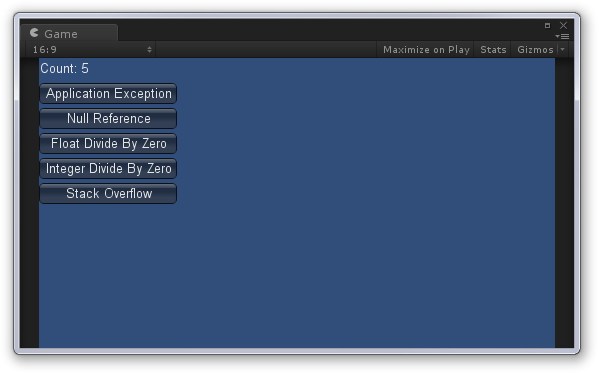
Running this reveals a few interesting things:

  1. Application.LogCallback does work, and will be called when exceptions occur.

  2. Perhaps surprisingly, floating point divide by zero does not throw an exception. This is part of the .NET floating point specification, and it makes sense, since floating point numbers have a representation for infinity. Integer divide by zero does throw an exception, as there is no way to represent infinity with an integer.

  3. While Unity will occasionally catch a stack overflow exception, you can't rely on this -- usually the Unity editor just dies.

Note that the script generates a log file in your Assets folder. You may need to reimport this asset after running in order to see the latest changes from in the Unity editor.

 using System;
 using System.IO;
 using UnityEngine;
 
 public class ExceptionHandler : MonoBehaviour
 {
     private StreamWriter m_Writer;
     private int m_ExceptionCount = 0;
     
     void Awake()
     {
         Application.RegisterLogCallback(HandleException);
         m_Writer = new StreamWriter(Path.Combine(Application.dataPath, "unityexceptions.txt"));
         m_Writer.AutoFlush = true;
     }
     
     private void HandleException(string condition, string stackTrace, LogType type)
     {
         if (type == LogType.Exception)
         {
             m_ExceptionCount++;
             m_Writer.WriteLine("{0}: {1}\n{2}", type, condition, stackTrace);
         }
     }
     
     void OnGUI()
     {
         GUILayout.Label(string.Format("Count: {0}", m_ExceptionCount));
         if (GUILayout.Button("Application Exception"))
         {
             throw new ApplicationException();
         }
         if (GUILayout.Button("Null Reference"))
         {
             GameObject go = null;
             Debug.Log(go.name);
         }
         if (GUILayout.Button("Float Divide By Zero"))
         {
             float x = 3.14f;
             float y = 0.0f;
             float z = x / y;
             Debug.Log(z.ToString());
         }
         if (GUILayout.Button("Integer Divide By Zero"))
         {
             int x = 42;
             int y = 0;
             int z = x / y;
             Debug.Log(z.ToString());
         }
         if (GUILayout.Button("Stack Overflow"))
         {
             OverflowStack(1, 2, 3);
         }
     }
     
     private int OverflowStack(int a, int b, int c)
     {
         return OverflowStack(c, b, a) + OverflowStack(b, c, a+1);
     }
 }


Comment
Add comment · Share
10 |3000 characters needed characters left characters exceeded
▼
  • Viewable by all users
  • Viewable by moderators
  • Viewable by moderators and the original poster
  • Advanced visibility
Viewable by all users
avatar image
0

Answer by Bryan-Legend · Jun 03, 2014 at 04:50 PM

Here is my version based on YoYo's answer. I use it to call my own MessageBox.Show instead of writing to a log file. I just call SetupExceptionHandling from each of my scenes.

 static bool isExceptionHandlingSetup;
 public static void SetupExceptionHandling()
 {
     if (!isExceptionHandlingSetup)
     {
         isExceptionHandlingSetup = true;
         Application.RegisterLogCallback(HandleException);
     }
 }
 
 static void HandleException(string condition, string stackTrace, LogType type)
 {
     if (type == LogType.Exception)
     {
         MessageBox.Show(condition + "\n" + stackTrace);
     }
 }
 
Comment
Add comment · Share
10 |3000 characters needed characters left characters exceeded
▼
  • Viewable by all users
  • Viewable by moderators
  • Viewable by moderators and the original poster
  • Advanced visibility
Viewable by all users
avatar image
0

Answer by ybaklaci · Jan 08, 2016 at 08:15 PM

There is a plugin called Reporter, which would capture your Debug Logs, Crash stacktrace and Screen Shot on Error; then sends you and email. This is a crossplatform plugin , so you would receive the error logs also from user devices. Hope it helps.

Comment
Add comment · Share
10 |3000 characters needed characters left characters exceeded
▼
  • Viewable by all users
  • Viewable by moderators
  • Viewable by moderators and the original poster
  • Advanced visibility
Viewable by all users

Your answer

Hint: You can notify a user about this post by typing @username

Up to 2 attachments (including images) can be used with a maximum of 524.3 kB each and 1.0 MB total.

Follow this Question

Answers Answers and Comments

2 People are following this question.

avatar image avatar image

Related Questions

What to do when there is an error at runtime 1 Answer

How to get a reliable stack trace in release build? 2 Answers

Google Play prelaunch test - java.lang.SecurityException 0 Answers

Asserts not working (Debug.assert or Assertions.Assert.xxx(xx.)) 1 Answer

Changing ambient light for just one object? 3 Answers


Enterprise
Social Q&A

Social
Subscribe on YouTube social-youtube Follow on LinkedIn social-linkedin Follow on Twitter social-twitter Follow on Facebook social-facebook Follow on Instagram social-instagram

Footer

  • Purchase
    • Products
    • Subscription
    • Asset Store
    • Unity Gear
    • Resellers
  • Education
    • Students
    • Educators
    • Certification
    • Learn
    • Center of Excellence
  • Download
    • Unity
    • Beta Program
  • Unity Labs
    • Labs
    • Publications
  • Resources
    • Learn platform
    • Community
    • Documentation
    • Unity QA
    • FAQ
    • Services Status
    • Connect
  • About Unity
    • About Us
    • Blog
    • Events
    • Careers
    • Contact
    • Press
    • Partners
    • Affiliates
    • Security
Copyright © 2020 Unity Technologies
  • Legal
  • Privacy Policy
  • Cookies
  • Do Not Sell My Personal Information
  • Cookies Settings
"Unity", Unity logos, and other Unity trademarks are trademarks or registered trademarks of Unity Technologies or its affiliates in the U.S. and elsewhere (more info here). Other names or brands are trademarks of their respective owners.
  • Anonymous
  • Sign in
  • Create
  • Ask a question
  • Spaces
  • Default
  • Help Room
  • META
  • Moderators
  • Explore
  • Topics
  • Questions
  • Users
  • Badges
