
Wayback Machinekoobas.hobune.stream
May JUN Jul
Previous capture 13 Next capture
2021 2022 2023
1 capture
13 Jun 22 - 13 Jun 22
sparklines
Close Help
  • Products
  • Solutions
  • Made with Unity
  • Learning
  • Support & Services
  • Community
  • Asset Store
  • Get Unity

UNITY ACCOUNT

You need a Unity Account to shop in the Online and Asset Stores, participate in the Unity Community and manage your license portfolio. Login Create account
  • Blog
  • Forums
  • Answers
  • Evangelists
  • User Groups
  • Beta Program
  • Advisory Panel

Navigation

  • Home
  • Products
  • Solutions
  • Made with Unity
  • Learning
  • Support & Services
  • Community
    • Blog
    • Forums
    • Answers
    • Evangelists
    • User Groups
    • Beta Program
    • Advisory Panel

Unity account

You need a Unity Account to shop in the Online and Asset Stores, participate in the Unity Community and manage your license portfolio. Login Create account

Language

  • Chinese
  • Spanish
  • Japanese
  • Korean
  • Portuguese
  • Ask a question
  • Spaces
    • Default
    • Help Room
    • META
    • Moderators
    • Topics
    • Questions
    • Users
    • Badges
  • Home /
This question was closed Jan 13, 2015 at 07:08 AM by BlackPanda for the following reason:

The question is answered, right answer was accepted

avatar image
1
Question by BlackPanda · Jun 22, 2014 at 07:48 AM · uploadgoogle-play-storecertificate

PlayStore Upload Failed. "You uploaded an APK that is signed with a different certificate to your previous APKs. You must use the same certificate."
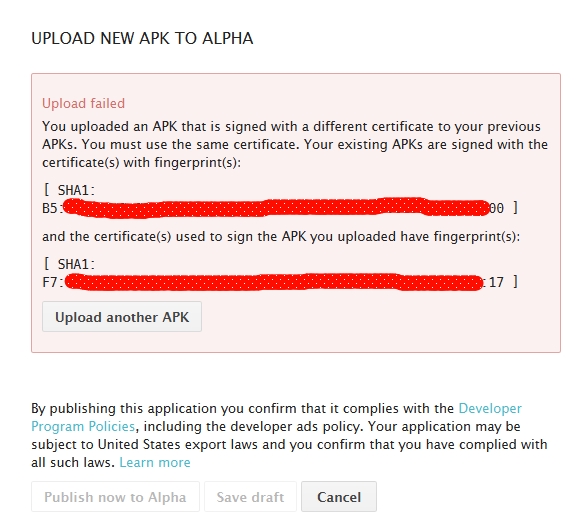
Upload Error

I used the same key as the previous versions while signing, for both keystore and the alias. But I'm developing the app in both my work PC and home PC. So the keystore file path is different in both versions (but the keys are same). Is that causing this problem? If yes, how can I make the app development portable?

apk_upload_error.jpg (175.6 kB)
Comment
Add comment · Show 3
10 |3000 characters needed characters left characters exceeded
▼
  • Viewable by all users
  • Viewable by moderators
  • Viewable by moderators and the original poster
  • Advanced visibility
Viewable by all users
avatar image meat5000 ♦ · Jun 22, 2014 at 09:01 AM 0
Share

Did you inadvertantly sign one in Debug mode?

avatar image BlackPanda · Jun 22, 2014 at 09:51 AM 0
Share

No I didn't. I chose the correct alias everytime.

avatar image JigneshKoradiya · Aug 07, 2015 at 07:01 PM 0
Share

https://youtu.be/iBmgCnJ_z1k

watch this one your all answer is here

1 Reply

  • Sort: 
avatar image
0
Best Answer

Answer by BlackPanda · Jun 24, 2014 at 06:15 AM

Okey so as it turns out, the path of the keystore file should be the same throughout the project development. So it is better to develop the entire project in one machine or create a file path in the other machine which is same as in the original project. Hope it helps someone. If there's another solution, please post. :)

EDIT: This issue no longer exists in Unity. It was solved in 4.6.x versions. You just have to select the same keystore file in every machine you work, irrespective of their folder path.


Comment
Add comment · Share
10 |3000 characters needed characters left characters exceeded
▼
  • Viewable by all users
  • Viewable by moderators
  • Viewable by moderators and the original poster
  • Advanced visibility
Viewable by all users

Follow this Question

Answers Answers and Comments

4 People are following this question.

avatar image avatar image avatar image avatar image

Related Questions

You uploaded an APK that is signed with a different certificate to your previous APKs 0 Answers

Uploading Unity Mac Game To AppStore 2 Answers

Can't Upload APK File to Play Store 1 Answer

Uploading a game (problems) -1 Answers

publish to App Store BINARY to iTunes connect ? 1 Answer


Enterprise
Social Q&A

Social
Subscribe on YouTube social-youtube Follow on LinkedIn social-linkedin Follow on Twitter social-twitter Follow on Facebook social-facebook Follow on Instagram social-instagram

Footer

  • Purchase
    • Products
    • Subscription
    • Asset Store
    • Unity Gear
    • Resellers
  • Education
    • Students
    • Educators
    • Certification
    • Learn
    • Center of Excellence
  • Download
    • Unity
    • Beta Program
  • Unity Labs
    • Labs
    • Publications
  • Resources
    • Learn platform
    • Community
    • Documentation
    • Unity QA
    • FAQ
    • Services Status
    • Connect
  • About Unity
    • About Us
    • Blog
    • Events
    • Careers
    • Contact
    • Press
    • Partners
    • Affiliates
    • Security
Copyright © 2020 Unity Technologies
  • Legal
  • Privacy Policy
  • Cookies
  • Do Not Sell My Personal Information
  • Cookies Settings
"Unity", Unity logos, and other Unity trademarks are trademarks or registered trademarks of Unity Technologies or its affiliates in the U.S. and elsewhere (more info here). Other names or brands are trademarks of their respective owners.
  • Anonymous
  • Sign in
  • Create
  • Ask a question
  • Spaces
  • Default
  • Help Room
  • META
  • Moderators
  • Explore
  • Topics
  • Questions
  • Users
  • Badges