 koobas.hobune.stream


Does GUI.BeginScrollView have a max height?
Hello, I'm using GUI.BeginScrollView to obviously make a scrollable area and it appears that I can't make my scrollable area any larger. I had it set at my screen width for testing purposes and now that I'm populating it my text is now going off screen. When I made the area 4 times the size of the screen width there was no change.
My code:
         //this box defines the overall rectangle. The viewable size (not counting scrolling). So this will position the scroll bars and what not
         Rect box1 = new Rect((screenWidth/3)/2, screenHeight/4 + screenHeight/15, screenWidth/2 + screenWidth/6, screenHeight/2);

         //this is the box inside box1. This box defines what can be displayed inside it. So if this is bigger then box1 then we will be able to scroll.
         Rect box2 = new Rect(0, 0, 0, screenWidth*4);

         scrollPosition = GUI.BeginScrollView(box1, scrollPosition, box2);


         float tempHeight = 0;
         GUI.skin.label.normal.textColor = towerStatsLabel1Color;
         GUI.skin.label.font = towerStatsBoldfont;
         GUI.Label(new Rect(0,tempHeight,theContentsWidth, towerStatsLabel1Height), towerStatsLabel1);

         GUI.skin.label.normal.textColor = towerStatsLabel2Color;
         GUI.skin.label.font = towerStatsNormalfont;
         tempHeight += towerStatsLabel1Height;
         GUI.Label(new Rect(0,tempHeight,theContentsWidth, towerStatsLabel2Height), towerStatsLabel2);


         GUI.skin.label.normal.textColor = towerStatsLabel3Color;
         GUI.skin.label.font = towerStatsBoldfont;
         tempHeight += towerStatsLabel2Height;
         GUI.Label(new Rect(0,tempHeight,theContentsWidth, towerStatsLabel3Height), towerStatsLabel3);

         GUI.skin.label.normal.textColor = towerStatsLabel4Color;
         GUI.skin.label.font = towerStatsNormalfont;
         tempHeight += towerStatsLabel3Height;
         GUI.Label(new Rect(0,tempHeight,theContentsWidth, towerStatsLabel4Height), towerStatsLabel4);


         GUI.skin.label.normal.textColor = towerStatsLabel5Color;
         GUI.skin.label.font = towerStatsBoldfont;
         tempHeight += towerStatsLabel4Height;
         GUI.Label(new Rect(0,tempHeight,theContentsWidth, towerStatsLabel5Height), towerStatsLabel5);

         GUI.skin.label.normal.textColor = towerStatsLabel6Color;
         GUI.skin.label.font = towerStatsNormalfont;
         tempHeight += towerStatsLabel5Height;
         GUI.Label(new Rect(0,tempHeight,theContentsWidth, towerStatsLabel6Height), towerStatsLabel6);


         GUI.skin.label.normal.textColor = towerStatsLabel7Color;
         GUI.skin.label.font = towerStatsBoldfont;
         tempHeight += towerStatsLabel6Height;
         GUI.Label(new Rect(0,tempHeight,theContentsWidth, towerStatsLabel7Height), towerStatsLabel7);

         GUI.skin.label.normal.textColor = towerStatsLabel8Color;
         GUI.skin.label.font = towerStatsNormalfont;
         tempHeight += towerStatsLabel7Height;
         GUI.Label(new Rect(0,tempHeight,theContentsWidth, towerStatsLabel8Height), towerStatsLabel8);


         GUI.skin.label.normal.textColor = towerStatsLabel9Color;
         GUI.skin.label.font = towerStatsBoldfont;
         tempHeight += towerStatsLabel8Height;
         GUI.Label(new Rect(0,tempHeight,theContentsWidth, towerStatsLabel9Height), towerStatsLabel9);

         GUI.skin.label.normal.textColor = towerStatsLabel10Color;
         GUI.skin.label.font = towerStatsNormalfont;
         tempHeight += towerStatsLabel9Height;
         GUI.Label(new Rect(0,tempHeight,theContentsWidth, towerStatsLabel10Height), towerStatsLabel10);


         GUI.skin.label.normal.textColor = towerStatsLabel11Color;
         GUI.skin.label.font = towerStatsBoldfont;
         tempHeight += towerStatsLabel10Height;
         GUI.Label(new Rect(0,tempHeight,theContentsWidth, towerStatsLabel11Height), towerStatsLabel11);

         GUI.skin.label.normal.textColor = towerStatsLabel12Color;
         GUI.skin.label.font = towerStatsNormalfont;
         tempHeight += towerStatsLabel11Height;
         GUI.Label(new Rect(0,tempHeight,theContentsWidth, towerStatsLabel12Height), towerStatsLabel12);


         GUI.EndScrollView();
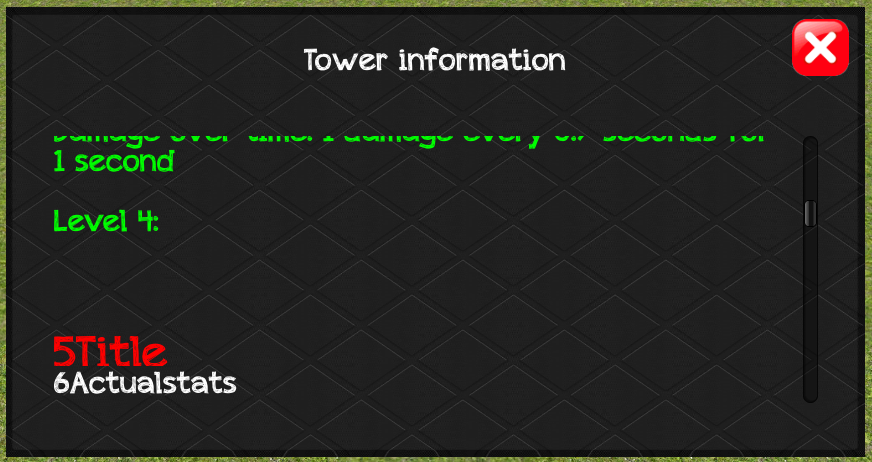
Now if you look at the image, the scroll bar's space show that I have lots of room, but it caps it. I'm unable to scroll any lower then where it is at right now - even though it appears that it will let me. It's acting as if it's clamped or something.
Any thoughts?
Well I found a band aid fix!
I'm very surprised no one else has had this problem, where the height of a scrollview is capped. Not sure how or why but I figured out how to "work around" this problem.
 //declare your vars
 float scrollX = 0;
 float scrollY = 0;
 private Vector2 scrollPosition = new Vector2(0,1);


 //in the onGUI:
 scrollPosition = GUI.BeginScrollView(new Rect(0, 0, screenWidth, screenHeight), new Vector2(scrollX,scrollY), new Rect(0, 0, screenWidth * 965, screenHeight * 85));
 scrollX = scrollPosition.x;
 scrollY = scrollPosition.y;

 GUI.EndScrollView();

 Debug.Log ("Box scrolled @ " + scrollPosition.ToString("F4"));
Notice that instead of getting the x and y from the vector I get it individually from a X var and a Y var. I set those values to the vector, then get the x and y separately from the vector.
From my tests I found that the X coordinate does not have a cap, I can have it 900+ times the width of the screen and it will always scroll. However in my example anything over 3 times the screens height caused the scrollable area to cap in the height direction. This has to be a bug, right?



