
Wayback Machinekoobas.hobune.stream
May JUN Jul
Previous capture 13 Next capture
2021 2022 2023
1 capture
13 Jun 22 - 13 Jun 22
sparklines
Close Help
  • Products
  • Solutions
  • Made with Unity
  • Learning
  • Support & Services
  • Community
  • Asset Store
  • Get Unity

UNITY ACCOUNT

You need a Unity Account to shop in the Online and Asset Stores, participate in the Unity Community and manage your license portfolio. Login Create account
  • Blog
  • Forums
  • Answers
  • Evangelists
  • User Groups
  • Beta Program
  • Advisory Panel

Navigation

  • Home
  • Products
  • Solutions
  • Made with Unity
  • Learning
  • Support & Services
  • Community
    • Blog
    • Forums
    • Answers
    • Evangelists
    • User Groups
    • Beta Program
    • Advisory Panel

Unity account

You need a Unity Account to shop in the Online and Asset Stores, participate in the Unity Community and manage your license portfolio. Login Create account

Language

  • Chinese
  • Spanish
  • Japanese
  • Korean
  • Portuguese
  • Ask a question
  • Spaces
    • Default
    • Help Room
    • META
    • Moderators
    • Topics
    • Questions
    • Users
    • Badges
  • Home /
This question was closed Jan 25, 2015 at 06:33 PM by meat5000 for the following reason:

The question is answered, right answer was accepted

avatar image
0
Question by AramShahbazians · Jan 25, 2015 at 06:28 AM · shader

Trees sparkling at night with directional light

Hi everyone, I have this problem with almost all the trees. When it's night (ambient light dark, directional light with intensity = 0.1) the leaves are still reflecting white light in an unreaslistic way. How can I eliminate this problem? I tried changing the parameters of the materials but I can't seem to find the right one. Thanks for the help!
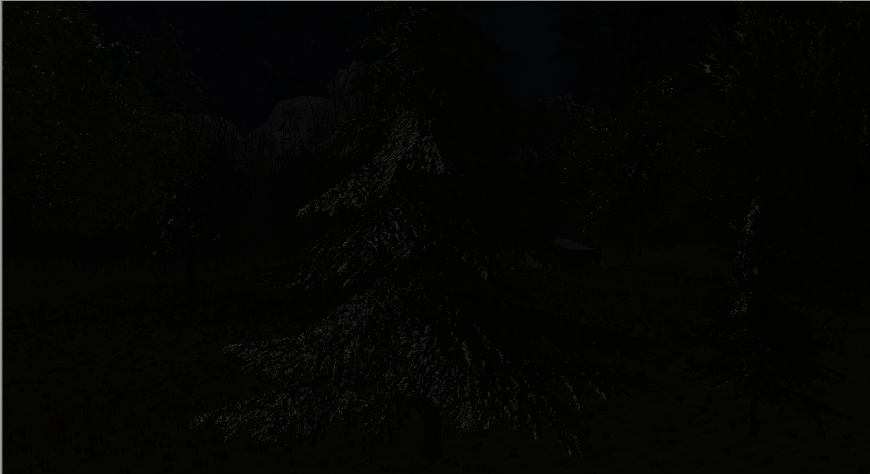
alt text

untitled.png (334.3 kB)
Comment
Add comment · Show 1
10 |3000 characters needed characters left characters exceeded
▼
  • Viewable by all users
  • Viewable by moderators
  • Viewable by moderators and the original poster
  • Advanced visibility
Viewable by all users
avatar image getyour411 · Jan 25, 2015 at 06:39 AM 0
Share

Check if the tree has Ambient Occlusion or other material settings that are causing this.

1 Reply

  • Sort: 
avatar image
0
Best Answer

Answer by AramShahbazians · Jan 25, 2015 at 12:19 PM

Thanks for the reply! I found the solution. I choose the shader Unlit->Transparency cutoff with maximum cutoff, and then to make the change effective I had to close and re-open the leaves of the trees (in the tree creator). Weird but it works.

Comment
Add comment · Share
10 |3000 characters needed characters left characters exceeded
▼
  • Viewable by all users
  • Viewable by moderators
  • Viewable by moderators and the original poster
  • Advanced visibility
Viewable by all users

Follow this Question

Answers Answers and Comments

2 People are following this question.

avatar image avatar image

Related Questions

How to force the compilation of a shader in Unity? 5 Answers

Semi transparent Object behind walls? 1 Answer

Cheap soft particles for mobile 0 Answers

(Bilboard Shader) Max Screen Size 0 Answers

Cubemap on Android 1 Answer


Enterprise
Social Q&A

Social
Subscribe on YouTube social-youtube Follow on LinkedIn social-linkedin Follow on Twitter social-twitter Follow on Facebook social-facebook Follow on Instagram social-instagram

Footer

  • Purchase
    • Products
    • Subscription
    • Asset Store
    • Unity Gear
    • Resellers
  • Education
    • Students
    • Educators
    • Certification
    • Learn
    • Center of Excellence
  • Download
    • Unity
    • Beta Program
  • Unity Labs
    • Labs
    • Publications
  • Resources
    • Learn platform
    • Community
    • Documentation
    • Unity QA
    • FAQ
    • Services Status
    • Connect
  • About Unity
    • About Us
    • Blog
    • Events
    • Careers
    • Contact
    • Press
    • Partners
    • Affiliates
    • Security
Copyright © 2020 Unity Technologies
  • Legal
  • Privacy Policy
  • Cookies
  • Do Not Sell My Personal Information
  • Cookies Settings
"Unity", Unity logos, and other Unity trademarks are trademarks or registered trademarks of Unity Technologies or its affiliates in the U.S. and elsewhere (more info here). Other names or brands are trademarks of their respective owners.
  • Anonymous
  • Sign in
  • Create
  • Ask a question
  • Spaces
  • Default
  • Help Room
  • META
  • Moderators
  • Explore
  • Topics
  • Questions
  • Users
  • Badges