
Wayback Machinekoobas.hobune.stream
May JUN Jul
Previous capture 13 Next capture
2021 2022 2023
1 capture
13 Jun 22 - 13 Jun 22
sparklines
Close Help
  • Products
  • Solutions
  • Made with Unity
  • Learning
  • Support & Services
  • Community
  • Asset Store
  • Get Unity

UNITY ACCOUNT

You need a Unity Account to shop in the Online and Asset Stores, participate in the Unity Community and manage your license portfolio. Login Create account
  • Blog
  • Forums
  • Answers
  • Evangelists
  • User Groups
  • Beta Program
  • Advisory Panel

Navigation

  • Home
  • Products
  • Solutions
  • Made with Unity
  • Learning
  • Support & Services
  • Community
    • Blog
    • Forums
    • Answers
    • Evangelists
    • User Groups
    • Beta Program
    • Advisory Panel

Unity account

You need a Unity Account to shop in the Online and Asset Stores, participate in the Unity Community and manage your license portfolio. Login Create account

Language

  • Chinese
  • Spanish
  • Japanese
  • Korean
  • Portuguese
  • Ask a question
  • Spaces
    • Default
    • Help Room
    • META
    • Moderators
    • Topics
    • Questions
    • Users
    • Badges
  • Home /
avatar image
0
Question by Ralphp · Mar 25, 2014 at 03:25 PM · meshcube

Round edges of cubes?

Hi there!

I'm creating a game where the players need to build "Minecraft style" defensive structures to hold off waves of enemies. The level environment is NOT block based, so I was surprised how ugly these blocks look in my levels (even with nice materials).

Is there a way to let the blocks look less "cubish" (edged) without using custom models/meshes?

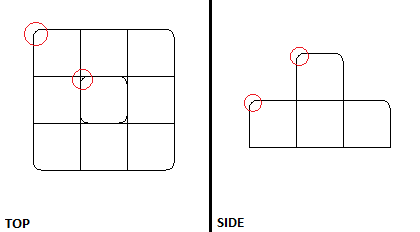
Ideally the blocks should have a slightly different shape depending on where they are placed. Blocks forming wall or floor should blend nicely while corner blocks should have round edges (see image).

Desired results:
image

If the only solution is to use custom meshes, is there a way to get around having a whole bunch of different block meshes for each possible block position?

I have to say that I'm pretty new to Unity and game development in general. Any help or general advices for my game idea are useful for me!

Thanks!

Comment
Add comment · Show 2
10 |3000 characters needed characters left characters exceeded
▼
  • Viewable by all users
  • Viewable by moderators
  • Viewable by moderators and the original poster
  • Advanced visibility
Viewable by all users
avatar image saschandroid · Mar 25, 2014 at 03:59 PM 0
Share

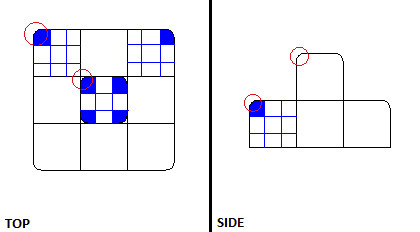
If you subdivide each block in 3x3 blocks, you need only two different (subdivided) blocks. One with 8 sharp edges and one with 7 sharp edges and a round corner. Rotate the latter so that the round corner points to the outside.
alt text

unbenannt.jpg (14.7 kB)
avatar image Ralphp · Mar 25, 2014 at 04:47 PM 0
Share

Great idea, thanks! But is there a way to still apply a single material as if all of the 27 sub cubes would be one single cube?

2 Replies

· Add your reply
  • Sort: 
avatar image
0

Answer by zwoxy · Mar 25, 2014 at 04:26 PM

I think that the easiest way is to use costum meshes. You can also make meshes in script but that would probably be a lot more comlicated. I would use a lot of different meshes as you said and then use raycast to se if there are blocks above, next to or under it.

Comment
Add comment · Show 2 · Share
10 |3000 characters needed characters left characters exceeded
▼
  • Viewable by all users
  • Viewable by moderators
  • Viewable by moderators and the original poster
  • Advanced visibility
Viewable by all users
avatar image Ralphp · Mar 25, 2014 at 04:58 PM 0
Share

I kind of like the idea to dynamically create the meshes. The meshes could probably be reused by storing them in a hash map... I will try to look into that!

avatar image zwoxy · Mar 25, 2014 at 07:20 PM 0
Share

Yeah, good luck then!

avatar image
0

Answer by Jroel · Sep 10, 2017 at 04:07 PM

Excellent tutorial for rounded cubes: http://catlikecoding.com/unity/tutorials/rounded-cube/

Comment
Add comment · Share
10 |3000 characters needed characters left characters exceeded
▼
  • Viewable by all users
  • Viewable by moderators
  • Viewable by moderators and the original poster
  • Advanced visibility
Viewable by all users

Your answer

Hint: You can notify a user about this post by typing @username

Up to 2 attachments (including images) can be used with a maximum of 524.3 kB each and 1.0 MB total.

Follow this Question

Answers Answers and Comments

23 People are following this question.

avatar image avatar image avatar image avatar image avatar image avatar image avatar image avatar image avatar image avatar image avatar image avatar image avatar image avatar image avatar image avatar image avatar image avatar image avatar image avatar image avatar image avatar image avatar image

Related Questions

Adjusting strange Vector3.Normalize behaviour 2 Answers

Game Object's Vector3 changing threw script without reason 1 Answer

Incorrect cube subdivision mesh 1 Answer

highlight a portion of a mesh in runtime 1 Answer

Cube botttom transparent with shader? 1 Answer


Enterprise
Social Q&A

Social
Subscribe on YouTube social-youtube Follow on LinkedIn social-linkedin Follow on Twitter social-twitter Follow on Facebook social-facebook Follow on Instagram social-instagram

Footer

  • Purchase
    • Products
    • Subscription
    • Asset Store
    • Unity Gear
    • Resellers
  • Education
    • Students
    • Educators
    • Certification
    • Learn
    • Center of Excellence
  • Download
    • Unity
    • Beta Program
  • Unity Labs
    • Labs
    • Publications
  • Resources
    • Learn platform
    • Community
    • Documentation
    • Unity QA
    • FAQ
    • Services Status
    • Connect
  • About Unity
    • About Us
    • Blog
    • Events
    • Careers
    • Contact
    • Press
    • Partners
    • Affiliates
    • Security
Copyright © 2020 Unity Technologies
  • Legal
  • Privacy Policy
  • Cookies
  • Do Not Sell My Personal Information
  • Cookies Settings
"Unity", Unity logos, and other Unity trademarks are trademarks or registered trademarks of Unity Technologies or its affiliates in the U.S. and elsewhere (more info here). Other names or brands are trademarks of their respective owners.
  • Anonymous
  • Sign in
  • Create
  • Ask a question
  • Spaces
  • Default
  • Help Room
  • META
  • Moderators
  • Explore
  • Topics
  • Questions
  • Users
  • Badges
