Wayback Machinekoobas.hobune.stream
May JUN Jul
Previous capture 13 Next capture
2021 2022 2023
1 capture
13 Jun 22 - 13 Jun 22
sparklines
Close Help
  • Products
  • Solutions
  • Made with Unity
  • Learning
  • Support & Services
  • Community
  • Asset Store
  • Get Unity

UNITY ACCOUNT

You need a Unity Account to shop in the Online and Asset Stores, participate in the Unity Community and manage your license portfolio. Login Create account
  • Blog
  • Forums
  • Answers
  • Evangelists
  • User Groups
  • Beta Program
  • Advisory Panel

Navigation

  • Home
  • Products
  • Solutions
  • Made with Unity
  • Learning
  • Support & Services
  • Community
    • Blog
    • Forums
    • Answers
    • Evangelists
    • User Groups
    • Beta Program
    • Advisory Panel

Unity account

You need a Unity Account to shop in the Online and Asset Stores, participate in the Unity Community and manage your license portfolio. Login Create account

Language

  • Chinese
  • Spanish
  • Japanese
  • Korean
  • Portuguese
  • Ask a question
  • Spaces
    • Default
    • Help Room
    • META
    • Moderators
    • Topics
    • Questions
    • Users
    • Badges
  • Home /
avatar image
0
Question by Van Zeng · Mar 25, 2013 at 07:25 PM · texture2dprime31uitoolkittexture-atlas

image stretched when packing textures in large size

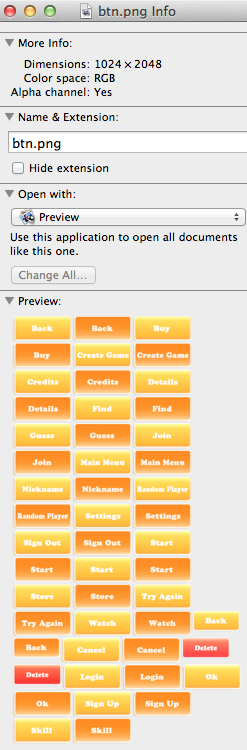
I was using UIToolkit from Prime31 and Texture Packer to pack a group of my textures. The image is 1024x2048 after packing, and it doesn't display correctly in Unity3D. Actually it's kinda like being stretched or something.

  1. It's not the issue of the UIToolkit, for there's no errors nor exceptions. And I didn't change the script a thing.

  2. It might not be the issue of TexturePacker, for I've checked the published image in Mac Finder, and it's okay.

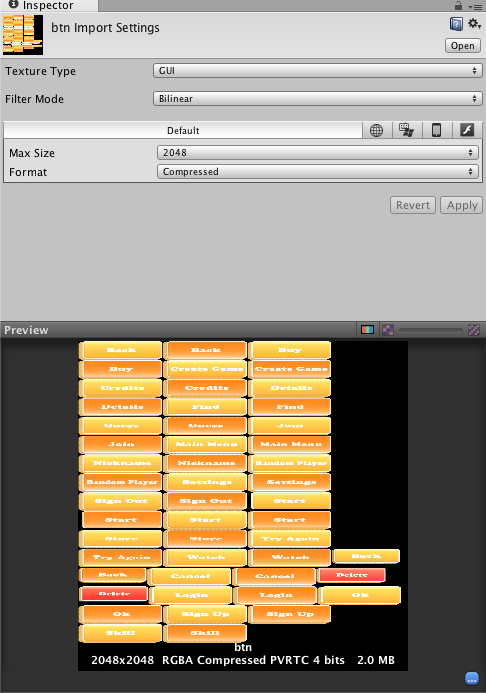
  3. Things are not right when I'm checking the preview in Unity3D. The preview in Unity3D is Stretched. And the GUI in gameplay is stretched,too, as I described in the beginning. But I've set the image type as GUI. And I've tried to set the image's size from 1024 to 4096. They all act not-normal.

My questions are, Have you tried to pack images in large size like me? You have the same issue? Unity3D cannot handle this size of texture? Kinda unbelievable. I'm using Unity3D 3.5.

Thank you guys!

Comment
Add comment · Show 4
10 |3000 characters needed characters left characters exceeded
▼
  • Viewable by all users
  • Viewable by moderators
  • Viewable by moderators and the original poster
  • Advanced visibility
Viewable by all users
avatar image Graham-Dunnett ♦♦ · Mar 25, 2013 at 08:15 PM 0
Share

Obviously Unity can handle textures of that size. Texture packing requires the UV coordinates on the objects to be changed. I suspect something has gone wrong there.

avatar image Loius · Mar 25, 2013 at 08:25 PM 0
Share

Screenshot(s) would help a lot in figuring out what's up.

avatar image Van Zeng · Apr 02, 2013 at 03:08 AM 0
Share

alt text alt text

screen shot 2013-04-02 at 11.05.51 am.png (95.8 kB)
screen shot 2013-04-02 at 11.04.59 am.png (130.3 kB)
avatar image Van Zeng · Apr 02, 2013 at 03:10 AM 0
Share

As you can see above, my image is actually in the dimension of 1024*2048. But when exported, it's stretched into a square. If I simply pack 2 images together, that's no problem.

1 Reply

· Add your reply
  • Sort: 
avatar image
0
Best Answer

Answer by Van Zeng · Apr 02, 2013 at 03:12 AM

It seems that I set the format as 16bit or true color, rather than compressed, there will be no problem then.

Comment
Add comment · Show 1 · Share
10 |3000 characters needed characters left characters exceeded
▼
  • Viewable by all users
  • Viewable by moderators
  • Viewable by moderators and the original poster
  • Advanced visibility
Viewable by all users
avatar image Van Zeng · Apr 02, 2013 at 03:17 AM 0
Share

But I still don't understand very well. In the Unity3D Documents, The Compressed Format is described like, Compressed RGB texture. This is the most common format for diffuse textures. 4 bits per pixel (32 $$anonymous$$B for a 256x256 texture).

It didn't say it would stretch the image and force it in a shape of a square.

Besides, this is not the first time I use non-square image for GUI. I didn't see any issue before.

Your answer

Hint: You can notify a user about this post by typing @username

Up to 2 attachments (including images) can be used with a maximum of 524.3 kB each and 1.0 MB total.

Follow this Question

Answers Answers and Comments

12 People are following this question.

avatar image avatar image avatar image avatar image avatar image avatar image avatar image avatar image avatar image avatar image avatar image avatar image

Related Questions

Packing unity textures into atlases 0 Answers

Texture-Atlas Modifying Mesh UVs 2 Answers

What's the benefit to use texture atlas after Unity3D released 2D sprite support? 1 Answer

Sprite Rendering Cost Calculation 1 Answer

Does Prime31's textureFromFileAtPath require specific plane settings? 1 Answer


Enterprise
Social Q&A

Social
Subscribe on YouTube social-youtube Follow on LinkedIn social-linkedin Follow on Twitter social-twitter Follow on Facebook social-facebook Follow on Instagram social-instagram

Footer

  • Purchase
    • Products
    • Subscription
    • Asset Store
    • Unity Gear
    • Resellers
  • Education
    • Students
    • Educators
    • Certification
    • Learn
    • Center of Excellence
  • Download
    • Unity
    • Beta Program
  • Unity Labs
    • Labs
    • Publications
  • Resources
    • Learn platform
    • Community
    • Documentation
    • Unity QA
    • FAQ
    • Services Status
    • Connect
  • About Unity
    • About Us
    • Blog
    • Events
    • Careers
    • Contact
    • Press
    • Partners
    • Affiliates
    • Security
Copyright © 2020 Unity Technologies
  • Legal
  • Privacy Policy
  • Cookies
  • Do Not Sell My Personal Information
  • Cookies Settings
"Unity", Unity logos, and other Unity trademarks are trademarks or registered trademarks of Unity Technologies or its affiliates in the U.S. and elsewhere (more info here). Other names or brands are trademarks of their respective owners.
  • Anonymous
  • Sign in
  • Create
  • Ask a question
  • Spaces
  • Default
  • Help Room
  • META
  • Moderators
  • Explore
  • Topics
  • Questions
  • Users
  • Badges