Wayback Machinekoobas.hobune.stream
May JUN Jul
Previous capture 12 Next capture
2021 2022 2023
1 capture
12 Jun 22 - 12 Jun 22
sparklines
Close Help
  • Products
  • Solutions
  • Made with Unity
  • Learning
  • Support & Services
  • Community
  • Asset Store
  • Get Unity

UNITY ACCOUNT

You need a Unity Account to shop in the Online and Asset Stores, participate in the Unity Community and manage your license portfolio. Login Create account
  • Blog
  • Forums
  • Answers
  • Evangelists
  • User Groups
  • Beta Program
  • Advisory Panel

Navigation

  • Home
  • Products
  • Solutions
  • Made with Unity
  • Learning
  • Support & Services
  • Community
    • Blog
    • Forums
    • Answers
    • Evangelists
    • User Groups
    • Beta Program
    • Advisory Panel

Unity account

You need a Unity Account to shop in the Online and Asset Stores, participate in the Unity Community and manage your license portfolio. Login Create account

Language

  • Chinese
  • Spanish
  • Japanese
  • Korean
  • Portuguese
  • Ask a question
  • Spaces
    • Default
    • Help Room
    • META
    • Moderators
    • Topics
    • Questions
    • Users
    • Badges
  • Home /
avatar image
0
Question by jifu · Jul 24, 2017 at 12:49 PM · collisionrigidbodybouncekinematic

Both Kinematic and Non-Kinematic behaviours at the same time.

Hello everyone, i am currently running into a problem, which can't be easily solved, so i am looking for any advice that could help.

I got an 3D Sphere as Energy Shield with a rigidbody and collider on it.

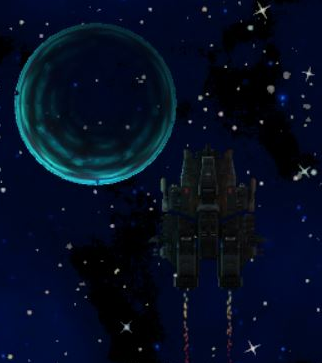
If i put this object on "kinematic" (picture 1), and control all movements and collisions by script, then its moving fine with the player together, until it collides with some enemies / hazards. The hazards / enemies won't bounce correctly as the physics engine does not capture the collisions, and the enemies / hazards often enter the shield until they collides with the player. I can only prevent this by adding negative force to the enemies / hazards, but it is not working fine, as there are fast moving objects in the game, so they hit both the sphere and the player.

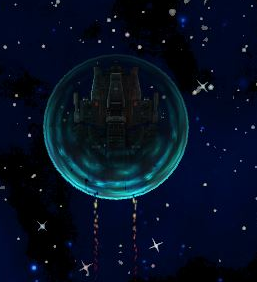
If i put the object off kinematic (picture 2), which means fully physically working, the collisions are captured perfectly, but the system won't let me put it "on" the player object. I tried it with setting player as parent, setting the transform manually to the same as the player, but it always get "pushed away" as soon as it appears.

Anyone? alt text alt text
2017-07-24-14-38-28-spaceshooterx.jpg (93.9 kB)
2017-07-24-14-37-38-unity-562f1-personal-64bit-mai.jpg (133.3 kB)
Comment
Add comment · Show 1
10 |3000 characters needed characters left characters exceeded
▼
  • Viewable by all users
  • Viewable by moderators
  • Viewable by moderators and the original poster
  • Advanced visibility
Viewable by all users
avatar image jifu · Jul 24, 2017 at 04:44 PM 0
Share

ok i found the solution to the problem.

  • setting the ignoreCollision

  • setting parent of sphere to ship

  • using both rigidbody and colliders

  • using transform.localposition = Vector3.zero and localRotation = Quaternion.identity as read here http://answers.unity3d.com/questions/841072/cannot-position-child-object-relative-to-parent.html

1 Reply

· Add your reply
  • Sort: 
avatar image
0

Answer by jifu · Jul 24, 2017 at 04:02 PM

ok after some testing and trials, i found out the following:

  • removing rigidbody from the shield sphere object makes it perfectly surrounding the ship, and following it, but the collider does not to seem work anymore (OnCollisionEnter with debug.log gives nothing)

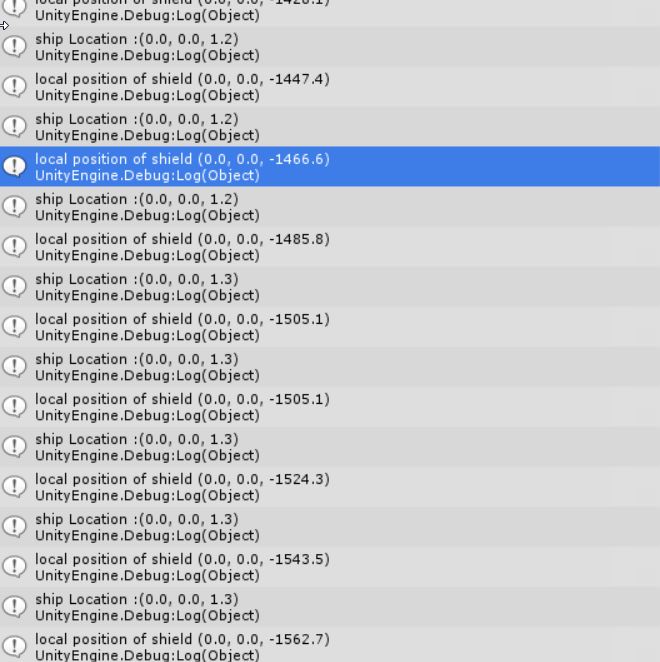
  • physics.IgnoreCollision given both colliders of ship and shield sphere makes it possible that both objects overlap, but the sphere does not move with the parent ship anymore even when i use shield.transform.SetParent(player.transform); shield.transform.localPosition = new Vector3 (0.0f, 0.0f, 0.0f); , Debug gives strange values, when moving the ship along the z axis, the values of the shield localposition are way off, but on screen its barely moving a pixelalt text

2017-07-24-17-56-33-unity-562f1-personal-64bit-mai.jpg (5.5 kB)
2017-07-24-18-00-00-unity-562f1-personal-64bit-mai.jpg (73.7 kB)
Comment
Add comment · Share
10 |3000 characters needed characters left characters exceeded
▼
  • Viewable by all users
  • Viewable by moderators
  • Viewable by moderators and the original poster
  • Advanced visibility
Viewable by all users

Your answer

Hint: You can notify a user about this post by typing @username

Up to 2 attachments (including images) can be used with a maximum of 524.3 kB each and 1.0 MB total.

Follow this Question

Answers Answers and Comments

117 People are following this question.

avatar image avatar image avatar image avatar image avatar image avatar image avatar image avatar image avatar image avatar image avatar image avatar image avatar image avatar image avatar image avatar image avatar image avatar image avatar image avatar image avatar image avatar image avatar image avatar image avatar image avatar image avatar image avatar image avatar image avatar image avatar image avatar image avatar image avatar image avatar image avatar image avatar image avatar image avatar image avatar image avatar image avatar image avatar image avatar image avatar image avatar image avatar image avatar image avatar image avatar image avatar image avatar image avatar image avatar image avatar image avatar image avatar image avatar image avatar image avatar image avatar image avatar image avatar image avatar image avatar image avatar image avatar image avatar image avatar image avatar image avatar image avatar image avatar image avatar image avatar image avatar image avatar image avatar image avatar image avatar image avatar image avatar image avatar image avatar image avatar image avatar image avatar image avatar image avatar image avatar image avatar image avatar image avatar image avatar image avatar image avatar image avatar image avatar image avatar image avatar image avatar image avatar image avatar image avatar image avatar image avatar image avatar image avatar image avatar image avatar image avatar image avatar image avatar image avatar image avatar image avatar image avatar image

Related Questions

[SOLVED] Desactivate pushing forces between two objects 2 Answers

Rigidbody with Physics or Kinematic Rigidbody 1 Answer

How to tell the exact moment a rigidbody bounces? 1 Answer

Collisions are driving me mad! My sanity is fading fast... 3 Answers

Enemy rigidbody and bullet collisions 1 Answer


Enterprise
Social Q&A

Social
Subscribe on YouTube social-youtube Follow on LinkedIn social-linkedin Follow on Twitter social-twitter Follow on Facebook social-facebook Follow on Instagram social-instagram

Footer

  • Purchase
    • Products
    • Subscription
    • Asset Store
    • Unity Gear
    • Resellers
  • Education
    • Students
    • Educators
    • Certification
    • Learn
    • Center of Excellence
  • Download
    • Unity
    • Beta Program
  • Unity Labs
    • Labs
    • Publications
  • Resources
    • Learn platform
    • Community
    • Documentation
    • Unity QA
    • FAQ
    • Services Status
    • Connect
  • About Unity
    • About Us
    • Blog
    • Events
    • Careers
    • Contact
    • Press
    • Partners
    • Affiliates
    • Security
Copyright © 2020 Unity Technologies
  • Legal
  • Privacy Policy
  • Cookies
  • Do Not Sell My Personal Information
  • Cookies Settings
"Unity", Unity logos, and other Unity trademarks are trademarks or registered trademarks of Unity Technologies or its affiliates in the U.S. and elsewhere (more info here). Other names or brands are trademarks of their respective owners.
  • Anonymous
  • Sign in
  • Create
  • Ask a question
  • Spaces
  • Default
  • Help Room
  • META
  • Moderators
  • Explore
  • Topics
  • Questions
  • Users
  • Badges