
Wayback Machinekoobas.hobune.stream
May JUN Jul
Previous capture 11 Next capture
2021 2022 2023
1 capture
11 Jun 22 - 11 Jun 22
sparklines
Close Help
  • Products
  • Solutions
  • Made with Unity
  • Learning
  • Support & Services
  • Community
  • Asset Store
  • Get Unity

UNITY ACCOUNT

You need a Unity Account to shop in the Online and Asset Stores, participate in the Unity Community and manage your license portfolio. Login Create account
  • Blog
  • Forums
  • Answers
  • Evangelists
  • User Groups
  • Beta Program
  • Advisory Panel

Navigation

  • Home
  • Products
  • Solutions
  • Made with Unity
  • Learning
  • Support & Services
  • Community
    • Blog
    • Forums
    • Answers
    • Evangelists
    • User Groups
    • Beta Program
    • Advisory Panel

Unity account

You need a Unity Account to shop in the Online and Asset Stores, participate in the Unity Community and manage your license portfolio. Login Create account

Language

  • Chinese
  • Spanish
  • Japanese
  • Korean
  • Portuguese
  • Ask a question
  • Spaces
    • Default
    • Help Room
    • META
    • Moderators
    • Topics
    • Questions
    • Users
    • Badges
  • Home /
avatar image
0
Question by Reloaded23 · Aug 10, 2015 at 06:33 PM · camerafpsfirst-person-controllercamera viewport

FPS Camera Position full Body

Hi,

I am making a first person shooting game which will be multiplayer in the near future. For player I have tried using full body and with only hands. Camera setup seems to be the issue.

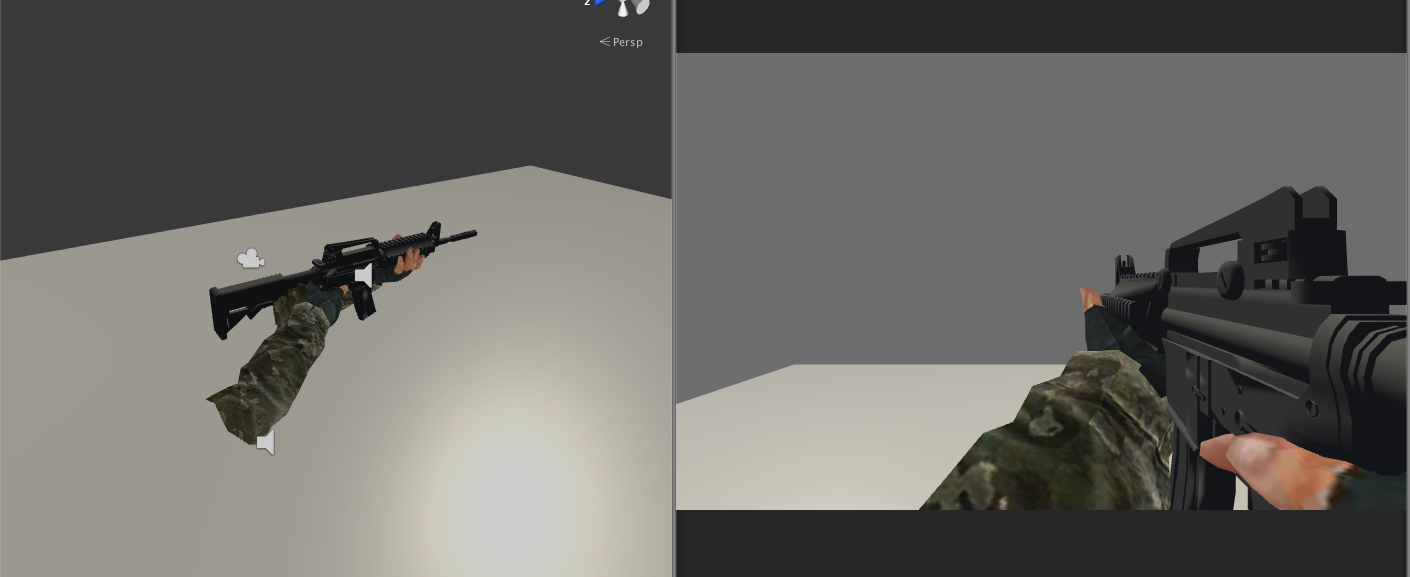
When i am using only hand with a gun the view looks like this and is looking good.
alt text

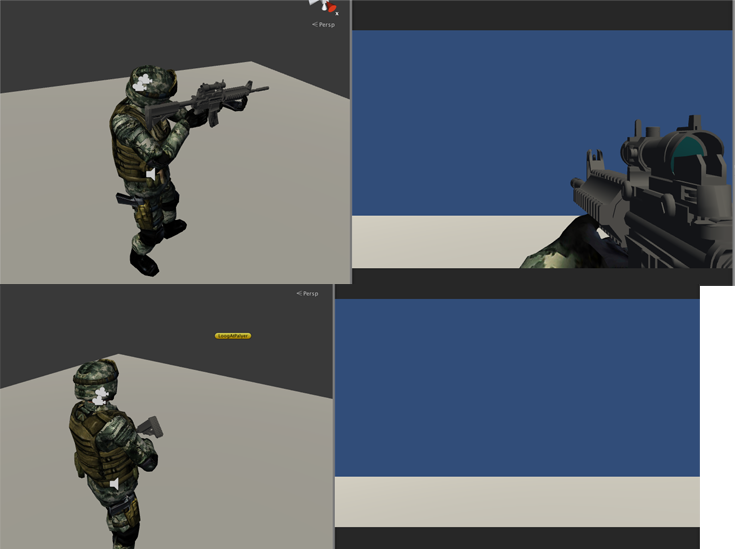
When i am using full body with two cameras one is rendering only gun and the other is rendering the whole environment. This is looking good as well.The camera which is rendering the gun is kept near right shoulder. Now when player is in idle position it looks like this.
alt text

But the gun camera is not able to render the gun as it is not in the camera view. I want it to render the gun.

This problem might also come when player is running and other animations as well.

So my question is how to use hand mesh for multiplayer as the opponent will be able to see my full body? And if i am using the whole body how to set up the camera for all type of animations?

screenshot-1.png (241.5 kB)
screenshot-2.png (117.3 kB)
Comment
Add comment · Show 4
10 |3000 characters needed characters left characters exceeded
▼
  • Viewable by all users
  • Viewable by moderators
  • Viewable by moderators and the original poster
  • Advanced visibility
Viewable by all users
avatar image Cherno · Aug 10, 2015 at 08:40 PM 0
Share

Impossible to answer without knowing specifics. Generally, a camera that is a child of the head bone is a good start.

avatar image Reloaded23 · Aug 11, 2015 at 06:50 AM 0
Share

@Cherno I have edited the question. plz take a look

avatar image Cherno · Aug 11, 2015 at 09:16 AM 0
Share

Games commonly do it like this:

The arms and gun you see yourself in the lower right corner of the screen are called "view models" and they are only rendered by the player's own camera; they are directly connected to it so they always stay in the right position.

The complete body is not rendered by player's camera; Only by the other player's cameras. It looks like you already did this approach, why not stay with it?

avatar image Glurth · Aug 11, 2015 at 01:56 PM 0
Share

But the gun camera is not able to render the gun as it is not in the camera view. I want it to render the gun.

should the gun camera continue to show the gun pointing forward? If so, what exactly do you do to the arm & gun model when the character goes to rest position, such that it goes off camera? whatever it is, can you choose to simply NOT do that with the arm & gun model?

Or should the gun be shown in a rest position, diagonal across the chest, like in the 3rd person image you posted? If this is the case, I would thin you $$anonymous$$UST move the gun-camera position, from say shoulder to chest, to put it back in view.

0 Replies

· Add your reply
  • Sort: 

Your answer

Hint: You can notify a user about this post by typing @username

Up to 2 attachments (including images) can be used with a maximum of 524.3 kB each and 1.0 MB total.

Follow this Question

Answers Answers and Comments

26 People are following this question.

avatar image avatar image avatar image avatar image avatar image avatar image avatar image avatar image avatar image avatar image avatar image avatar image avatar image avatar image avatar image avatar image avatar image avatar image avatar image avatar image avatar image avatar image avatar image avatar image avatar image avatar image

Related Questions

Camera Help? 0 Answers

First Person Camera Not Spining Player 0 Answers

Enabling and siabling first person controller 0 Answers

Movie Textures. 0 Answers

FPS weapon natural look 0 Answers


Enterprise
Social Q&A

Social
Subscribe on YouTube social-youtube Follow on LinkedIn social-linkedin Follow on Twitter social-twitter Follow on Facebook social-facebook Follow on Instagram social-instagram

Footer

  • Purchase
    • Products
    • Subscription
    • Asset Store
    • Unity Gear
    • Resellers
  • Education
    • Students
    • Educators
    • Certification
    • Learn
    • Center of Excellence
  • Download
    • Unity
    • Beta Program
  • Unity Labs
    • Labs
    • Publications
  • Resources
    • Learn platform
    • Community
    • Documentation
    • Unity QA
    • FAQ
    • Services Status
    • Connect
  • About Unity
    • About Us
    • Blog
    • Events
    • Careers
    • Contact
    • Press
    • Partners
    • Affiliates
    • Security
Copyright © 2020 Unity Technologies
  • Legal
  • Privacy Policy
  • Cookies
  • Do Not Sell My Personal Information
  • Cookies Settings
"Unity", Unity logos, and other Unity trademarks are trademarks or registered trademarks of Unity Technologies or its affiliates in the U.S. and elsewhere (more info here). Other names or brands are trademarks of their respective owners.
  • Anonymous
  • Sign in
  • Create
  • Ask a question
  • Spaces
  • Default
  • Help Room
  • META
  • Moderators
  • Explore
  • Topics
  • Questions
  • Users
  • Badges
