 koobas.hobune.stream


Long delay with WWW.isDone
We're seeing a multi-second hiccup in our application, and according to the profiler it appears to be during WWW.isDone. First, a bit of background:
Our application is a data viz tool. When it launches, we do a bunch of setup and also launch a search for the latest data to our 'core', which is a RESTful API on a server. When the search returns, we do a bunch of things (parse the JSON, instantiate some NGUI objects, kick off additional downloads, etc.). During this time, we're seeing a huge pause, but only in the webplayer. The standalone app has no pause at all - it runs smoothly.
After a bit of testing, it appears that a large chunk of the delay is being caused by our download manager checking to see if the download is complete by calling dl.isDone(). Here's what I'm seeing in the profiler:
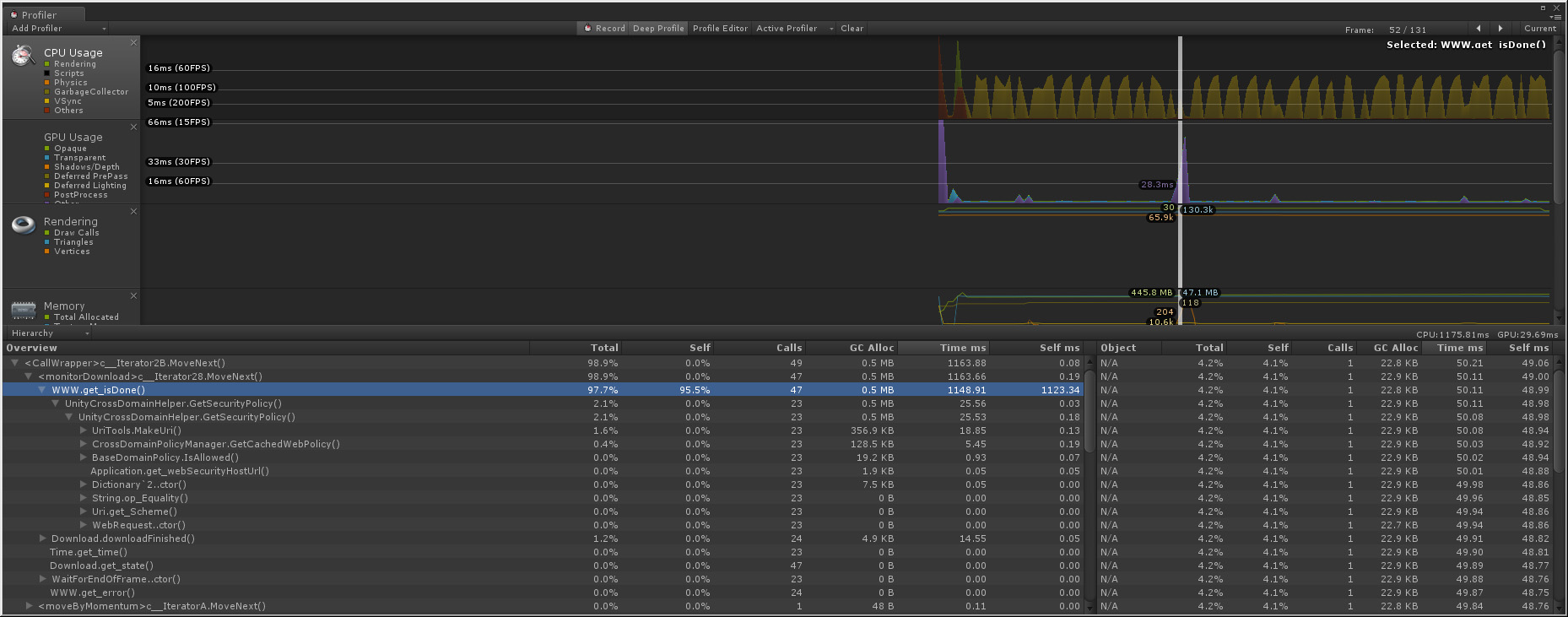
As you can see, each isDone call appears to be taking 50 ms, with UnityCrossDomainHelper.GetSecurityPolicy being the only thing listed under isDone. Here's the relevant code from our download manager:
 private IEnumerator monitorDownload()
 {
     while (state == State.Downloading)
     {
         if (www.isDone)
         {
MonitorDownload basically just runs on a loop, yielding every frame, and checks up on the download as it's happening, along with managing download state (something we introduced in our download manager), etc.
So, in summary, for some reason calling www.isDone in some cases is causing up to a 50 ms delay, but only in the webplayer.

Some data to consider:
Apparently, the WebPlayer still uses the browser for downloading:
http://forum.unity3d.com/threads/141679-WWW-calls-slow-in-the-unity-web-player
WWW vs HttpWebRequest:
http://forum.unity3d.com/threads/64695-Comparing-performance-of-HttpWebRequest-to-WWW-class
I wonder if you (for debugging only, $$anonymous$$d) tried using the HttpWebRequest object, what speed would it report?

Thanks @Dracorat,
I've seen posts stating that HttpWebRequest isn't available in the webplayer: http://forum.unity3d.com/threads/53218-Alternative-for-httpWebRequest-amp-HttpWebResponse
If that's actually the case (and not user error) that would pretty much be a no-go :)
Agreed. If it's not available, that's too bad (for testing). =(
This appears to be a bug internal to Unity, something to do with UnityCrossDomainHelper.GetSecurityPolicy. It doesn't appear to have anything to do with the number of downloads, and is reproducible with a skeleton project.
Submitted bug 538108:
Large delay with WWW.isDone
I'm consistently seeing a 50 ms delay per call to WWW.isDone, when the following the application is running as a webplayer app (even in the editor when target is set to webplayer)
This 50 ms delay is only seen when WWW.isDone in turn calls UnityCrossDomainHelper.GetSecurityPolicy, which it does not appear to do for every download, and doesn't appear to do every frame for the downloads it does affect.
I've included a repro project with a test scene and script to start 7 downloads and then launch a coroutine for each to call WWW.isDone once per frame. I've included 2 profiler screenshots showing frame 1 and frame 2 of running the application in the editor. As you can see, in frame 1 there are 7 downloads, and 2 calls are made to GetSecurityPolicy, resulting in around 100 ms of delay. In the very next frame, the 7 downloads are still active and no calls are made to GetSecurityPolicy, with a result of 0.00 ms of delay for the same code.
In our main application, I have seen the total delay get as high as 1100 ms in rare instances when we're running a couple dozen downloads simultaneously. This only happens for the webplayer - the standalone app is unaffected. The delay seems perfectly linear - each call to GetSecurityPolicy adds 50 ms of delay. I've seen this happen for as few as 3 calls to WWW.isDone in a single frame and as many as 30.

get security will indeed take a lengthy amount of time as it has to contact the server and verify the crossdomain xml file. unsure why you get up to such high ms numbers though, probably related to the parallel downloads and a limitation on concurrently open http connections from the browser side. Standalone / editor do not use browser http pipelines, they use raw tcp sockets so they have no limit on the number of parallel WWW requests.
you might want to experiment if you can get rid of it by enhancing your download manager to only execute 4 parallel WWW at a time while the others wait (while (...) yield loops) for their time to start
Yeah, it's very strange. I removed the call to www.isDone as you suggested, and the GetSecurityPolicy calls remain, so apparently there's no way to get around them. I'm not sure why they're taking so long, nor why Unity would need to make so many calls when we're contacting just a handful of servers.
Additionally, when I try to reduce the number of simultaneous downloads, I'm seeing it with as few as 4 downloads (4 calls to isDone resulting in 1 call to GetSecurityPolicy, resulting in a 50 ms delay that frame). I don't know about you, but 4 downloads and 1 security check doesn't sound like all that much.
Because it has to verify the access security for every single new server you want to contact. The only server where it will not do that is the own server when you access the files with relative URLs.
This is documented under the Webplayer Sandbox manual page and acts the same way Flash, Silverlight and any halfway secure web technology works regarding cross domain access. Its a required evil to ensure that no private data gets accessed within local networks without the user explicitelly allowing it.
That's the thing, though - we have a proxy set up on our server, and all requests for (say) thumbnails go through that proxy. So while the individual URLs are different, everything from the server down through the service being called are identical. And once it fetches the crossdomain.xml for a server, it should never need to fetch it again, even for a different URL on that server.

The webplayer uses the browsers HTTP pipeline for any request (to benefit from the browser caching, cookie and session handling), so if you ask WWW about 'isDone' it will have to call out to the browser, get and process the response and feed it back into the scripting layer for you to consume during the next frame / fixed udpate.
This normally shouldn't cause any delays and alike and hasn't basing on my experience, but my implementations always ensured to limit the amount of parallel downloads to a handfull at max. many browsers have limits for parallel http connections, if you fire up 40 in a single round, you are risking to lock yourself down for a lengthy amount of time
The easy and non-performance kiling way is removing the isDone loop and use yield return www but this only works if the download progress is irrelevant.
If you need to access the download progress, you could use a longer yield timeframe as the progress will not jump from 0 to 100% in 0.016 / 0.02s, So using something like yield return new WaitForSeconds(0.1f) or even 0.5f would make a major difference.
Thanks for the info. Interestingly, I'm seeing this behaviour in the editor, which I imagine isn't running the requests through any browser :)
Originally we were quite interested in getting the download progress (to deter$$anonymous$$e whether downloads of large imagery were just slow or actually hung). However, in my experience www.progress almost never works, unless you're downloading a file straight from a web directory. If you're going through a web service, it will always be 0 until it's 1. So yeah, it might be time to rework that code.
However, the whole thing is very strange - at the point of the pause we see a 50 ms delay per request, but at other points I see a 0 ms delay. Of course, as I'm writing this I realize that later in our app we do manage simultaneous downloads (to 5 per dataset), so perhaps it is just the sheer number - I'll throttle it and report back.
I throttled the count to 6 downloads, and at one point in the code I see that it's taking 300 ms - so that's a linear decrease, and still 50 ms per call to www.isDone. Also, the very next frame I'm still making 6 calls, but the total time is 0 ms.
Here's the interesting part: in the frame with the 300 ms hiccup, I see a call to UnityCrossDomainHelper.GetSecurityPolicy under WWW.get_isDone(). The following frame, with 0 ms delay, there is no call to GetSecurityPolicy.
I'm going to continue researching to see if this holds up in other situations, and see if I can figure out what the circumstances are that cause the call to GetSecurityPolicy.
Well, it does appear to be the case that GetSecurityPolicy is what's causing the delay, even if it lists itself as only a few ms in the profiler. In my various tests so far, it is always the case that each call to GetSecurityPolicy adds ~50 ms of delay. For instance, check out the screenshot below:
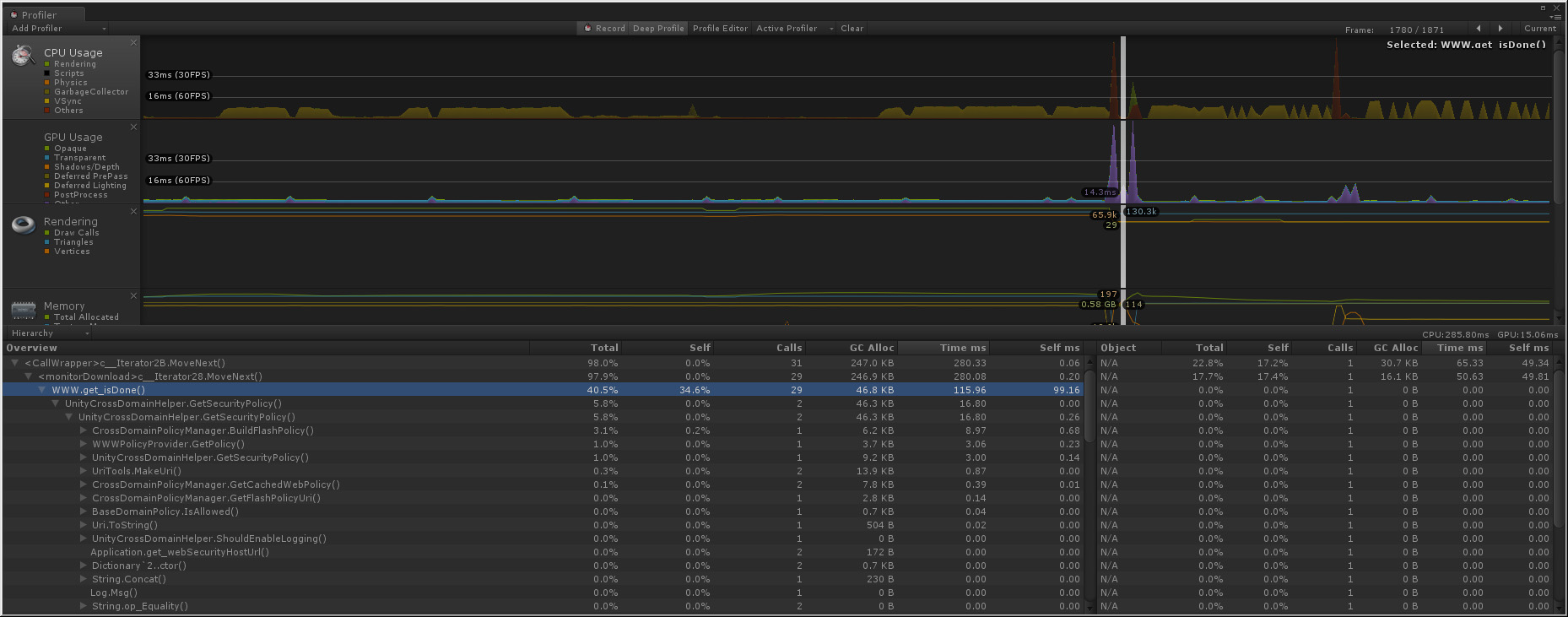
As you can see, there are 29 calls to isDone and only 2 to GetSecurityPolicy, and sure enough the delay is around 100 ms.
Hopefully this will be enough for me to build a repro project.




