
Wayback Machinekoobas.hobune.stream
May JUN Jul
Previous capture 13 Next capture
2021 2022 2023
1 capture
13 Jun 22 - 13 Jun 22
sparklines
Close Help
  • Products
  • Solutions
  • Made with Unity
  • Learning
  • Support & Services
  • Community
  • Asset Store
  • Get Unity

UNITY ACCOUNT

You need a Unity Account to shop in the Online and Asset Stores, participate in the Unity Community and manage your license portfolio. Login Create account
  • Blog
  • Forums
  • Answers
  • Evangelists
  • User Groups
  • Beta Program
  • Advisory Panel

Navigation

  • Home
  • Products
  • Solutions
  • Made with Unity
  • Learning
  • Support & Services
  • Community
    • Blog
    • Forums
    • Answers
    • Evangelists
    • User Groups
    • Beta Program
    • Advisory Panel

Unity account

You need a Unity Account to shop in the Online and Asset Stores, participate in the Unity Community and manage your license portfolio. Login Create account

Language

  • Chinese
  • Spanish
  • Japanese
  • Korean
  • Portuguese
  • Ask a question
  • Spaces
    • Default
    • Help Room
    • META
    • Moderators
    • Topics
    • Questions
    • Users
    • Badges
  • Home /
avatar image
0
Question by ungalyant2 · Apr 10, 2014 at 09:24 AM · audiobugdestroyclipping

Audio Artefacts When Stopping/Destroying during play.

I've had this issue since I started using Unity, only I've never had it as a pressing enough problem to warrant exploring too much, but after much searching around and finding no other immediately visible topics on the issue (though there may be some which I simply have not found) I wanted to find out if this is a known issue and if there's anything I can do about it.

Essentially often, when I stop an audio clip mid play, or destroy the object upon which the relevant audio source resides, the audio will cut with a awful spluttering click. I'm currently working on a title for full release, and I'm not sure that kind of thing is acceptable for something you would be expecting people to pay money for. Am I simply doing something wrong? I've had this same issue on several different PCs, over more than 2 years, and it happens both in editor and build.

Does anyone have any suggestions?

Comment
Add comment
10 |3000 characters needed characters left characters exceeded
▼
  • Viewable by all users
  • Viewable by moderators
  • Viewable by moderators and the original poster
  • Advanced visibility
Viewable by all users

2 Replies

· Add your reply
  • Sort: 
avatar image
2

Answer by Jonatan Crafoord · Oct 15, 2015 at 03:13 PM

When you stop a sound in Unity, or it stops because its AudioSource was destroyed, the sound will stop instantly. This sometimes results in the waveform making a "leap" from high amplitude to zero, which results in the click or pop you're hearing. To solve this, most commercial software for playing back music or other audio make a small fade-out when stopping the sound.

If you want your audio to behave similarly, you can either look at implementing a middleware for playing back sound that includes fades and smooth stops when destroying, or you can program your own little wrapper to do this whenever you stop a sound. If you're going with middleware, I'd recommend Fabric (http://www.tazman-audio.co.uk/).

If you want to do it yourself, make a function that lowers the volume of the AudioSource over a short duration, then stops it when it has reached zero. This fade-out can be very short, a tenth of a second could suffice. Note that this will not work when you are destroying objects, unless you first move the AudioSource to a new GameObject at the same position, and destroy that when the sound has stopped.

Good luck!

Comment
Add comment · Show 1 · Share
10 |3000 characters needed characters left characters exceeded
▼
  • Viewable by all users
  • Viewable by moderators
  • Viewable by moderators and the original poster
  • Advanced visibility
Viewable by all users
avatar image aeroson · Oct 18, 2015 at 11:21 AM 0
Share

The thing is I had this isue with the m4 shoot audio, from the image you can see that it has a fade out inside it self. At the end the of it the amplitude is zero so there is no leap and thus there should be no pop/click ? Yet if it is wav and decompress on load you hear the pop/click. Try it your self: https://dl.dropboxusercontent.com/u/70097519/UNITY/m4%20shoot.wav simply make scene with this audio in the audio source and let it play only once. Load type has to be decompress on load.

avatar image
0

Answer by aeroson · Oct 12, 2015 at 04:43 PM

I have the same problem, playing the sound thru any other software is just fine. But inside Unity both my runtime import and editor import ends with this spluttering click at the end.

Visualising the AudioClip data shows no artefacts at the end, so it must be issue inside Unity's audio.

I managed to fix it by stopping the audioSource few samples before the end.

 void Update() 
 {
     if (audioSource.timeSamples > audioSource.clip.samples - 300) audioSource.Stop();
 }
 

Another fix is to use different Load Type, just not Decompress On Load.
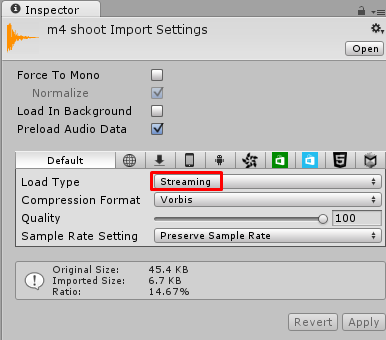
alt text

Also another fix is to convert the audio file into different format, converting from wav to mp3 using Audacity worked for me.

Here is the audio file that has this issue: https://dl.dropboxusercontent.com/u/70097519/UNITY/m4%20shoot.wav


ox63yx0.png (21.3 kB)
Comment
Add comment · Share
10 |3000 characters needed characters left characters exceeded
▼
  • Viewable by all users
  • Viewable by moderators
  • Viewable by moderators and the original poster
  • Advanced visibility
Viewable by all users

Your answer

Hint: You can notify a user about this post by typing @username

Up to 2 attachments (including images) can be used with a maximum of 524.3 kB each and 1.0 MB total.

Follow this Question

Answers Answers and Comments

23 People are following this question.

avatar image avatar image avatar image avatar image avatar image avatar image avatar image avatar image avatar image avatar image avatar image avatar image avatar image avatar image avatar image avatar image avatar image avatar image avatar image avatar image avatar image avatar image avatar image

Related Questions

using Contains(gameObject) to find and destroy a gameObject from a list 2 Answers

UnityWebRequestMultimedia.GetAudioClip dont't work in WebGL build (2019.3.15f1). 1 Answer

Generate instances of prefab, then save to GameObject array... How? 1 Answer

Unity Iphone AudioQueueAddPropertyListener problem 1 Answer

playing an audio clip before destroying object 3 Answers


Enterprise
Social Q&A

Social
Subscribe on YouTube social-youtube Follow on LinkedIn social-linkedin Follow on Twitter social-twitter Follow on Facebook social-facebook Follow on Instagram social-instagram

Footer

  • Purchase
    • Products
    • Subscription
    • Asset Store
    • Unity Gear
    • Resellers
  • Education
    • Students
    • Educators
    • Certification
    • Learn
    • Center of Excellence
  • Download
    • Unity
    • Beta Program
  • Unity Labs
    • Labs
    • Publications
  • Resources
    • Learn platform
    • Community
    • Documentation
    • Unity QA
    • FAQ
    • Services Status
    • Connect
  • About Unity
    • About Us
    • Blog
    • Events
    • Careers
    • Contact
    • Press
    • Partners
    • Affiliates
    • Security
Copyright © 2020 Unity Technologies
  • Legal
  • Privacy Policy
  • Cookies
  • Do Not Sell My Personal Information
  • Cookies Settings
"Unity", Unity logos, and other Unity trademarks are trademarks or registered trademarks of Unity Technologies or its affiliates in the U.S. and elsewhere (more info here). Other names or brands are trademarks of their respective owners.
  • Anonymous
  • Sign in
  • Create
  • Ask a question
  • Spaces
  • Default
  • Help Room
  • META
  • Moderators
  • Explore
  • Topics
  • Questions
  • Users
  • Badges