 koobas.hobune.stream


Equipping unity prefabs to blender armature
Okay... so, I've refined the question below to a better, more specific question: http://answers.unity3d.com/questions/572821/equipping-weapons-to-photon-prefabs.html
My new question is about making a child snap-to influence on runtime.
I'm creating a Photon based RPG. In this RPG there are many elements I must focus on at this point of creation:
->All player models should be able to access all the same weapons and shields ->Weapons can be sheathed ->Players can run/walk with a weapon wielded
So, here's the obstacles; ->Player model must have a sheath bone ->Weapon must be able to become a child of both the hand.R bone and the sheath bone, switchable on runtime ->Sheild must be able to become a child of both the hand.L bone and sheath bone
The questions are mainly about blender structure, and unity parenting.
Should I have a weapon bone at all times so a weapon could be used in ANY animation?
Should I have a shield bone?
how do these retain location/rotation? the shield and sword inherits rotation and position of the bone? How do I determine "influence" as labeled in blender within unity? Influence makes the weapon closer or farther from the bone parented from.
I also believe that just as the player, I should put each weapon model inside of a prefab in unity. This way I can create/destroy weapons when equipped?
a sequence of events just to make sure I'm understood: player.Spawn(); weapon.Spawn.state=sheathed(childOf(sheathBone)); player.Weild(); weapon.state(childOf(Hand.R));
player.Animate(walk);
this is just a pseudo code, and wouldn't work. I'm just making sure the logic is correct before I jump into animating the player.
I can add some blender screenshots later.
EDIT: Thanks to AlejandroGorgal I've gotten the following result: 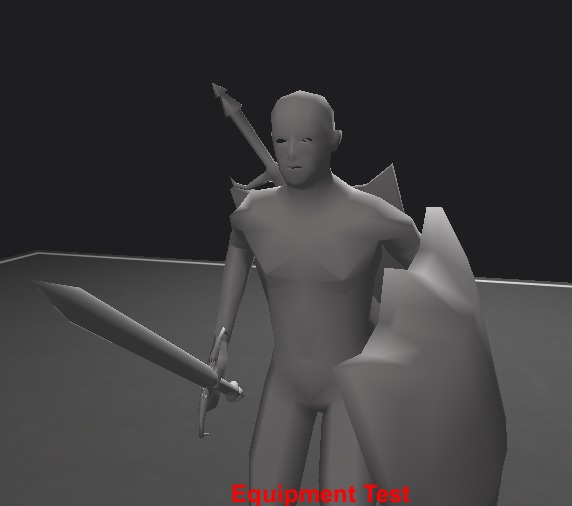
Using Pre-defined place holders from the blender file, I was able to actually child the imported models to the fixed models and render them with no material.
The Sheath is a empty game object, but the animSword is a no material blender object. For animating the equipment it just seemed more logical the equipped weapons inherit the animated weapons' properties?
Is this a decent method? 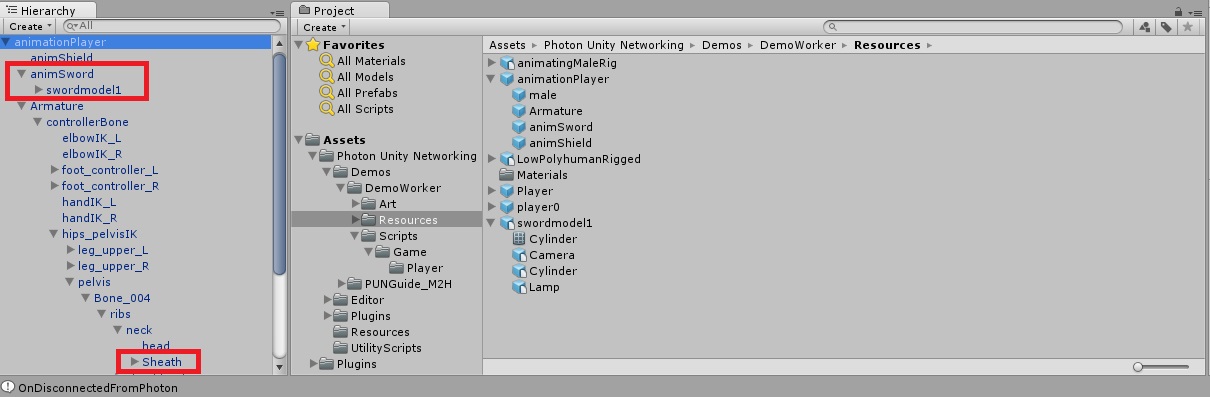

Your best option is not to create a specific weapon bone in Blender but to create an empty object in Unity and attach it to the character's hand bone in the editor. All weapons you add here (provided that they are centered) will be added to the same location, so if they are not fitting exactly the player's hand you can simply move the emptyObject until they are on the location you want.
In Blender make sure that all weapons have their grip on the same location, this way when you add them to the empty object they'll all fit the player's hand perfectly.
Load up all your weapons to this new empty Object and add your weapon switching script there.

If you want it to swap location (like say going from the player's hand to his back) then you will need to add two game objects, each with the same weapons on it and enable one and disable the other depending on whether the weapon is equipped or not.
To create an empty object go to the menu at the top: Game Object > Create Empty.
Then on the Hierarchy pane select your character and expand it, you should see the list of bones it has, keep expanding it until you find the hands, then drag and drop your new empty object there.
This video tutorial should explain the logic of how this works: http://www.youtube.com/watch?v=OXo5AYPnL1c
You will have to try to be sure but Im almost 100% sure that it will retain to changes.
Try this: drag the prefab to the Hierarchy pane, make your changes then select the top (the parent) of that prefab on that same hierarchy view list, on the inspector you'll see a button that says Apply, whenever you press this whatever changes you've made here will be applied to the original prefab you have on the assets folder.
In my experience doing this saves all of the changes, the only thing it doesn't seems to save is when you target other separate gameObjects (such as enemies) but that shouldn't be a problem for you since you are doing a different thing.
Hope that helps.
I think your changes are the same, I really didn't know about meshes without materials in Blender as I usually used an empty object for that, but as long as it allows you to attach a weapon mesh to it then it's fine.
Now, for enabling and disabling the weapons the best method is probably to simply turn off the mesh rendered, like so:
renderer.enabled = false;
This code needs to be on the weapon itself, so Im thinking (I haven't actually done this just yer) that on the weapon you could have a script that's something like this:
 var weaponState: boolean = false;  // weapon will be disabled by default

 function Update()
 {
 if (Input.Get$$anonymous$$eyDown($$anonymous$$eyCode.Space) && weaponState == false)
 {
 renderer.enabled = true;
 }
 else if (Input.Get$$anonymous$$eyDown($$anonymous$$eyCode.Space) && weaponState == true)
 {
 renderer.enabled = false;
 }
 }
This code is untested, but in theory when you press the spacebar key it should toggle the mesh rendering on and off.
Apologies, the idea itself was ok but my code had some errors, here's a working version:
 var weaponState: boolean = true;  // weapon will be disabled by default

 function Update()
 {
 if (Input.Get$$anonymous$$eyDown($$anonymous$$eyCode.LeftShift) && weaponState == false)
 {
 renderer.enabled = true;
 weaponState = true;
 }
 else if (Input.Get$$anonymous$$eyDown($$anonymous$$eyCode.LeftShift) && weaponState == true)
 {
 renderer.enabled = false;
 weaponState = false;
 }
 }
This was actually a very useful test as I plan to use this same system myself :)




