 koobas.hobune.stream


lookAt on the x axis, without the 180°turn!
Hi =)
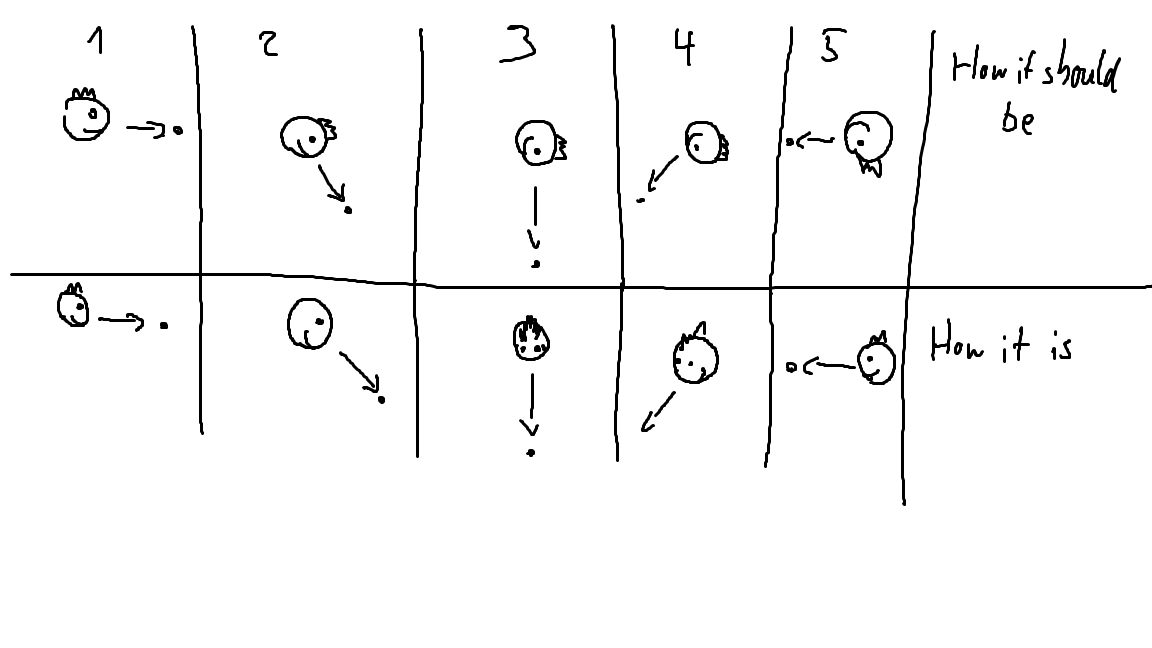
I want to rotate my object only on the x axis looking at a target that rotates around the object's x axis. Sounds easy at first. But the problem now is, after 90° of turning up or down, the object would be upside down, which results in a 180° turn around the y axis at those points. Imagine you are looking at a bee that's flying though you legs. After it's on the other side, you won't having your head keep turning until it's upside down while continue looking at the bee, but you turn 180° when it got behind you. Look at the attached image to see what I mean.
As I searched how to fix that problem peolple said things like
transform.LookAt(Vector3(0, target.y, target.z));
but then I just got a bit twitching...
The y rotation jumps from 90 to 270 because of that 180° turn, so I tried to make it stay always 90°, which just ended in some weird results....
Making the Objekt a child of another object, which is turned 90° so that it would rotate around the Y axis to look at the target. But the y axis just jumpf out of the parents rotation, having it's y axis looking up in world space again ......
I hope you understand what I mean and have a Idea how to fix that!


if you find a solution, please share here. I'm fighting the same problem at the moment! thanks, mate!

Helping searchability - not an answer: This is called gimbal lock, and it occurs when you're not using Quaternions for your camera's rotation.
Don't ever look into the math behind quaternions, they're magical and just work with, quite seriously, imagination. Well, imaginary numbers and four dimensional math.

Presuming that in your drawing X is into the screen (weird, but it seems that's what you are saying)
  var targetPosition = target.position;
  var currentPosition = transform.position;
  targetPosition.x = 0;
  currentPosition.x = 0;
  transform.rotation = Quaternion.LookRotation(targetPosition - currentPosition, Vector3.up);

Still the same result ..... Y axis always looking up, which means that the object is turning 180° around Y when I get from one side of the target to the other ... But now I don't have to care about the depht of its position anymore, what helps alot!
There's only 1 problem left now. Atm it turns 180° instantly, what is perfect, so it's no prob with a 2 sided texture. But when I try to add a Quaternion.Slerp to it, I get a slow turn around the Y axis, and no instant switch anymore.... I tried a few ways to add it to the code, but I get either a slow Y turn or just an error ... So if you could put a working Quaternion.Slerp to it, that would be great =)
So hang on - a slerp is going to give you a slow turn - I'm not sure what you want there?
Are you after a smoothed motion on the turn?
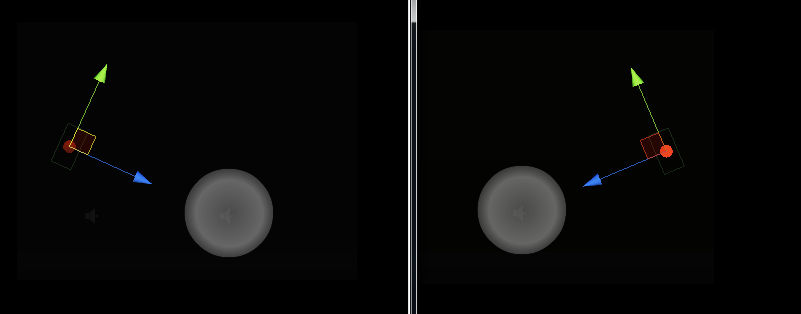
that's exactly my problem, HolidayAtHome. The green axis should be pointing downwards in the image on the right, but it doesn't. I don't know, but I feel that most people in the forums don't understand the problem. or I don't understand the answers...? I'm watching this topic very intently!:) Thanks!
How about trying:
  var rotateRightToUp = Quaternion.FromToRotation(Vector3.right, Vector3.up);
  transform.rotation = Quaternion.LookRotation(targetPosition - currentPosition, Vector3.right) * rotateRightToUp;
Thank you so much. I tried it with this and still failed. But still I it to work brilliantly with the SmoothOrbit script shipped with unity. So HolidayAtHome, I recommend using that as a reference or starting point for a new try and never touching lookat or Quaternion.LookRotation ever again;) Not if you want 6DOF, at least. Or again, maybe I just messed up. I miss 2d:( Thank you for your great help though, you kept the hope alive!

i had the same problem too with a charakter lookin at me, and rotated the model when i was at a higher level. what i used was you make the objects x rotation look at itself, its y rotation at the target, and the z rotation at itself.
in my script it looked like this, but in your case you need to tweak it a little.
             Vector3 new_WayPointPos = new Vector3(nextWaypoint.position.x, transform.position.y, nextWaypoint.position.z);
             Quaternion RotateTo = Quaternion.LookRotation(new_WayPointPos - transform.position);
             transform.rotation = Quaternion.Slerp(transform.rotation, RotateTo, Time.deltaTime * 3);
i used a waypoint as a target.

I may have to update this when I get home, but i think this is exactly what I figured out last night. There is no transition to this code so it may be jerky. My case was I was making a turret on an object face a direction (x,z), but only wanted to rotate on local y even if the parent transform was rotated (eg tank on the side of a hill). Please note this is all from my memory and hasn't been tested.
 GameObject go;//Some GameObject that is always facing up World.up
 ...
 var direction = camera.position - target.position;
 var rel_direction = go.transform.InverseTransformDirection(direction);
 //You may have to switch or invert the parameters to the Atan2 function, but this should lock your rotation around the x-axis
 camera.rotation = Quaternion.Euler(Mathf.Atan2(rel_direction.y, rel_direction.z) * Mathf.Rad2Deg, 0, 0);
 ...




