
Wayback Machinekoobas.hobune.stream
May JUN Jul
Previous capture 13 Next capture
2021 2022 2023
1 capture
13 Jun 22 - 13 Jun 22
sparklines
Close Help
  • Products
  • Solutions
  • Made with Unity
  • Learning
  • Support & Services
  • Community
  • Asset Store
  • Get Unity

UNITY ACCOUNT

You need a Unity Account to shop in the Online and Asset Stores, participate in the Unity Community and manage your license portfolio. Login Create account
  • Blog
  • Forums
  • Answers
  • Evangelists
  • User Groups
  • Beta Program
  • Advisory Panel

Navigation

  • Home
  • Products
  • Solutions
  • Made with Unity
  • Learning
  • Support & Services
  • Community
    • Blog
    • Forums
    • Answers
    • Evangelists
    • User Groups
    • Beta Program
    • Advisory Panel

Unity account

You need a Unity Account to shop in the Online and Asset Stores, participate in the Unity Community and manage your license portfolio. Login Create account

Language

  • Chinese
  • Spanish
  • Japanese
  • Korean
  • Portuguese
  • Ask a question
  • Spaces
    • Default
    • Help Room
    • META
    • Moderators
    • Topics
    • Questions
    • Users
    • Badges
  • Home /
avatar image
0
Question by Elysian.Zhen · Sep 27, 2012 at 06:38 AM · particleseffectsmokebubbles

Particles for dreamy smoke-like effects and bubbles

Something like this:
http://i.minus.com/iuLgAKa2zQtEI.jpg

My aims:

  • Animated coloured smoke particles in the background with some blurrings

  • Bubbles like particles with distinctive colour outlines floating in the foreground

It doesn't have to be exact, something that resembles it will do.
I have absolutely no idea how to implement this, so I would like to get some inputs and advices from the community.

Please give me a hand on how to achieve this result.
So any hints or tips would highly appreciated.

Thanks.

Comment
Add comment · Show 1
10 |3000 characters needed characters left characters exceeded
▼
  • Viewable by all users
  • Viewable by moderators
  • Viewable by moderators and the original poster
  • Advanced visibility
Viewable by all users
avatar image Fattie · Sep 27, 2012 at 07:11 AM 0
Share

one small suggestion, check the Asset store, it may exist already

2 Replies

· Add your reply
  • Sort: 
avatar image
1
Best Answer

Answer by fafase · Sep 27, 2012 at 08:24 AM

If you have pro, there is this:

http://docs.unity3d.com/Documentation/Components/script-BlurEffect.html

But I would guess you do not have pro.

You could then try to trick creating a blur picture with GIMP (tutorial online, http://docs.gimp.org/en/filters-blur.html).

You create a plane and you apply the texture to it and make it cover the whole screen. I do not think you can use a GUITexture as you cannot apply particle on top of it (Maybe you can I do not know).

For your particle, no big deal again, back in Gimp, create a circle with a white ring and the white inside zone. Lower the opacity of the ring about 80% and the body about 40% (to be modified). Lowering the opacity will allow some of the color behind to pass through.

Now your particle emitter is placed right front below the camera and front of the plane from above.
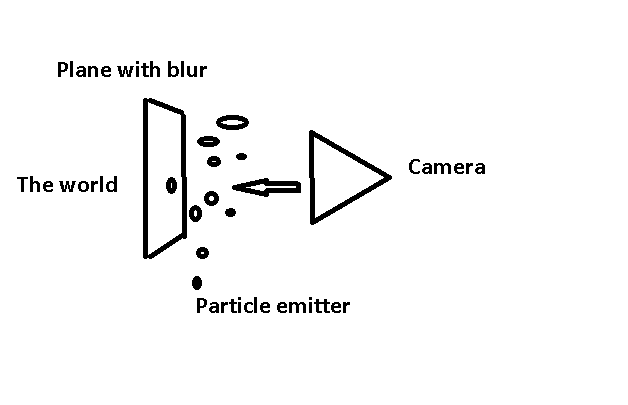
alt text

The particle emitter allows to randomize the size and speed and other variables.

Now hold on, this might not be the best thing but in case you would have nothing else coming...


pic.png (8.7 kB)
Comment
Add comment · Share
10 |3000 characters needed characters left characters exceeded
▼
  • Viewable by all users
  • Viewable by moderators
  • Viewable by moderators and the original poster
  • Advanced visibility
Viewable by all users
avatar image
1

Answer by SarperS · Sep 27, 2012 at 03:08 PM

What you are trying to achieve is called "Depth of Field". More details in the Unity3D documentation http://docs.unity3d.com/Documentation/Components/script-DepthOfField34.html

Comment
Add comment · Show 1 · Share
10 |3000 characters needed characters left characters exceeded
▼
  • Viewable by all users
  • Viewable by moderators
  • Viewable by moderators and the original poster
  • Advanced visibility
Viewable by all users
avatar image fafase · Sep 27, 2012 at 07:32 PM 0
Share

Oh yeah, I knew I saw something similar but couldn't figure it out.

Your answer

Hint: You can notify a user about this post by typing @username

Up to 2 attachments (including images) can be used with a maximum of 524.3 kB each and 1.0 MB total.

Follow this Question

Answers Answers and Comments

12 People are following this question.

avatar image avatar image avatar image avatar image avatar image avatar image avatar image avatar image avatar image avatar image avatar image avatar image

Related Questions

I'd like to play Particles and Animated Character in scene at same time. 0 Answers

How to hide wire after burn effect? 1 Answer

Spawn Particle Effect on Socket 0 Answers

Alpha Blended Partiles Flickering 1 Answer

Two Particle Systems 1 Answer


Enterprise
Social Q&A

Social
Subscribe on YouTube social-youtube Follow on LinkedIn social-linkedin Follow on Twitter social-twitter Follow on Facebook social-facebook Follow on Instagram social-instagram

Footer

  • Purchase
    • Products
    • Subscription
    • Asset Store
    • Unity Gear
    • Resellers
  • Education
    • Students
    • Educators
    • Certification
    • Learn
    • Center of Excellence
  • Download
    • Unity
    • Beta Program
  • Unity Labs
    • Labs
    • Publications
  • Resources
    • Learn platform
    • Community
    • Documentation
    • Unity QA
    • FAQ
    • Services Status
    • Connect
  • About Unity
    • About Us
    • Blog
    • Events
    • Careers
    • Contact
    • Press
    • Partners
    • Affiliates
    • Security
Copyright © 2020 Unity Technologies
  • Legal
  • Privacy Policy
  • Cookies
  • Do Not Sell My Personal Information
  • Cookies Settings
"Unity", Unity logos, and other Unity trademarks are trademarks or registered trademarks of Unity Technologies or its affiliates in the U.S. and elsewhere (more info here). Other names or brands are trademarks of their respective owners.
  • Anonymous
  • Sign in
  • Create
  • Ask a question
  • Spaces
  • Default
  • Help Room
  • META
  • Moderators
  • Explore
  • Topics
  • Questions
  • Users
  • Badges
