
Wayback Machinekoobas.hobune.stream
May JUN Jul
Previous capture 13 Next capture
2021 2022 2023
1 capture
13 Jun 22 - 13 Jun 22
sparklines
Close Help
  • Products
  • Solutions
  • Made with Unity
  • Learning
  • Support & Services
  • Community
  • Asset Store
  • Get Unity

UNITY ACCOUNT

You need a Unity Account to shop in the Online and Asset Stores, participate in the Unity Community and manage your license portfolio. Login Create account
  • Blog
  • Forums
  • Answers
  • Evangelists
  • User Groups
  • Beta Program
  • Advisory Panel

Navigation

  • Home
  • Products
  • Solutions
  • Made with Unity
  • Learning
  • Support & Services
  • Community
    • Blog
    • Forums
    • Answers
    • Evangelists
    • User Groups
    • Beta Program
    • Advisory Panel

Unity account

You need a Unity Account to shop in the Online and Asset Stores, participate in the Unity Community and manage your license portfolio. Login Create account

Language

  • Chinese
  • Spanish
  • Japanese
  • Korean
  • Portuguese
  • Ask a question
  • Spaces
    • Default
    • Help Room
    • META
    • Moderators
    • Topics
    • Questions
    • Users
    • Badges
  • Home /
avatar image
0
Question by J_Troher · Nov 11, 2014 at 08:51 AM · vector3distancespace

Distance Changing Conversions (1000m = 1km 1200m = 1.2km etc)

Hello Unity.

I have myself a little radar system, which reads out distance from you to whoever is on it. No problem.

But, if you get farther than 1000 meters away, I run into issues with it fitting in my hud. So I want to convert them up/down.

I currently just use Vector3.Distance a to b. I did just multiply it, but I'm left with many many remaining places. Is there anyway to just get the first 1 or 2 digits after the decimal?

I would love for it to kick over and say 1.10km 1.76km

I suppose if this question is answered and problem solved. To save time asking another. I would also like to know if there is an easy way to sort my GameObject List ascending based on said Distance. Closest to farthers top to bottom.

Huge thanks in Advance

Edit:

Screenshot of the radar element (I will be updating this to 4.6 UI later before anyone yells at me for using UnityGUI ;) )
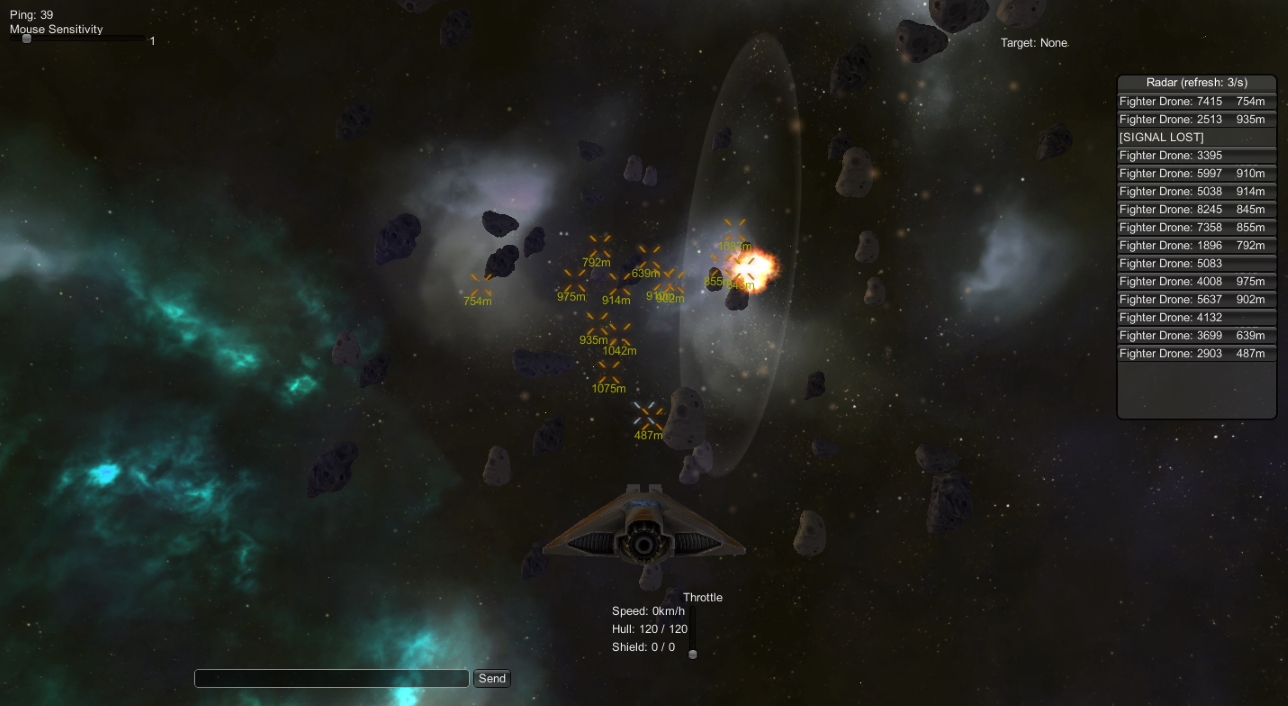
alt text

-Fatal

space.jpg (439.9 kB)
Comment
Add comment
10 |3000 characters needed characters left characters exceeded
▼
  • Viewable by all users
  • Viewable by moderators
  • Viewable by moderators and the original poster
  • Advanced visibility
Viewable by all users

3 Replies

· Add your reply
  • Sort: 
avatar image
0
Best Answer

Answer by J_Troher · Nov 12, 2014 at 03:41 AM

Thanks to what Fafase said, I came up with this nifty pub string.

     public static string Distance(GameObject Player, GameObject target){
         float distance = Vector3.Distance(Player.transform.position, target.transform.position);
         string distanceText = null;
         if(distance >= 1000){
             float temp = (int)distance / 1000f;
             distanceText = temp.ToString("0.0" + "km");
         } else {
             distanceText = distance.ToString("0" + "m");
         }
         return distanceText;
     }


I will come up with a way to sort the radar list at another time, since I've moved on to shields for the next day or two. But awesome work thanks guys! Hope this helps anyone in the future.

I would imagine it wouldn't be too difficult to step it up more past km, to AU or something.

Comment
Add comment · Show 1 · Share
10 |3000 characters needed characters left characters exceeded
▼
  • Viewable by all users
  • Viewable by moderators
  • Viewable by moderators and the original poster
  • Advanced visibility
Viewable by all users
avatar image Bunny83 · Nov 12, 2014 at 04:12 AM 0
Share

Since 1AU is way above 1000km you might want to use the usual metric prefixes first.

avatar image
1

Answer by fafase · Nov 11, 2014 at 09:16 AM

 int distance = (int)Vector3.Distance(a,b);
 string distanceText = null;
 if(distance >= 1000)
 {
     float temp = (float)distance / 1000f;
     distanceText = temp.ToString("0.00");
 }else
 {
     distanceText = distance.ToString();
 }
 print(distanceText);


There may be better ways but this one is simple.

Comment
Add comment · Show 2 · Share
10 |3000 characters needed characters left characters exceeded
▼
  • Viewable by all users
  • Viewable by moderators
  • Viewable by moderators and the original poster
  • Advanced visibility
Viewable by all users
avatar image fafase · Nov 11, 2014 at 09:17 AM 0
Share

If you plan on releasing the game do not use 4.6 uGui since it is beta and can only be played on computers with Unity 4.6 installed on.

avatar image J_Troher · Nov 11, 2014 at 09:27 AM 0
Share

Really? Wow. Well it's most likely not to be released for awhile. But maybe I'll just use NGUI, I have it, though I've never gotten into it. I've watched some tutorials for 4.6 (and like using native things). But from what I hear they're the same(ish)?

avatar image
0

Answer by VioKyma · Nov 11, 2014 at 09:14 AM

In regards to outputting the distance you could just use ToString() with a format specifier eg:

distance.ToString("F2");

This would display the string to 2 decimal places. You can do more with this also, depending on what you need. You could modify the float itself, but I think this is better because it is only for display purposes.

For ordering the list, I would look into something like Array.Sort as it is really quite fast, making sure you specify a comparison delegate that compares the distance property. Let me know if you need an example, I haven't used it for a while, so it would take a little bit to knock one up. You can find the MSDN page for Array.Sort here: http://msdn.microsoft.com/en-us/library/system.array.sort%28v=vs.90%29.aspx

Comment
Add comment · Share
10 |3000 characters needed characters left characters exceeded
▼
  • Viewable by all users
  • Viewable by moderators
  • Viewable by moderators and the original poster
  • Advanced visibility
Viewable by all users

Your answer

Hint: You can notify a user about this post by typing @username

Up to 2 attachments (including images) can be used with a maximum of 524.3 kB each and 1.0 MB total.

Follow this Question

Answers Answers and Comments

27 People are following this question.

avatar image avatar image avatar image avatar image avatar image avatar image avatar image avatar image avatar image avatar image avatar image avatar image avatar image avatar image avatar image avatar image avatar image avatar image avatar image avatar image avatar image avatar image avatar image avatar image avatar image avatar image avatar image

Related Questions

Keep camera at certain distance from character when rotating 3 Answers

Return to Start Position 1 Answer

Move parent so children align with other obj! 1 Answer

Make Navmesh agent follow closest object with tag 0 Answers

iPhone Real World Touch Detection. 1 Answer


Enterprise
Social Q&A

Social
Subscribe on YouTube social-youtube Follow on LinkedIn social-linkedin Follow on Twitter social-twitter Follow on Facebook social-facebook Follow on Instagram social-instagram

Footer

  • Purchase
    • Products
    • Subscription
    • Asset Store
    • Unity Gear
    • Resellers
  • Education
    • Students
    • Educators
    • Certification
    • Learn
    • Center of Excellence
  • Download
    • Unity
    • Beta Program
  • Unity Labs
    • Labs
    • Publications
  • Resources
    • Learn platform
    • Community
    • Documentation
    • Unity QA
    • FAQ
    • Services Status
    • Connect
  • About Unity
    • About Us
    • Blog
    • Events
    • Careers
    • Contact
    • Press
    • Partners
    • Affiliates
    • Security
Copyright © 2020 Unity Technologies
  • Legal
  • Privacy Policy
  • Cookies
  • Do Not Sell My Personal Information
  • Cookies Settings
"Unity", Unity logos, and other Unity trademarks are trademarks or registered trademarks of Unity Technologies or its affiliates in the U.S. and elsewhere (more info here). Other names or brands are trademarks of their respective owners.
  • Anonymous
  • Sign in
  • Create
  • Ask a question
  • Spaces
  • Default
  • Help Room
  • META
  • Moderators
  • Explore
  • Topics
  • Questions
  • Users
  • Badges
