Wayback Machinekoobas.hobune.stream
May JUN Jul
Previous capture 13 Next capture
2021 2022 2023
1 capture
13 Jun 22 - 13 Jun 22
sparklines
Close Help
  • Products
  • Solutions
  • Made with Unity
  • Learning
  • Support & Services
  • Community
  • Asset Store
  • Get Unity

UNITY ACCOUNT

You need a Unity Account to shop in the Online and Asset Stores, participate in the Unity Community and manage your license portfolio. Login Create account
  • Blog
  • Forums
  • Answers
  • Evangelists
  • User Groups
  • Beta Program
  • Advisory Panel

Navigation

  • Home
  • Products
  • Solutions
  • Made with Unity
  • Learning
  • Support & Services
  • Community
    • Blog
    • Forums
    • Answers
    • Evangelists
    • User Groups
    • Beta Program
    • Advisory Panel

Unity account

You need a Unity Account to shop in the Online and Asset Stores, participate in the Unity Community and manage your license portfolio. Login Create account

Language

  • Chinese
  • Spanish
  • Japanese
  • Korean
  • Portuguese
  • Ask a question
  • Spaces
    • Default
    • Help Room
    • META
    • Moderators
    • Topics
    • Questions
    • Users
    • Badges
  • Home /
avatar image
0
Question by cliffen_allen · Jan 19, 2014 at 06:19 AM · animationblenderroot motion

How to apply root motion to Blender animation

hello, i'm new to unity.. as the title says, i have a character with walkcycle animation which i made in blender.. but when i export it as fbx file to unity and try to play it in preview, the walkcycle animation stay in place..

my question is, how can i make the animation move forward? thank you

Comment
Add comment · Show 1
10 |3000 characters needed characters left characters exceeded
▼
  • Viewable by all users
  • Viewable by moderators
  • Viewable by moderators and the original poster
  • Advanced visibility
Viewable by all users
avatar image getyour411 · Jan 19, 2014 at 10:03 AM 0
Share

An imported model/animation from Blender does not "move forward" unless you've done something quite different. You still need to move the Player via script logic (while playing the animation "walk" or whatever); not sure I understood you.

3 Replies

· Add your reply
  • Sort: 
avatar image
1

Answer by ArkarKyaw · Mar 07, 2014 at 05:29 AM

I got this problem also and I found solution myself after searching a few hours. Solution is as shown in figure :)alt text PS.worked in Pose Mode
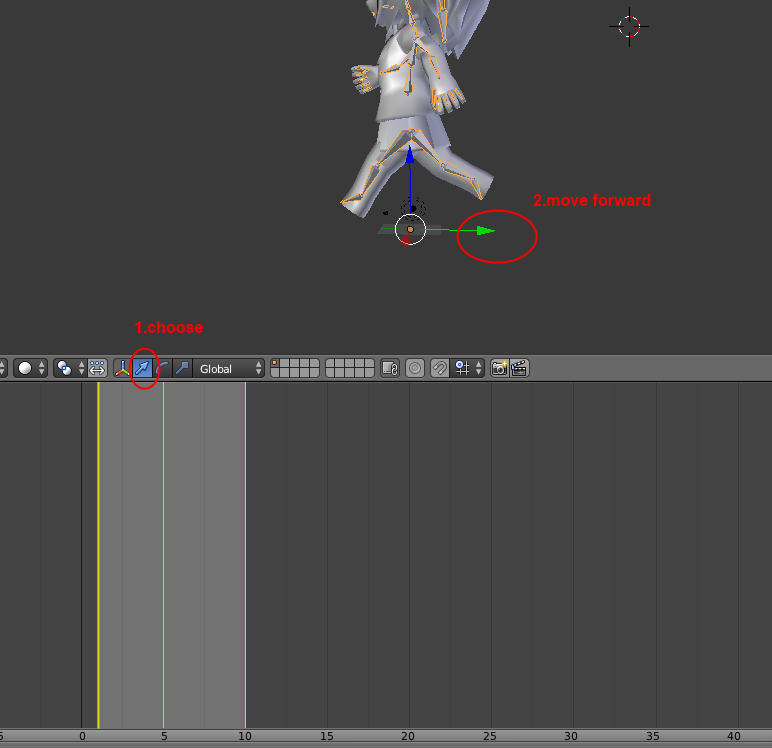

moveanswer.png (60.0 kB)
Comment
Add comment · Share
10 |3000 characters needed characters left characters exceeded
▼
  • Viewable by all users
  • Viewable by moderators
  • Viewable by moderators and the original poster
  • Advanced visibility
Viewable by all users
avatar image
1

Answer by DSOrnstein · Sep 10, 2014 at 06:12 AM

I just discovered how to do this. I was having the same problem, and I couldn't find the answer on google. So this is how I did it:

  1. Go into Object mode, select the armature(Object) and animate it on your walk cycle action.

  2. Export to unity in fbx format.

  3. Then select your character asset, on the inspector(Importer), choose Animations:

  4. Choose your walk cycle clip.

  5. Scroll down, and on the Root Transform Positon(Y), check Bake Into Pose, and choose Root Node Position.

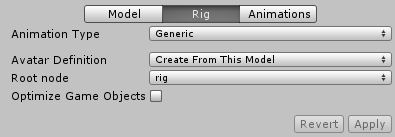
  6. Now choose the Rig option

    Now on the Root Node option choose the bone or object where the movement is coming from. In my case, I moved the armature as and Object, so I chose rig(Name of my armature).

    I hope this helps other people with the same problem.

Comment
Add comment · Share
10 |3000 characters needed characters left characters exceeded
▼
  • Viewable by all users
  • Viewable by moderators
  • Viewable by moderators and the original poster
  • Advanced visibility
Viewable by all users
avatar image
0

Answer by RyanPaterson · Jan 19, 2014 at 10:11 AM

Like getyour411 said, you need to move the object yourself. In blender you animate the object walking in the same spot, and then in unity you move it. You could also (say if it was for a cinematic scene) move it yourself in the animation panel. Check out this tutorial for the very basics- http://www.youtube.com/watch?v=KWC6Pw63BAY

But the best way is by code. E.g. // animation.play("walk"); and put that where your movement is.

Comment
Add comment · Show 1 · Share
10 |3000 characters needed characters left characters exceeded
▼
  • Viewable by all users
  • Viewable by moderators
  • Viewable by moderators and the original poster
  • Advanced visibility
Viewable by all users
avatar image cliffen_allen · Jan 19, 2014 at 11:00 AM 0
Share

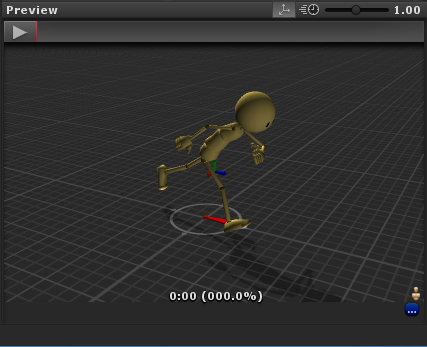
thank you for the replies.. i quite understand what you mean by using script to move my character forward in the game scene.. but what i mean is when i played my animation on preview window it stay in place, i've seen an animation that moves forward when it played on preview window..

here is an image of my animation on preview windows.. can i make it move forward according to the footsteps?
alt text

preview.png (91.6 kB)

Your answer

Hint: You can notify a user about this post by typing @username

Up to 2 attachments (including images) can be used with a maximum of 524.3 kB each and 1.0 MB total.

Follow this Question

Answers Answers and Comments

22 People are following this question.

avatar image avatar image avatar image avatar image avatar image avatar image avatar image avatar image avatar image avatar image avatar image avatar image avatar image avatar image avatar image avatar image avatar image avatar image avatar image avatar image avatar image avatar image

Related Questions

Problems with an animation 0 Answers

My model is moving during animation but it should not be 1 Answer

Blender, Maya animations 2 Answers

How can I get a blender FBX file's animations working in Unity? 0 Answers

Blender animation 1 Answer


Enterprise
Social Q&A

Social
Subscribe on YouTube social-youtube Follow on LinkedIn social-linkedin Follow on Twitter social-twitter Follow on Facebook social-facebook Follow on Instagram social-instagram

Footer

  • Purchase
    • Products
    • Subscription
    • Asset Store
    • Unity Gear
    • Resellers
  • Education
    • Students
    • Educators
    • Certification
    • Learn
    • Center of Excellence
  • Download
    • Unity
    • Beta Program
  • Unity Labs
    • Labs
    • Publications
  • Resources
    • Learn platform
    • Community
    • Documentation
    • Unity QA
    • FAQ
    • Services Status
    • Connect
  • About Unity
    • About Us
    • Blog
    • Events
    • Careers
    • Contact
    • Press
    • Partners
    • Affiliates
    • Security
Copyright © 2020 Unity Technologies
  • Legal
  • Privacy Policy
  • Cookies
  • Do Not Sell My Personal Information
  • Cookies Settings
"Unity", Unity logos, and other Unity trademarks are trademarks or registered trademarks of Unity Technologies or its affiliates in the U.S. and elsewhere (more info here). Other names or brands are trademarks of their respective owners.
  • Anonymous
  • Sign in
  • Create
  • Ask a question
  • Spaces
  • Default
  • Help Room
  • META
  • Moderators
  • Explore
  • Topics
  • Questions
  • Users
  • Badges