
Wayback Machinekoobas.hobune.stream
May JUN Jul
Previous capture 13 Next capture
2021 2022 2023
1 capture
13 Jun 22 - 13 Jun 22
sparklines
Close Help
  • Products
  • Solutions
  • Made with Unity
  • Learning
  • Support & Services
  • Community
  • Asset Store
  • Get Unity

UNITY ACCOUNT

You need a Unity Account to shop in the Online and Asset Stores, participate in the Unity Community and manage your license portfolio. Login Create account
  • Blog
  • Forums
  • Answers
  • Evangelists
  • User Groups
  • Beta Program
  • Advisory Panel

Navigation

  • Home
  • Products
  • Solutions
  • Made with Unity
  • Learning
  • Support & Services
  • Community
    • Blog
    • Forums
    • Answers
    • Evangelists
    • User Groups
    • Beta Program
    • Advisory Panel

Unity account

You need a Unity Account to shop in the Online and Asset Stores, participate in the Unity Community and manage your license portfolio. Login Create account

Language

  • Chinese
  • Spanish
  • Japanese
  • Korean
  • Portuguese
  • Ask a question
  • Spaces
    • Default
    • Help Room
    • META
    • Moderators
    • Topics
    • Questions
    • Users
    • Badges
  • Home /
avatar image
0
Question by write_edit_rpt · Feb 15, 2014 at 09:26 PM · textureimportmaya

Importing Maya model and textures, think I am missing something.

So I wanted to try to make my own simple game after going through one of the tutorials, A couple simple models with simple textures and a simple premise in the game.

My issue right now is that I am having trouble getting everything I want from Maya into Unity. Textures never show up, I just get the blank model. I've tried painting in Maya, creating a uv network with photoshop, and adding textures I found in google. None show up. I have tried importing into Unity with FBX file and the Maya mb file. I've added files manually as well after it doesn't work and nothing still. Not sure what I am doing wrong.

Comment
Add comment · Show 3
10 |3000 characters needed characters left characters exceeded
▼
  • Viewable by all users
  • Viewable by moderators
  • Viewable by moderators and the original poster
  • Advanced visibility
Viewable by all users
avatar image getyour411 · Feb 15, 2014 at 09:27 PM 0
Share

This reads more like a 'Post @ $$anonymous$$aya Support/FAQ Forum' but generally your comment about a 'uv network from photoshop' sounded a little weird. Do you have a UV map in $$anonymous$$aya directly?

avatar image write_edit_rpt · Feb 15, 2014 at 10:24 PM 0
Share

Sorry, I was afraid the question might not be specific enough, but wasn't really sure where to ask. The UV network let's you open up the UVs as a PSD in photoshop so you can paint and such then update to lay the texture onto the model in $$anonymous$$aya

avatar image getyour411 · Feb 15, 2014 at 10:36 PM 0
Share

Good, I don't use $$anonymous$$aya so don't know - to confirm then, you have a proper UV map in $$anonymous$$aya mapped to your mesh, yes? When you import your model in Unity, it might be applying a default material/shader with no texture selected. Look at the material slot. For the shader, there's a little box on that says "Select" and if you click it, you should be able to select your UV map. I attached a sample screenshot.
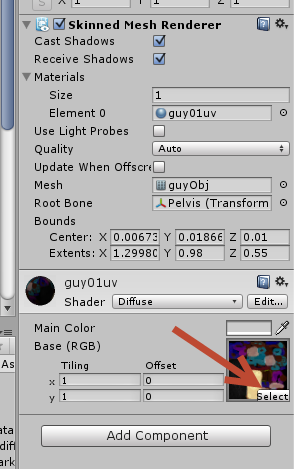
alt text

ua01.png (42.9 kB)

0 Replies

· Add your reply
  • Sort: 

Your answer

Hint: You can notify a user about this post by typing @username

Up to 2 attachments (including images) can be used with a maximum of 524.3 kB each and 1.0 MB total.

Follow this Question

Answers Answers and Comments

18 People are following this question.

avatar image avatar image avatar image avatar image avatar image avatar image avatar image avatar image avatar image avatar image avatar image avatar image avatar image avatar image avatar image avatar image avatar image avatar image

Related Questions

Importing from maya, textures gone 7 Answers

Texture on the wrong side of my objects 2 Answers

Importing textures from 3DS Max 3 Answers

Assigning UV Map to model at runtime 0 Answers

Importing with textures from Blender 2 Answers


Enterprise
Social Q&A

Social
Subscribe on YouTube social-youtube Follow on LinkedIn social-linkedin Follow on Twitter social-twitter Follow on Facebook social-facebook Follow on Instagram social-instagram

Footer

  • Purchase
    • Products
    • Subscription
    • Asset Store
    • Unity Gear
    • Resellers
  • Education
    • Students
    • Educators
    • Certification
    • Learn
    • Center of Excellence
  • Download
    • Unity
    • Beta Program
  • Unity Labs
    • Labs
    • Publications
  • Resources
    • Learn platform
    • Community
    • Documentation
    • Unity QA
    • FAQ
    • Services Status
    • Connect
  • About Unity
    • About Us
    • Blog
    • Events
    • Careers
    • Contact
    • Press
    • Partners
    • Affiliates
    • Security
Copyright © 2020 Unity Technologies
  • Legal
  • Privacy Policy
  • Cookies
  • Do Not Sell My Personal Information
  • Cookies Settings
"Unity", Unity logos, and other Unity trademarks are trademarks or registered trademarks of Unity Technologies or its affiliates in the U.S. and elsewhere (more info here). Other names or brands are trademarks of their respective owners.
  • Anonymous
  • Sign in
  • Create
  • Ask a question
  • Spaces
  • Default
  • Help Room
  • META
  • Moderators
  • Explore
  • Topics
  • Questions
  • Users
  • Badges
