 koobas.hobune.stream


Bullets, raycasts, and obstacles
Okay, so everyone knows you need to raycast from your crosshair on-screen to see where bullets will hit, and aim your gun accordingly. If you always aim at infinity then your aim's (almost) always off.
That's cool, and I'm pretty sure it'd always work if your gun shot right from the centre of the screen. Say you can have guns anywhere though; then how do you handle obstacles that the raycast doesn't see, but the bullet does?
Illustration:


Above, the raycast hits the hill, and the gun aims correctly. The crosshairs are lined up.
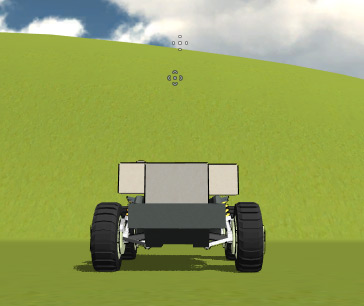
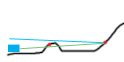
Uh oh, here I aimed up a little bit, which caused the gun to aim down, which is pretty counter-intuitive for the player. The crosshair is now aiming at infinity (or a farther hill, in the diagram). The gun aims correctly at the hit point, but it's actually hitting the closer hill, and it's actually aiming lower down than before.
Maybe I need to raycast from the gun instead of from the centre of the screen, somehow passing "through" the crosshair...? What I ultimately need is that the two crosshairs always line up, which would mean intentionally aiming "too high" in the second case.
All I can find is newbie questions about raycasting. The Unity Bootcamp demo has the same issue; it's just way less noticeable because the gun fires from almost the centre of the screen. If anyone could impart their knowledge or point me to some information on the subject, I'd really appreciate it.
Update: I've considered this some more and talked to a few people and I'm pretty sure it's not solvable. Take example 2, the gun is aimed too low to pass through the crosshair visually. Say I manually move it up to meet the crosshair height, it'll be shooting at infinity too, and it'll jump to being too high. There's no magic middleground.
However, sparkzbarca's suggestion of moving the gun instead of the crosshair should work as an alternative. The other option would be making the gun always aim at infinity. That'll remove the negative jump in position, but of course now your aim will be off except when looking at infinity.

You mention guns anywhere, but is there always only one gun or is this cute little rover one of several units?
In the case of the former, I'd recommend casting solely from the rover. If it's not the case then the behavior is fine, there is a precedent for it in games as old as time, and I'd say it would be acceptable to the player. The trick would then be to position the units so that their line of fire corresponds with the cameras.

Thanks for the reply. The payer builds their vehicle from parts, so the guns can be various and anywhere unfortunately! (the game: http://forum.unity3d.com/threads/161708-Scraps) But I know where the weapons are - I can cast a ray from them separately.
I'm not sure that really makes sense though. Like, say I cast a ray from the gun to the crosshair. Where "is" the crosshair in that case? If it's still considered to be at the point "behind" it on-screen, the raycast will hit the closer hill but the aim will still be eaxctly the same; that is, too low. I think?
I think you have it right. So I imagine the crosshairs will be at the cursor (or center of screen). If separate units are moving around in the world then they can't all be expected to have a clear vantage of the target point.
In RTS games, for example, units move around until they can get a shot. Again, in my view, the trick is to get the units to position themselves to that they have a clear angle. The gameplay, in this sense, will be controlling the positioning of the units optimally.
But maybe I'm way off...that's why I'm just commenting ins$$anonymous$$d of answering. Your game looks very cool though; can't wait to check it out!
In another example, third person shooters, the player character whose not in the same position as the camera, frequently shoots pillars and boxes and whatnot. It's just the way it it.
Yeah, I just added to the original post, I checked out what the Unity Bootcamp does and it has the same issue. However, it's almost imperceptible because the player's gun is near the centre of the screen. If you move the gun down, it becomes way more noticeable. Obviously one solution is to always have your gun fire from the centre of the screen, which is what FPS's do.
$$anonymous$$aybe the current behaviour is "right" (certainly I agree that heaps of games do it) but I still feel it could be better.

EDITED TO INCLUDE ANOTHER OPTION
raycast from the inside of the gun barrel to the tip.
that will give you what the gun is aiming at. to draw the cross hair its drawn on screen at the x and y co-ordinates of the raycasthit.point
Now as it regards how to change what the gun is aiming at.
Dont aim at the crosshair.
monitor the mouse input and use the change in the mouse to change the angle of attack on the gun.
have 2 pivot points on the gun. The X axis and the Y axis pivot points. rotate on those pivot points along those axes and you'll create a gun that works like people think it should because it works like a real gun does.
It will also have crosshairs that always point at what your aiming at.
SECOND METHOD
if you want to /insist on aiming at the crosshair you cast a ray from
(mousepos.x,mousepos.y,0)
to
(mouse.pos.x,mousepos.y,0) + camera.transform.forward
that gives you a flat plane its x and z may change but its 2 demensional because its height doesnt change.
you then hit something like maybe that back hill back there.
you dont aim yet.
you cast a ray from the gun barrel to the point you hit, like maybe that point on that back hill.
the thing is this ray cast wont hit that back hill point. it'll hit the front hill. you use that to get the depth basically.
if the purple ray doesnt hit the same object as the red ray does.
then the modified aim point is
(purpleRayHit.point.x,RedRayHit.y,PurpleRayHit.z)
thumbs up cause i gave you a diagram!! 
Brilliant! $$anonymous$$ove the guns and position the crosshair accordingly, ins$$anonymous$$d of moving the crosshair and positioning the guns. I agree, that would totally fix the issue.
It might have its own problems though. Like right now, some guns don't aim as fast you you can move - they have to catch up to where you're ai$$anonymous$$g. I don't think I'd be able to do that. $$anonymous$$aybe that explains why an AAA game like Battlefield: BC2 had that horrible tank ai$$anonymous$$g where you had to drag your mouse 1000 times. And if I had guns that moved at different speeds you couldn't control them at the same time.
Thanks for the idea though, it's given me a new way of thinking about it.
Actually, either way would work. If you went with spark's method it would just lend a different feel to it. And if you did to that route maybe you just don't fire the guns until they're pointing at their target. That would provide incentive to the player to use one gun over another; providing more to think about while creating their build.
In the end, I like spark's suggestion to the problem, but gameplay should trump all, and that's your call to make! :)
Second method moves the crosshair to match where the gun's ai$$anonymous$$g though right? You don't want the player to aim somewhere and then suddenly they're ai$$anonymous$$g somewhere else. I've actually realised (I think) that the crosshair ai$$anonymous$$g method is not solvable - see my Update at the bottom of the main post.
As a reply to your update, if you manually moved the aim-point to correspond to the crosshair, you'd be shooting even higher because then you'd be firing at a different point to infinity with the crosshair as an intercept.
Yeah, exactly. Thats what I tried to describe. There's simply no way to always "shoot towards the crosshair".


