 koobas.hobune.stream


Teleport player script
Hey everyone,
I need a script that when any object touches my "teleporter" they are teleported to another location. I'm using photon and the players are made on runtime. (In other words the players don't have there own gameobject, when they start the game the object is made.)
Thanks.

 var targetPosition : Vector3;

 function OnTriggerEnter( other : Collider ) {
   other.transform.position = targetPosition;
 }

Where should I attach this on to? Should I attach it onto the teleportation pad?

yeah.
don't forget to work through a worthwhile tutorial at some point.
it didn't work. I made the player collide/hit the object and nothing happened.
read about collisions, then. you need a trigger volume.
i'm being intentionally vague because this is extremely basic stuff and if I just tell you everything you'll miss out on important learningstuffs. :)
$$anonymous$$any thanks to Loius and person who answered. I understand it now :~D

If Loius' answer doesn't work for you, make sure the object you're trying to teleport has a PhotonView and a PhotonTransformView attached to it. And make sure you add the PhotonTransformView to the PhotonView's Observed Components list.
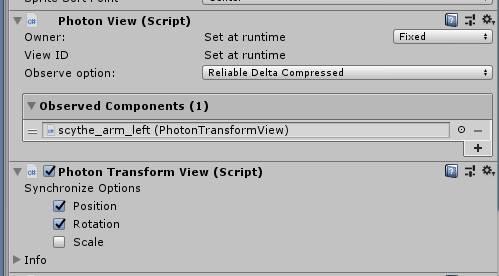
If that doesn't work, or you also have to sync your Rigidbody2D, you can add a PhotonRigidbody2DView to your object in the same way. 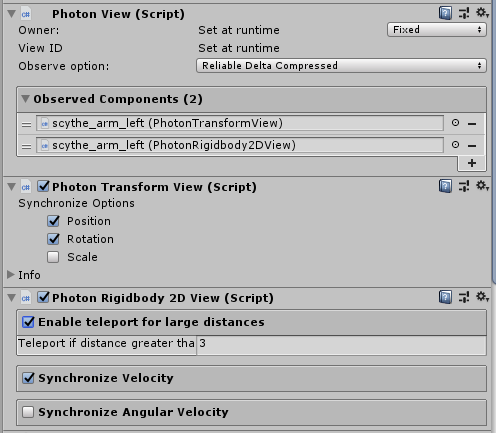
If it still doesn't work, try replacing gameObject.transform.position = targetPosition; with a call to teleportObject():
 IEnumerator teleportObject(GameObject go, Vector3 newPosition)
 {
     Rigidbody2D rb2d = go.GetComponent<Rigidbody2D>();
     rb2d.isKinematic = true;
     while (go.transform.position != newPosition)
     {
         go.transform.position = newPosition;
         yield return null;
     }
     rb2d.isKinematic = false;
     yield return null;
 }
You can call this method with:
StartCoroutine(teleportObject(gameObject, targetPosition);
You might also be able to get away with just setting Rigidbody2D.isKinematic = true; before setting the position and then just setting it back with Rigidbody2D.isKinematic = false; at the end, but I haven't tested it.




