
Wayback Machinekoobas.hobune.stream
May JUN Jul
Previous capture 13 Next capture
2021 2022 2023
1 capture
13 Jun 22 - 13 Jun 22
sparklines
Close Help
  • Products
  • Solutions
  • Made with Unity
  • Learning
  • Support & Services
  • Community
  • Asset Store
  • Get Unity

UNITY ACCOUNT

You need a Unity Account to shop in the Online and Asset Stores, participate in the Unity Community and manage your license portfolio. Login Create account
  • Blog
  • Forums
  • Answers
  • Evangelists
  • User Groups
  • Beta Program
  • Advisory Panel

Navigation

  • Home
  • Products
  • Solutions
  • Made with Unity
  • Learning
  • Support & Services
  • Community
    • Blog
    • Forums
    • Answers
    • Evangelists
    • User Groups
    • Beta Program
    • Advisory Panel

Unity account

You need a Unity Account to shop in the Online and Asset Stores, participate in the Unity Community and manage your license portfolio. Login Create account

Language

  • Chinese
  • Spanish
  • Japanese
  • Korean
  • Portuguese
  • Ask a question
  • Spaces
    • Default
    • Help Room
    • META
    • Moderators
    • Topics
    • Questions
    • Users
    • Badges
  • Home /
avatar image
1
Question by PhosHilaron · Jul 11, 2014 at 07:13 AM · materialshadersmaterialsself-illumination

Self-Illumination only works across the whole object

Hello Unity users!

I'm in a bit of a bind and was wondering if you all could help.

I'm working on a crate object below: alt text
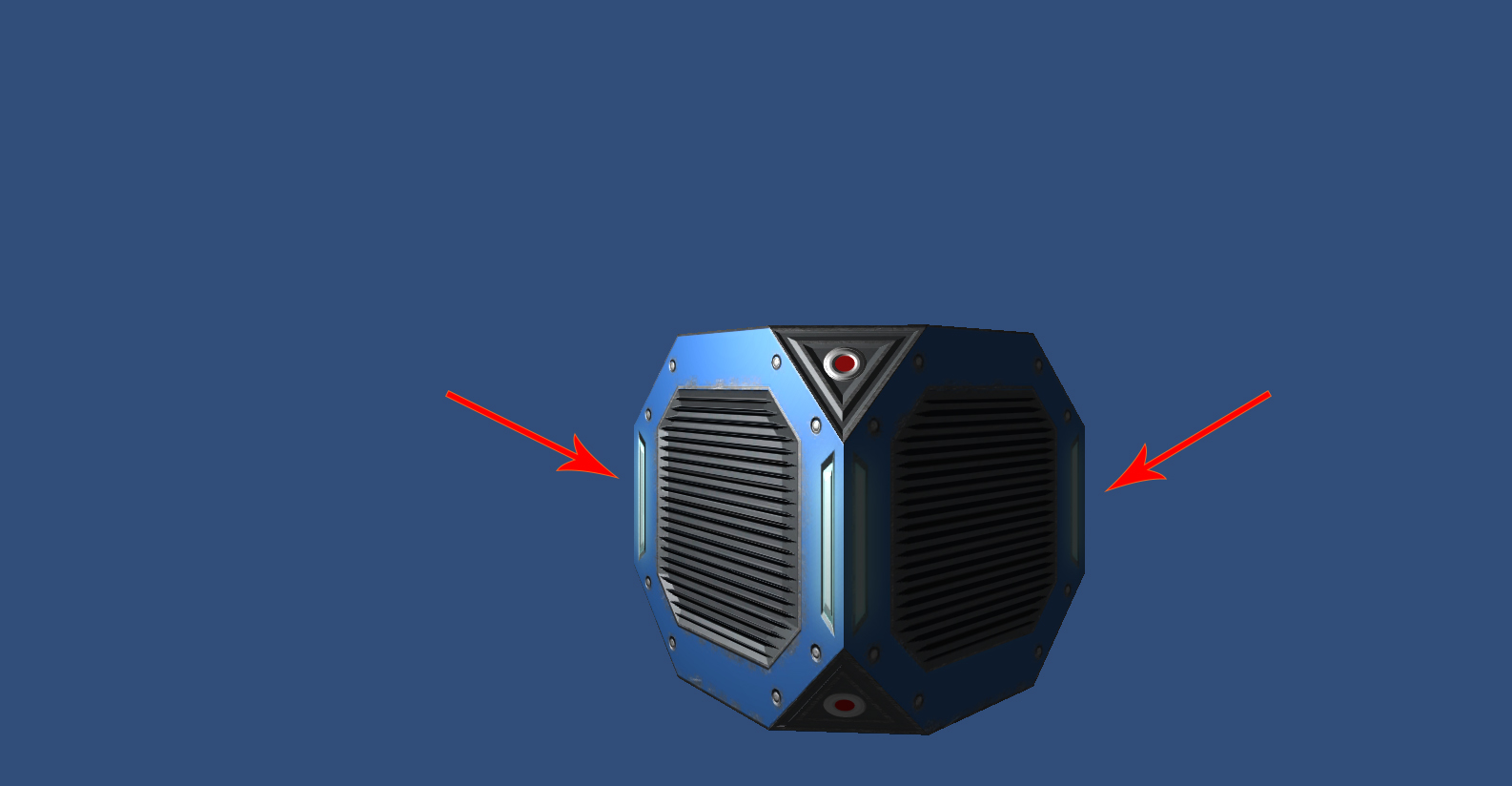
When I use a bump specular shader, everything works fine. But I have these lights on the crate that I would like to be self-illuminated. The red arrows point to them. As part of the material I used photoshop to make a self-illumination texture using a black-white map where white is the lights and black is everything else. I applied this map to the alpha channel. But when I apply this to a self-illum bump specular shader and attach it to the crate, this is what I get: alt text
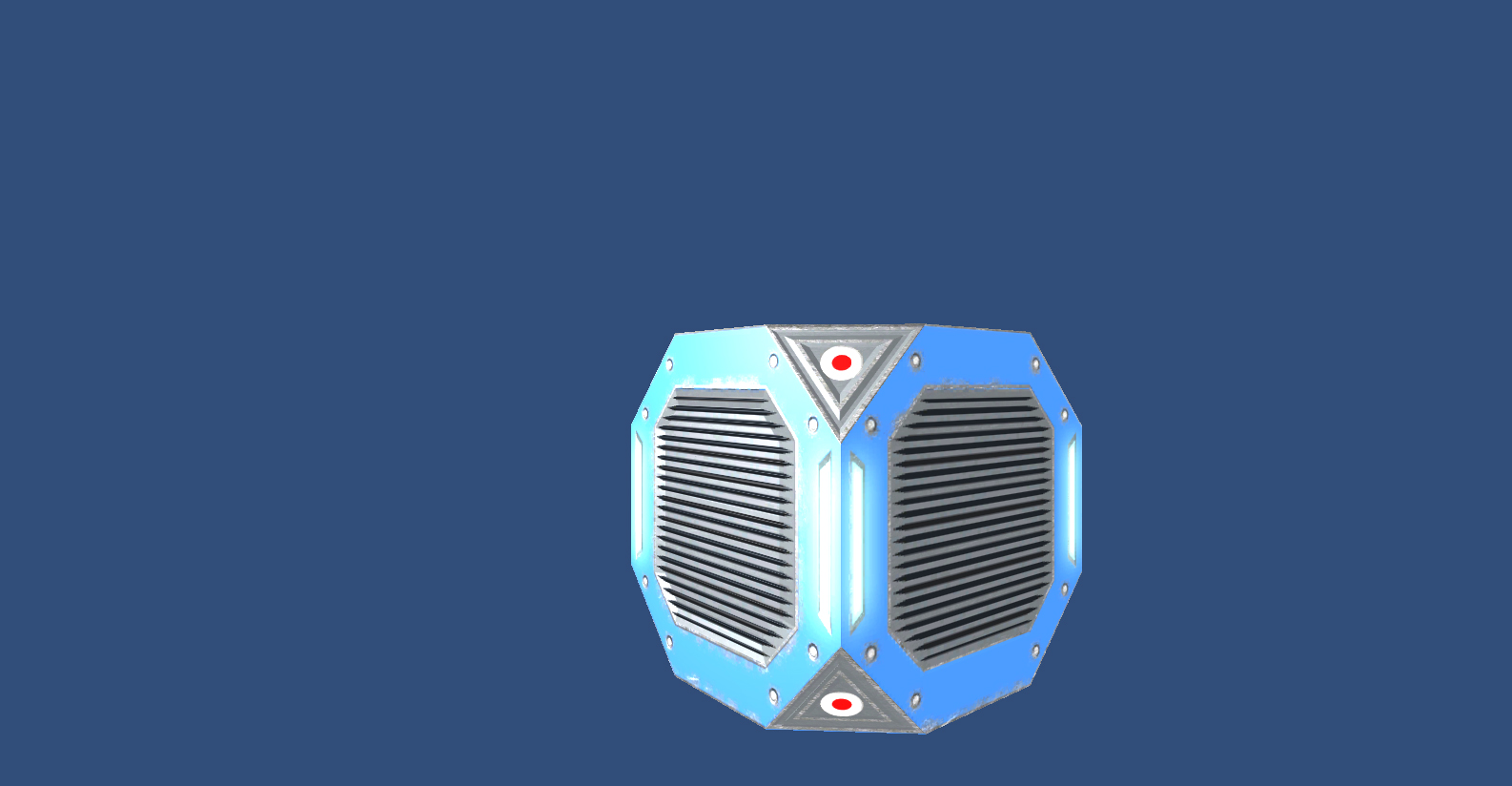
As you can see, the whole crate is illuminating.

I've tried attaching the illumination map to the diffuse, the normal, and even its own map as the alpha channel in Photoshop, but nothing works. I'm using deffered lighting in the images above but I also tried forward rendering but it was the same. I am also using Unity Pro if that has anything to do with it.

Any thoughts? I could really use some help.

Thanks!

Dwayne / Phos

crate no illum.jpg (172.6 kB)
crate with illum.jpg (208.5 kB)
Comment
Add comment · Show 2
10 |3000 characters needed characters left characters exceeded
▼
  • Viewable by all users
  • Viewable by moderators
  • Viewable by moderators and the original poster
  • Advanced visibility
Viewable by all users
avatar image Tehnique · Jul 11, 2014 at 07:29 AM 0
Share

It could be that your lights are too bright and illu$$anonymous$$ate the whole thing, starting from the light areas.

If you placed the illu$$anonymous$$ation map in the bump texture's alpha channel, it should work as expected. You could try to tweak the colors a little, so you get less intense lights, and see if they still illu$$anonymous$$ate the entire object.

avatar image PhosHilaron · Jul 12, 2014 at 07:41 PM 0
Share

Thanks for the thoughts, Technique. To respond to your first thought, the crate is self-illu$$anonymous$$ated even in no light (with default lighting turned off). Second, when you say bump, you mean normal map right? I will try tweaking the colors, though. Thanks!

1 Reply

· Add your reply
  • Sort: 
avatar image
0

Answer by Girish006 · Nov 14, 2014 at 07:33 AM

How u have created the illumination map?

The areas which has to be self illuminated should be in white color and the rest should be transparent.

Comment
Add comment · Show 2 · Share
10 |3000 characters needed characters left characters exceeded
▼
  • Viewable by all users
  • Viewable by moderators
  • Viewable by moderators and the original poster
  • Advanced visibility
Viewable by all users
avatar image Serinx · Nov 19, 2014 at 12:19 AM 0
Share

He did note that he was using white and black, not white and transparent. Could that be the problem?

avatar image PhosHilaron · Nov 19, 2014 at 04:52 PM 0
Share

OH $$anonymous$$Y GOSH THAT WOR$$anonymous$$ED!!! It looks perfect now! Thank you so much! Yeah, I was using white and black but when I got rid of the black and reapplied the texture it works perfectly! Thank you thank you thank you!

Your answer

Hint: You can notify a user about this post by typing @username

Up to 2 attachments (including images) can be used with a maximum of 524.3 kB each and 1.0 MB total.

Follow this Question

Answers Answers and Comments

4 People are following this question.

avatar image avatar image avatar image avatar image

Related Questions

Alpha texture overlaying opaque texture, both with colors? 0 Answers

UGUI button gray shader 1 Answer

Is this the correct way? 1 Answer

How to apply a color to the second texture in this shader? 1 Answer

Accidentally assigned shader to default sprite material, how to revert it back to Sprites/Default? 0 Answers


Enterprise
Social Q&A

Social
Subscribe on YouTube social-youtube Follow on LinkedIn social-linkedin Follow on Twitter social-twitter Follow on Facebook social-facebook Follow on Instagram social-instagram

Footer

  • Purchase
    • Products
    • Subscription
    • Asset Store
    • Unity Gear
    • Resellers
  • Education
    • Students
    • Educators
    • Certification
    • Learn
    • Center of Excellence
  • Download
    • Unity
    • Beta Program
  • Unity Labs
    • Labs
    • Publications
  • Resources
    • Learn platform
    • Community
    • Documentation
    • Unity QA
    • FAQ
    • Services Status
    • Connect
  • About Unity
    • About Us
    • Blog
    • Events
    • Careers
    • Contact
    • Press
    • Partners
    • Affiliates
    • Security
Copyright © 2020 Unity Technologies
  • Legal
  • Privacy Policy
  • Cookies
  • Do Not Sell My Personal Information
  • Cookies Settings
"Unity", Unity logos, and other Unity trademarks are trademarks or registered trademarks of Unity Technologies or its affiliates in the U.S. and elsewhere (more info here). Other names or brands are trademarks of their respective owners.
  • Anonymous
  • Sign in
  • Create
  • Ask a question
  • Spaces
  • Default
  • Help Room
  • META
  • Moderators
  • Explore
  • Topics
  • Questions
  • Users
  • Badges
