
Wayback Machinekoobas.hobune.stream
May JUN Jul
Previous capture 13 Next capture
2021 2022 2023
1 capture
13 Jun 22 - 13 Jun 22
sparklines
Close Help
  • Products
  • Solutions
  • Made with Unity
  • Learning
  • Support & Services
  • Community
  • Asset Store
  • Get Unity

UNITY ACCOUNT

You need a Unity Account to shop in the Online and Asset Stores, participate in the Unity Community and manage your license portfolio. Login Create account
  • Blog
  • Forums
  • Answers
  • Evangelists
  • User Groups
  • Beta Program
  • Advisory Panel

Navigation

  • Home
  • Products
  • Solutions
  • Made with Unity
  • Learning
  • Support & Services
  • Community
    • Blog
    • Forums
    • Answers
    • Evangelists
    • User Groups
    • Beta Program
    • Advisory Panel

Unity account

You need a Unity Account to shop in the Online and Asset Stores, participate in the Unity Community and manage your license portfolio. Login Create account

Language

  • Chinese
  • Spanish
  • Japanese
  • Korean
  • Portuguese
  • Ask a question
  • Spaces
    • Default
    • Help Room
    • META
    • Moderators
    • Topics
    • Questions
    • Users
    • Badges
  • Home /
avatar image
0
Question by MithosAnnar · Jul 15, 2012 at 10:10 AM · textureterraincolorspaint

Dull Colors On Terrain

Hello again, I ditched any idea of tessellation in unity 3. Instead I'm using a height map on a terrain. When I put a texture on it I get this:
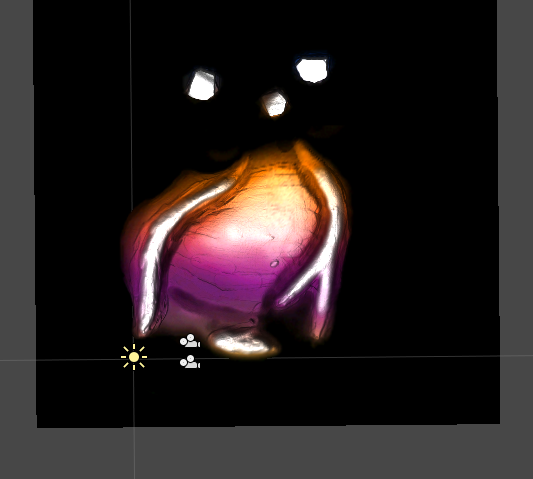
alt text

But I want it to look like my original, here:
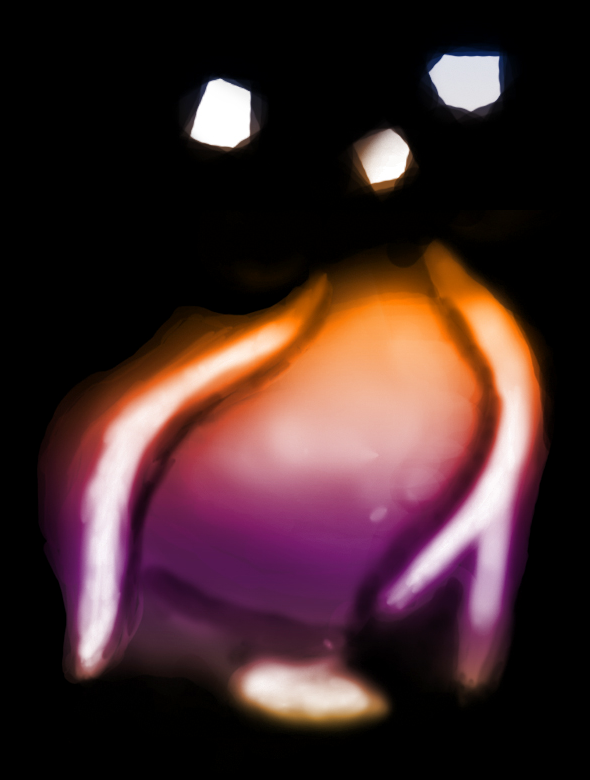
alt text

What I'm doing currently is this:

  1. Export a height map, made in Vue 10 Xtsream . (1024 x 1024)

  2. Touch It up In Photoshop CS4 extended. (1024 x 1024)

  3. Import that into unity 3.1.0. (Terrain: width 1024, height 50, length 1024)

  4. Bring the height map back into photoshop CS4 extended, and paint it. (1024 x 1024)

  5. Import the painted height map back into unity 3.1.0, and set it to the terrains main texture.

  6. Dull Colors ! ! ! !

Iv'e looked on the internet, but no seems to have even done it this way.

Thank you for reading this post. <- I hear-by assign you the task of answering it! (correctly)

Cheers!

Mithos

islandheightmap.jpg (398.0 kB)
screen shot 2012-07-15 at 12.28.46 pm.png (105.1 kB)
Comment
Add comment
10 |3000 characters needed characters left characters exceeded
▼
  • Viewable by all users
  • Viewable by moderators
  • Viewable by moderators and the original poster
  • Advanced visibility
Viewable by all users

1 Reply

· Add your reply
  • Sort: 
avatar image
1
Best Answer

Answer by captaincrunch80 · Jul 15, 2012 at 10:31 AM

Well It will look like the original if you put in on a flat plane...

Light and shadows do their work there. You can try to set the ambient light to full white in Render settings. Remove any light source and the shadows should be gone.

If you want to use custom shaders, you will have to build the terrain model in an external tool like blender or 3dsmax. Then you can apply whatever shader you like and have more influence on the look.

By the way, OpenGL will render your stuff in RGB565 colors, no matter what texture you apply. (There are ways to change that, but not in unity afaik. And it will cost performance).

Comment
Add comment · Show 5 · Share
10 |3000 characters needed characters left characters exceeded
▼
  • Viewable by all users
  • Viewable by moderators
  • Viewable by moderators and the original poster
  • Advanced visibility
Viewable by all users
avatar image MithosAnnar · Jul 15, 2012 at 10:47 AM 0
Share

So its a lighting problem, Thank you.

Tried making it in an external program, like z brush. But unity limits you to like 6000 polygons, which for me, is no good, and inevitably made the terrain look sharp and low poly.

As you can see I get loads more definition with a height map on a terrain, which is what I wanted, even at this definition I'm only getting 3ms/frame with fantastic graphics and Sync to VBL turned on.

avatar image MithosAnnar · Jul 15, 2012 at 11:28 AM 0
Share

How do I tell my terrain not to receive shadows?

avatar image captaincrunch80 · Jul 15, 2012 at 11:38 AM 0
Share

The shadows are calculated by the shader, not received. So when you use the terrain, you are bound to the terrain shader and I can only think up a workaround.

It depends on the influence of light sources + ambient light.

You can tell a light source not to shine on a specific gameobject, by putting that gameobject in a specific layer (lets use a custom and call it NoShadow) and then deactivate that layer on the light's Culling $$anonymous$$ask.

To see the terrain after that you will have to set Ambient Light to full white (Edit->RenderSettings->AmbientLight).

I just tested that and it does look quite dark, maybe the terrain shader does not use the full ambient light.

But why a height map if you do not use shadows? The depth and 3D effect will be totally lost.

avatar image MithosAnnar · Jul 15, 2012 at 12:11 PM 0
Share

@captaincrunch80, Thanks a thousand times! ++

avatar image captaincrunch80 · Jul 15, 2012 at 12:16 PM 0
Share

No problem, I hope it helped!

Your answer

Hint: You can notify a user about this post by typing @username

Up to 2 attachments (including images) can be used with a maximum of 524.3 kB each and 1.0 MB total.

Follow this Question

Answers Answers and Comments

5 People are following this question.

avatar image avatar image avatar image avatar image avatar image

Related Questions

Terrain Painting Script 0 Answers

2D Terrain 1 Answer

Paint terrain texture with scripting 1 Answer

How to "paint" the terrain in a script? 1 Answer

Painting on the terrain. 2 Answers


Enterprise
Social Q&A

Social
Subscribe on YouTube social-youtube Follow on LinkedIn social-linkedin Follow on Twitter social-twitter Follow on Facebook social-facebook Follow on Instagram social-instagram

Footer

  • Purchase
    • Products
    • Subscription
    • Asset Store
    • Unity Gear
    • Resellers
  • Education
    • Students
    • Educators
    • Certification
    • Learn
    • Center of Excellence
  • Download
    • Unity
    • Beta Program
  • Unity Labs
    • Labs
    • Publications
  • Resources
    • Learn platform
    • Community
    • Documentation
    • Unity QA
    • FAQ
    • Services Status
    • Connect
  • About Unity
    • About Us
    • Blog
    • Events
    • Careers
    • Contact
    • Press
    • Partners
    • Affiliates
    • Security
Copyright © 2020 Unity Technologies
  • Legal
  • Privacy Policy
  • Cookies
  • Do Not Sell My Personal Information
  • Cookies Settings
"Unity", Unity logos, and other Unity trademarks are trademarks or registered trademarks of Unity Technologies or its affiliates in the U.S. and elsewhere (more info here). Other names or brands are trademarks of their respective owners.
  • Anonymous
  • Sign in
  • Create
  • Ask a question
  • Spaces
  • Default
  • Help Room
  • META
  • Moderators
  • Explore
  • Topics
  • Questions
  • Users
  • Badges
