
Wayback Machinekoobas.hobune.stream
May JUN Jul
Previous capture 13 Next capture
2021 2022 2023
1 capture
13 Jun 22 - 13 Jun 22
sparklines
Close Help
  • Products
  • Solutions
  • Made with Unity
  • Learning
  • Support & Services
  • Community
  • Asset Store
  • Get Unity

UNITY ACCOUNT

You need a Unity Account to shop in the Online and Asset Stores, participate in the Unity Community and manage your license portfolio. Login Create account
  • Blog
  • Forums
  • Answers
  • Evangelists
  • User Groups
  • Beta Program
  • Advisory Panel

Navigation

  • Home
  • Products
  • Solutions
  • Made with Unity
  • Learning
  • Support & Services
  • Community
    • Blog
    • Forums
    • Answers
    • Evangelists
    • User Groups
    • Beta Program
    • Advisory Panel

Unity account

You need a Unity Account to shop in the Online and Asset Stores, participate in the Unity Community and manage your license portfolio. Login Create account

Language

  • Chinese
  • Spanish
  • Japanese
  • Korean
  • Portuguese
  • Ask a question
  • Spaces
    • Default
    • Help Room
    • META
    • Moderators
    • Topics
    • Questions
    • Users
    • Badges
  • Home /
avatar image
0
Question by Kazaskater · Dec 23, 2010 at 02:58 AM · colliderfpsgunwall

Gun goes through wall in a FPS

Im making a FPS, and the gun will go through walls and stuff. How do I make it like call of duty, where the gun will always be visible, no matter what?

Comment
Add comment
10 |3000 characters needed characters left characters exceeded
▼
  • Viewable by all users
  • Viewable by moderators
  • Viewable by moderators and the original poster
  • Advanced visibility
Viewable by all users

5 Replies

· Add your reply
  • Sort: 
avatar image
6
Best Answer

Answer by Eric5h5 · Dec 23, 2010 at 03:27 AM

Put the gun on a separate layer and have it be rendered by another camera, which is on top of the main camera and only renders the gun layer. See the docs (the section called "depth only").

Comment
Add comment · Show 5 · Share
10 |3000 characters needed characters left characters exceeded
▼
  • Viewable by all users
  • Viewable by moderators
  • Viewable by moderators and the original poster
  • Advanced visibility
Viewable by all users
avatar image Kazaskater · Dec 23, 2010 at 04:34 AM 0
Share

I checked out the link, but i'm still not sure what to do

avatar image HolBol · Dec 23, 2010 at 12:46 PM 0
Share

This method worked, but for some reason dropped my fps quite a bit. Why?

avatar image Eric5h5 · Dec 23, 2010 at 03:12 PM 0
Share

Define "quite a bit"...adding another camera adds some overhead, but it's quite $$anonymous$$imal.

avatar image HolBol · May 08, 2011 at 07:54 PM 0
Share

Quite a bit being 'I was at 500 fps, i'm now at 0.7 fps'.

avatar image Eric5h5 · May 09, 2011 at 12:02 AM 0
Share

Well, something is wrong but I don't know what. At a guess, make sure you're using layers correctly. You should lose maybe 1fps, if that much.

avatar image
5
Wiki

Answer by lollie009 · Oct 24, 2013 at 06:06 PM

  1. Create new camera and remove standard listener component

  2. Parent new camera to your main camera

  3. Create tag for the gun on layer 11 or another free layer (you'll see why in the next step) and then change the layer from default to the new gun layer created

  4. In the new camera's inspector option, set clear flags to depth only, culling mask to the newly created gun layer and change depth to something like 80 (higher numbers are drawn on top)

  5. go back to main camera and remove the gun from culling mask

Comment
Add comment · Show 4 · Share
10 |3000 characters needed characters left characters exceeded
▼
  • Viewable by all users
  • Viewable by moderators
  • Viewable by moderators and the original poster
  • Advanced visibility
Viewable by all users
avatar image MCGamer256 · Oct 31, 2014 at 12:11 AM 0
Share

I think what lollie009 said was a great answer, i think thats what devs that make games like call of duty do. Thank you for the answer lollie009, amazing!

avatar image TripleSmeven · May 25, 2016 at 08:39 PM 0
Share

Thanks for the help! From 2016.

avatar image crackyourspeakers · Sep 25, 2017 at 11:09 PM 0
Share

awesome, alot of people that explain this does not mention to remove the gun from culling mask on the main camera. thank you

avatar image Sahebpreet · Jul 17, 2020 at 12:07 PM 0
Share

Thanks for Help from 2020 @lollie009

avatar image
0

Answer by Justin Warner · Dec 23, 2010 at 03:59 AM

You can always put a collider on the tip of the gun... That works for me at least.

Comment
Add comment · Share
10 |3000 characters needed characters left characters exceeded
▼
  • Viewable by all users
  • Viewable by moderators
  • Viewable by moderators and the original poster
  • Advanced visibility
Viewable by all users
avatar image
0

Answer by zeuo · Dec 23, 2010 at 05:37 AM

ya the same thing happened to me. u know when u add character controller to ur player and a green capsule appears, just make sure that the gun is inside that capsule. change the radius that worked for me

Comment
Add comment · Share
10 |3000 characters needed characters left characters exceeded
▼
  • Viewable by all users
  • Viewable by moderators
  • Viewable by moderators and the original poster
  • Advanced visibility
Viewable by all users
avatar image
0

Answer by GeorgeLuther · Dec 08, 2017 at 02:46 AM

doesn't it technically still clip through the wall though? its just an optical illusion that it doesn't? my prefabs from my weapon still appear on the other side of the wall! I have colliders on my walls and my sphere(gun) and the green-wireframes are slightly larger than the objects. I have checked the physics layers and made sure they are set to recognize each other. The prefab is set to load from an empty child within the body of the sphere. alt text
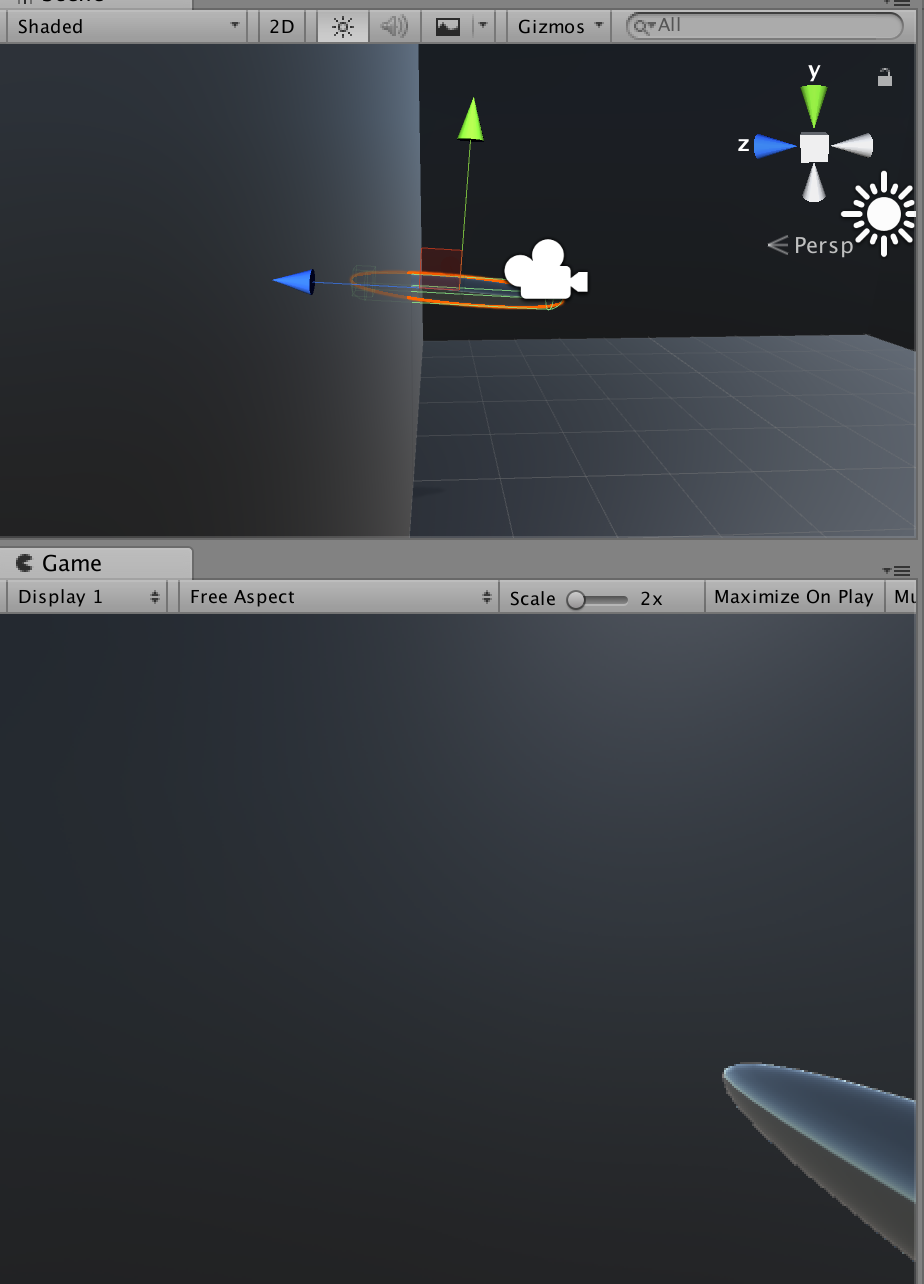

screen-shot-2017-12-07-at-94416-pm.png (326.1 kB)
Comment
Add comment · Share
10 |3000 characters needed characters left characters exceeded
▼
  • Viewable by all users
  • Viewable by moderators
  • Viewable by moderators and the original poster
  • Advanced visibility
Viewable by all users

Your answer

Hint: You can notify a user about this post by typing @username

Up to 2 attachments (including images) can be used with a maximum of 524.3 kB each and 1.0 MB total.

Follow this Question

Answers Answers and Comments

7 People are following this question.

avatar image avatar image avatar image avatar image avatar image avatar image avatar image

Related Questions

AI GameObjects Go Through Walls? 1 Answer

Help: A collider attached to the character controller of a FPS does not collide 1 Answer

Bullet Collision Issues 1 Answer

Particles not appearing on impact, muzzle flash problems? 2 Answers

Weapon random movement 0 Answers


Enterprise
Social Q&A

Social
Subscribe on YouTube social-youtube Follow on LinkedIn social-linkedin Follow on Twitter social-twitter Follow on Facebook social-facebook Follow on Instagram social-instagram

Footer

  • Purchase
    • Products
    • Subscription
    • Asset Store
    • Unity Gear
    • Resellers
  • Education
    • Students
    • Educators
    • Certification
    • Learn
    • Center of Excellence
  • Download
    • Unity
    • Beta Program
  • Unity Labs
    • Labs
    • Publications
  • Resources
    • Learn platform
    • Community
    • Documentation
    • Unity QA
    • FAQ
    • Services Status
    • Connect
  • About Unity
    • About Us
    • Blog
    • Events
    • Careers
    • Contact
    • Press
    • Partners
    • Affiliates
    • Security
Copyright © 2020 Unity Technologies
  • Legal
  • Privacy Policy
  • Cookies
  • Do Not Sell My Personal Information
  • Cookies Settings
"Unity", Unity logos, and other Unity trademarks are trademarks or registered trademarks of Unity Technologies or its affiliates in the U.S. and elsewhere (more info here). Other names or brands are trademarks of their respective owners.
  • Anonymous
  • Sign in
  • Create
  • Ask a question
  • Spaces
  • Default
  • Help Room
  • META
  • Moderators
  • Explore
  • Topics
  • Questions
  • Users
  • Badges
