
Wayback Machinekoobas.hobune.stream
May JUN Jul
Previous capture 13 Next capture
2021 2022 2023
1 capture
13 Jun 22 - 13 Jun 22
sparklines
Close Help
  • Products
  • Solutions
  • Made with Unity
  • Learning
  • Support & Services
  • Community
  • Asset Store
  • Get Unity

UNITY ACCOUNT

You need a Unity Account to shop in the Online and Asset Stores, participate in the Unity Community and manage your license portfolio. Login Create account
  • Blog
  • Forums
  • Answers
  • Evangelists
  • User Groups
  • Beta Program
  • Advisory Panel

Navigation

  • Home
  • Products
  • Solutions
  • Made with Unity
  • Learning
  • Support & Services
  • Community
    • Blog
    • Forums
    • Answers
    • Evangelists
    • User Groups
    • Beta Program
    • Advisory Panel

Unity account

You need a Unity Account to shop in the Online and Asset Stores, participate in the Unity Community and manage your license portfolio. Login Create account

Language

  • Chinese
  • Spanish
  • Japanese
  • Korean
  • Portuguese
  • Ask a question
  • Spaces
    • Default
    • Help Room
    • META
    • Moderators
    • Topics
    • Questions
    • Users
    • Badges
  • Home /
avatar image
0
Question by Euld · Apr 20, 2013 at 12:38 AM · raycastaiobstaclepatrolavoid

Keeping an raycasting AI within a patrol area

I have an AI that uses three Raycasts to detect objects in front of it, picture below for visual reference. When the Raycasts detect a collider, the AI turns to avoid it. Works great, except here's the problem. I need to "fence in" the AI with something with colliders (planes for example) but the player can't walk through anything with colliders on it. Turning the plane's colliders into OnTrigger doesn't do the trick, and I'm out of ideas.

     void CheckSurround()
     {
         Ray forwardRay = new Ray(this.transform.position + _colliderData.radius*transform.right, this.transform.forward);
         RaycastHit hitObj;
         //eventually replace the number with currentSpeed once the Ai can turn
         float distanceCheck = (currentSpeed)*predictTime;
             if (distanceCheck != 0 && Physics.Raycast(forwardRay, out hitObj, distanceCheck))
             {
                 //if there's a problem with braking, check the && hitObj.collider.CompareTag("tree") code and make sure it applies to braking
                 Brake (Vector3.Distance (this.transform.position, Vector3.MoveTowards(hitObj.point, this.transform.position,2f)/distanceCheck));
                 //Check direction
                 //Check to the right
                 Ray rightRay = new Ray (this.transform.position + transform.right, this.transform.forward + (this.transform.right * visionWidth));
                 RaycastHit rightCheck;
                 if (Physics.Raycast(rightRay,out rightCheck, distanceCheck) == false && hitObj.collider.CompareTag("tree"))
                 {
                     Turn(1f);
                     return;
                 }
                 //Check to the left
                 Ray leftRay = new Ray (this.transform.position + _colliderData.radius*-transform.right, this.transform.forward + (this.transform.right * -visionWidth));
                 RaycastHit leftCheck;
                 if (Physics.Raycast(leftRay,out leftCheck, distanceCheck) == false && hitObj.collider.CompareTag("tree"))
                 {
                     Turn(-1f);
                     return;
                 }
             
                 if (rightCheck.distance > leftCheck.distance)
                 {
                     Turn (1f);
                 }
                 else
                 {
                     Turn (-1f);
                 }
             }
             else
             {
                 Accel();
                 BrakeTurn();
             }
         }
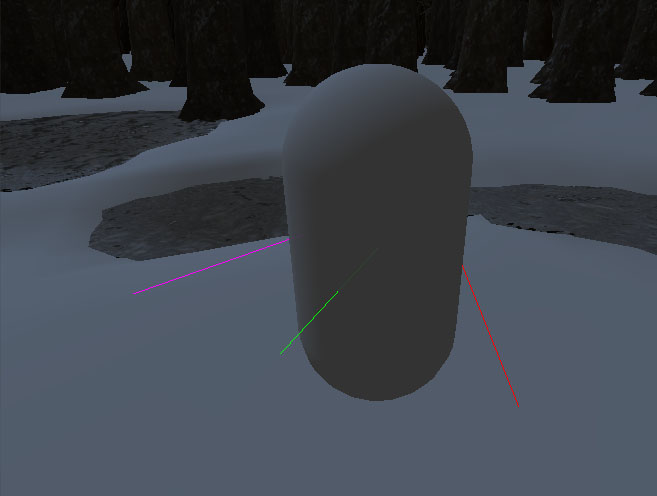
alt text

airaycast.jpg (42.8 kB)
Comment
Add comment
10 |3000 characters needed characters left characters exceeded
▼
  • Viewable by all users
  • Viewable by moderators
  • Viewable by moderators and the original poster
  • Advanced visibility
Viewable by all users

1 Reply

· Add your reply
  • Sort: 
avatar image
0

Answer by dendens2 · Apr 20, 2013 at 01:07 AM

Maybe you can try making invisible gameObjects. Then, you add them to their own layer. Finally you would use this code.

 if(hit.transform.gameObject.layer == fence)

with hit being the variable you store the Raycast information in. It should work because it does not use colliders.

Comment
Add comment · Show 1 · Share
10 |3000 characters needed characters left characters exceeded
▼
  • Viewable by all users
  • Viewable by moderators
  • Viewable by moderators and the original poster
  • Advanced visibility
Viewable by all users
avatar image dendens2 · Apr 20, 2013 at 01:11 AM 0
Share

Also you would have to declare it(fence) first.

 //This is in JavaScript BTW, should be pretty similar in C#
 
 //Variable
 var fence;
 
 //Start()
 
 fence = Layer$$anonymous$$ask.NameToLayer("fence");

Your answer

Hint: You can notify a user about this post by typing @username

Up to 2 attachments (including images) can be used with a maximum of 524.3 kB each and 1.0 MB total.

Follow this Question

Answers Answers and Comments

12 People are following this question.

avatar image avatar image avatar image avatar image avatar image avatar image avatar image avatar image avatar image avatar image avatar image avatar image

Related Questions

Can't figure out how to make my raycast obstacle avoidance less jittery 3 Answers

Problems with raycast obstacle avoidance 1 Answer

Raycast Steering Problem 1 Answer

AI Object Avoidance help 0 Answers

AI create path, help. 1 Answer


Enterprise
Social Q&A

Social
Subscribe on YouTube social-youtube Follow on LinkedIn social-linkedin Follow on Twitter social-twitter Follow on Facebook social-facebook Follow on Instagram social-instagram

Footer

  • Purchase
    • Products
    • Subscription
    • Asset Store
    • Unity Gear
    • Resellers
  • Education
    • Students
    • Educators
    • Certification
    • Learn
    • Center of Excellence
  • Download
    • Unity
    • Beta Program
  • Unity Labs
    • Labs
    • Publications
  • Resources
    • Learn platform
    • Community
    • Documentation
    • Unity QA
    • FAQ
    • Services Status
    • Connect
  • About Unity
    • About Us
    • Blog
    • Events
    • Careers
    • Contact
    • Press
    • Partners
    • Affiliates
    • Security
Copyright © 2020 Unity Technologies
  • Legal
  • Privacy Policy
  • Cookies
  • Do Not Sell My Personal Information
  • Cookies Settings
"Unity", Unity logos, and other Unity trademarks are trademarks or registered trademarks of Unity Technologies or its affiliates in the U.S. and elsewhere (more info here). Other names or brands are trademarks of their respective owners.
  • Anonymous
  • Sign in
  • Create
  • Ask a question
  • Spaces
  • Default
  • Help Room
  • META
  • Moderators
  • Explore
  • Topics
  • Questions
  • Users
  • Badges
