
Wayback Machinekoobas.hobune.stream
May JUN Jul
Previous capture 13 Next capture
2021 2022 2023
1 capture
13 Jun 22 - 13 Jun 22
sparklines
Close Help
  • Products
  • Solutions
  • Made with Unity
  • Learning
  • Support & Services
  • Community
  • Asset Store
  • Get Unity

UNITY ACCOUNT

You need a Unity Account to shop in the Online and Asset Stores, participate in the Unity Community and manage your license portfolio. Login Create account
  • Blog
  • Forums
  • Answers
  • Evangelists
  • User Groups
  • Beta Program
  • Advisory Panel

Navigation

  • Home
  • Products
  • Solutions
  • Made with Unity
  • Learning
  • Support & Services
  • Community
    • Blog
    • Forums
    • Answers
    • Evangelists
    • User Groups
    • Beta Program
    • Advisory Panel

Unity account

You need a Unity Account to shop in the Online and Asset Stores, participate in the Unity Community and manage your license portfolio. Login Create account

Language

  • Chinese
  • Spanish
  • Japanese
  • Korean
  • Portuguese
  • Ask a question
  • Spaces
    • Default
    • Help Room
    • META
    • Moderators
    • Topics
    • Questions
    • Users
    • Badges
  • Home /
avatar image
0
Question by macmouse · Jun 02, 2015 at 03:06 PM · physicsrigidbodycartutorialwheelcollider

Car - WheelCollider - Why the side is getting up?

I'm programming this car tutorial here:

Car Tutorial

I'm now on the third video. My car controller script looks like this:

 #pragma strict
 
 var wheelFL : WheelCollider;
 var wheelFR : WheelCollider;
 var wheelRL : WheelCollider;
 var wheelRR : WheelCollider;
 
 var maxTorque : float  = 20;
 
 function Start () {
     rigidbody.centerOfMass.y = -0.9;
 }
 
 function FixedUpdate () {
 
     wheelRR.motorTorque = maxTorque * Input.GetAxis("Vertical");
     wheelRL.motorTorque = maxTorque * Input.GetAxis("Vertical");
     
     wheelFL.steerAngle = 10 * Input.GetAxis("Horizontal");
     wheelFR.steerAngle = 10 * Input.GetAxis("Horizontal");
 
 }

When I now drive and start turning left, the right side of the car gets up:
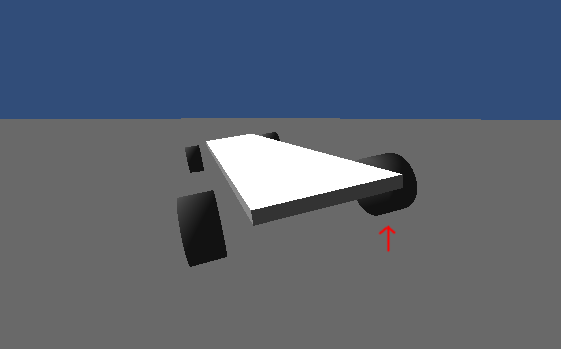
Car side gets up

I don't know why.

Comment
Add comment
10 |3000 characters needed characters left characters exceeded
▼
  • Viewable by all users
  • Viewable by moderators
  • Viewable by moderators and the original poster
  • Advanced visibility
Viewable by all users

2 Replies

· Add your reply
  • Sort: 
avatar image
0

Answer by starikcetin · Jun 02, 2015 at 03:21 PM

The weights of rigidbodies, i mean the one for body and ones for whells, have you adjusted them realistic? The whells must be much more lighter then body.

Comment
Add comment · Show 2 · Share
10 |3000 characters needed characters left characters exceeded
▼
  • Viewable by all users
  • Viewable by moderators
  • Viewable by moderators and the original poster
  • Advanced visibility
Viewable by all users
avatar image macmouse · Jun 02, 2015 at 04:10 PM 0
Share

I'm making the video tutorial. I'm now on #3. You mean, I should add Rigidbody to the tires?

avatar image starikcetin · Jun 02, 2015 at 09:08 PM 0
Share

Do they all have one rigidbody? You should assing different ones for different objects and use joints to connect them.

avatar image
0

Answer by yant · Jun 03, 2015 at 04:12 PM

Hello,

Unity 5? I'd recommend tweaking forceAppPointDistance first, which sets the point where the suspension and tyre forces are applied at (look for the little green sphere). This has already an effect of lowered centre of gravity.

Now, if you still wish to lower the centre of gravity, you must understand that you are trying to cheat physics in some sense actually as in a real world such a vehicle would really tend to roll in corners.

Another important consideration is that once you assign a custom centre of gravity to a rigidbody, you should not be modifying it (scaling, adding new colliders, etc) because setting a custom centre of gravity has an effect of marking the body as having a custom inertia tensor set and that would require you to provide the correct inertia tensor manually. Unfortunately, Unity 5 does not offer any convenient tools for computing CoM and that would require you jump though some hoops honestly. This CoM\tensor logic has been with Unity since forever, but I'd very much like to change it soon once the bug pressure settles down.

Thanks,

Anthony

Comment
Add comment · Share
10 |3000 characters needed characters left characters exceeded
▼
  • Viewable by all users
  • Viewable by moderators
  • Viewable by moderators and the original poster
  • Advanced visibility
Viewable by all users

Your answer

Hint: You can notify a user about this post by typing @username

Up to 2 attachments (including images) can be used with a maximum of 524.3 kB each and 1.0 MB total.

Follow this Question

Answers Answers and Comments

4 People are following this question.

avatar image avatar image avatar image avatar image

Related Questions

Are y-axis wheelcolliders possible? 1 Answer

Wheel Collider - Mesh/Box Collider Problem 0 Answers

need tutorials for rigidbody.Addforce 1 Answer

WheelCollider spontaneous jumping? 0 Answers

Wheelcolliders launch the car. 0 Answers


Enterprise
Social Q&A

Social
Subscribe on YouTube social-youtube Follow on LinkedIn social-linkedin Follow on Twitter social-twitter Follow on Facebook social-facebook Follow on Instagram social-instagram

Footer

  • Purchase
    • Products
    • Subscription
    • Asset Store
    • Unity Gear
    • Resellers
  • Education
    • Students
    • Educators
    • Certification
    • Learn
    • Center of Excellence
  • Download
    • Unity
    • Beta Program
  • Unity Labs
    • Labs
    • Publications
  • Resources
    • Learn platform
    • Community
    • Documentation
    • Unity QA
    • FAQ
    • Services Status
    • Connect
  • About Unity
    • About Us
    • Blog
    • Events
    • Careers
    • Contact
    • Press
    • Partners
    • Affiliates
    • Security
Copyright © 2020 Unity Technologies
  • Legal
  • Privacy Policy
  • Cookies
  • Do Not Sell My Personal Information
  • Cookies Settings
"Unity", Unity logos, and other Unity trademarks are trademarks or registered trademarks of Unity Technologies or its affiliates in the U.S. and elsewhere (more info here). Other names or brands are trademarks of their respective owners.
  • Anonymous
  • Sign in
  • Create
  • Ask a question
  • Spaces
  • Default
  • Help Room
  • META
  • Moderators
  • Explore
  • Topics
  • Questions
  • Users
  • Badges