
Wayback Machinekoobas.hobune.stream
May JUN Jul
Previous capture 12 Next capture
2021 2022 2023
1 capture
12 Jun 22 - 12 Jun 22
sparklines
Close Help
  • Products
  • Solutions
  • Made with Unity
  • Learning
  • Support & Services
  • Community
  • Asset Store
  • Get Unity

UNITY ACCOUNT

You need a Unity Account to shop in the Online and Asset Stores, participate in the Unity Community and manage your license portfolio. Login Create account
  • Blog
  • Forums
  • Answers
  • Evangelists
  • User Groups
  • Beta Program
  • Advisory Panel

Navigation

  • Home
  • Products
  • Solutions
  • Made with Unity
  • Learning
  • Support & Services
  • Community
    • Blog
    • Forums
    • Answers
    • Evangelists
    • User Groups
    • Beta Program
    • Advisory Panel

Unity account

You need a Unity Account to shop in the Online and Asset Stores, participate in the Unity Community and manage your license portfolio. Login Create account

Language

  • Chinese
  • Spanish
  • Japanese
  • Korean
  • Portuguese
  • Ask a question
  • Spaces
    • Default
    • Help Room
    • META
    • Moderators
    • Topics
    • Questions
    • Users
    • Badges
  • Home /
avatar image
1
Question by kbr0n · Sep 15, 2016 at 05:12 PM · guireflectiontogglespecular

Reflection and Specular Highlights: how to turn on/off? help pls!

hello world

what is the property to enable/disable Reflections and Specular Highlights (Standard Shader)?

_SpecularHighlights and _GlossyReflections are both "Float" but they are toggles (checkboxes) in the GUI

I want to control them via a checkbox but I don't know how, please help!

Comment
Add comment · Show 4
10 |3000 characters needed characters left characters exceeded
▼
  • Viewable by all users
  • Viewable by moderators
  • Viewable by moderators and the original poster
  • Advanced visibility
Viewable by all users
avatar image Sergio7888 · Sep 15, 2016 at 11:26 PM 0
Share

Sharder language don`t have boolean type, try set value to 0

avatar image kbr0n Sergio7888 · Sep 16, 2016 at 04:08 PM 0
Share

I tried that, nothing happens

 shapes.GetComponent<Renderer> ().material.SetFloat("_SpecularHighlights", 0);

looking at the source code of the Standard Shader I saw this:

 Shader "Standard" {
 Properties {
 ....
 [ToggleOff]  _SpecularHighlights ("Specular Highlights", Float) = 1.000000
 [ToggleOff]  _GlossyReflections ("Glossy Reflections", Float) = 1.000000
 ....
 }
 }

but I don't know how to access those properties via script...

avatar image kbr0n · Sep 16, 2016 at 04:08 PM 0
Share

I´ll try to explain it better:

I want a GUI checkbox for the user to be able to switch Specular Highlights On/Off while the project is running

this change should affect all GameObjects that use the same material

sorry, Arkins, but I don't see how your solution might work

I already managed to control other shader properties, like _Gloss$$anonymous$$apScale using:

 shapes.GetComponent<Renderer> ().material.SetFloat ("_Gloss$$anonymous$$apScale", sldfind.value);

but the same approach is not working for _SpecularHighlights or _GlossyReflections

avatar image Sergio7888 · Sep 17, 2016 at 10:26 AM 0
Share

After a analyze of the shader code, i can say Specular Highlights are a shader_feature, and can not be changed at runtime, you can create 2 different material one with it enabled and other with disable and switch the render material when you want enable or disable it.

3 Replies

· Add your reply
  • Sort: 
avatar image
4

Answer by kbr0n · Sep 21, 2016 at 12:14 PM

Finally! I manage to get this working using keywords and setfloat

like this:

to turn ON:

  shapes.GetComponent().material.DisableKeyword("_SPECULARHIGHLIGHTS_OFF");
 shapes.GetComponent().material.SetFloat("_SpecularHighlights",1f);


to turn OFF:

  shapes.GetComponent().material.EnableKeyword("_SPECULARHIGHLIGHTS_OFF");
 shapes.GetComponent().material.SetFloat("_SpecularHighlights",0f);

  • it's tricky cause there's no "_specularhighlights_on", instead you disable or enable "_specularhightlights_off"

aí @sergio7888 - tem jeito sim, fião. cc @Arkins_prod_studio

Comment
Add comment · Show 2 · Share
10 |3000 characters needed characters left characters exceeded
▼
  • Viewable by all users
  • Viewable by moderators
  • Viewable by moderators and the original poster
  • Advanced visibility
Viewable by all users
avatar image sanmn19 · Feb 17, 2017 at 06:53 AM 0
Share

Works for me! I experimented around with this and even setFloat("_SpecularHighlights, x); isn't necessary. Having just the enable and disable keyword works.

avatar image IvanStu · May 21, 2018 at 07:38 PM 0
Share

Thank you for this! This works for me as well (just enabling and disabling the keyword). This also worked with "_GLOSSYREFLECTIONS_OFF" as well, though they didn't always update properly in the inspector. (2017.3)

 thisRenderer.material.Enable$$anonymous$$eyword("_SPECULARHIGHLIGHTS_OFF");
 thisRenderer.material.Enable$$anonymous$$eyword("_GLOSSYREFLECTIONS_OFF");
avatar image
0

Answer by Arkins_prod_studio · Sep 16, 2016 at 12:39 PM

you can create a new matherial with this prefab:alt text i think it can work :)
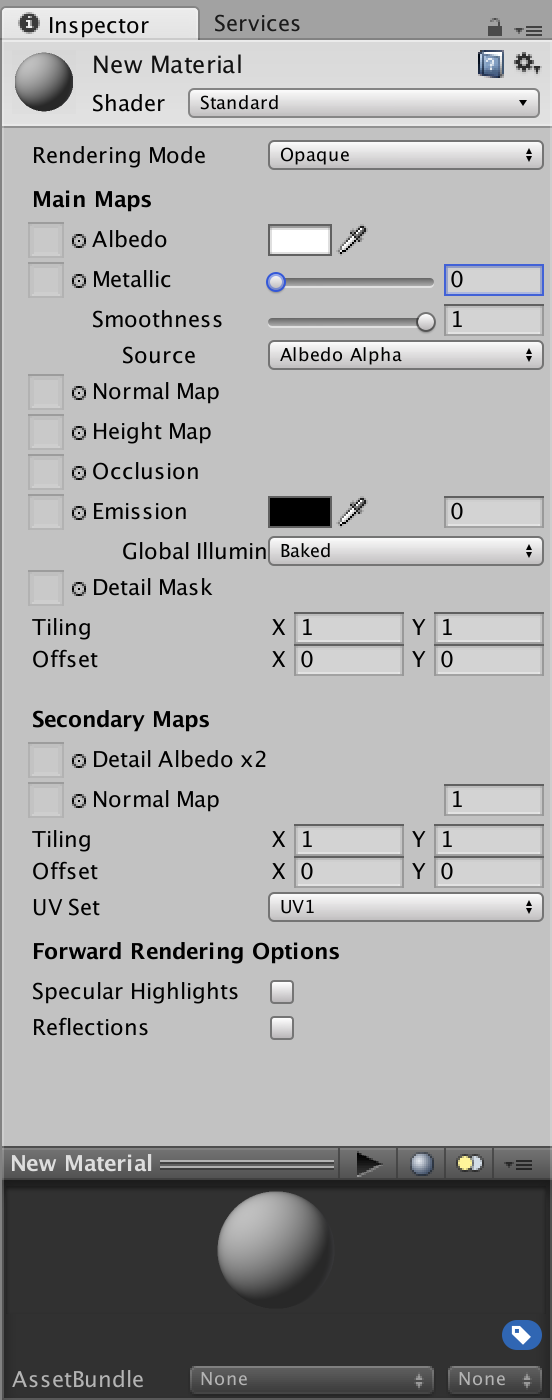

capture-decran-2016-09-15-a-231729.png (139.6 kB)
Comment
Add comment · Show 2 · Share
10 |3000 characters needed characters left characters exceeded
▼
  • Viewable by all users
  • Viewable by moderators
  • Viewable by moderators and the original poster
  • Advanced visibility
Viewable by all users
avatar image kbr0n · Sep 16, 2016 at 09:06 PM 0
Share

maybe I don't understand what you are suggesting but

user must have the ability to switch Specular Highs ON/OFF while the project is running

and I really want to know how to control those properties, so just switching materials wouldn't do the trick

avatar image Sergio7888 kbr0n · Sep 17, 2016 at 06:38 PM 0
Share

i aying its a shader_feature, shader feature are only compiled if selected, diferent from multicompile or standard shader options it cant be changed at runtime. and if you have 2 mateils with the same config, switch will resolve your problem, it can be a toggle but the property is not used in the shader code.

avatar image
0

Answer by Haze-Games · Sep 20, 2017 at 08:59 AM

Hello there, Just to say thanks for sharing as this helped me today :)

Just a quick note: Unity doesn't update the state of the checkboxes; so even after editing those keywords, it'll still show checked / unchecked checkbox states regardless of the new value of keywords. But from now on you can ignore those checkboxes if you're changing it through script.

Even after restarting the project, checkboxes are not refreshed correctly, but new keywords set are saved so all works well ;)

Thanks, Charles

Comment
Add comment · Share
10 |3000 characters needed characters left characters exceeded
▼
  • Viewable by all users
  • Viewable by moderators
  • Viewable by moderators and the original poster
  • Advanced visibility
Viewable by all users

Your answer

Hint: You can notify a user about this post by typing @username

Up to 2 attachments (including images) can be used with a maximum of 524.3 kB each and 1.0 MB total.

Follow this Question

Answers Answers and Comments

8 People are following this question.

avatar image avatar image avatar image avatar image avatar image avatar image avatar image avatar image

Related Questions

Put toggle label on left side of button and hover 1 Answer

UI Toggle Component Broken? 0 Answers

Gui Toggle help 2 Answers

Is there a way of using just basic gui.Buttons as toggles? 1 Answer

Toggle Switch 6 Answers


Enterprise
Social Q&A

Social
Subscribe on YouTube social-youtube Follow on LinkedIn social-linkedin Follow on Twitter social-twitter Follow on Facebook social-facebook Follow on Instagram social-instagram

Footer

  • Purchase
    • Products
    • Subscription
    • Asset Store
    • Unity Gear
    • Resellers
  • Education
    • Students
    • Educators
    • Certification
    • Learn
    • Center of Excellence
  • Download
    • Unity
    • Beta Program
  • Unity Labs
    • Labs
    • Publications
  • Resources
    • Learn platform
    • Community
    • Documentation
    • Unity QA
    • FAQ
    • Services Status
    • Connect
  • About Unity
    • About Us
    • Blog
    • Events
    • Careers
    • Contact
    • Press
    • Partners
    • Affiliates
    • Security
Copyright © 2020 Unity Technologies
  • Legal
  • Privacy Policy
  • Cookies
  • Do Not Sell My Personal Information
  • Cookies Settings
"Unity", Unity logos, and other Unity trademarks are trademarks or registered trademarks of Unity Technologies or its affiliates in the U.S. and elsewhere (more info here). Other names or brands are trademarks of their respective owners.
  • Anonymous
  • Sign in
  • Create
  • Ask a question
  • Spaces
  • Default
  • Help Room
  • META
  • Moderators
  • Explore
  • Topics
  • Questions
  • Users
  • Badges
