
Wayback Machinekoobas.hobune.stream
May JUN Jul
Previous capture 13 Next capture
2021 2022 2023
1 capture
13 Jun 22 - 13 Jun 22
sparklines
Close Help
  • Products
  • Solutions
  • Made with Unity
  • Learning
  • Support & Services
  • Community
  • Asset Store
  • Get Unity

UNITY ACCOUNT

You need a Unity Account to shop in the Online and Asset Stores, participate in the Unity Community and manage your license portfolio. Login Create account
  • Blog
  • Forums
  • Answers
  • Evangelists
  • User Groups
  • Beta Program
  • Advisory Panel

Navigation

  • Home
  • Products
  • Solutions
  • Made with Unity
  • Learning
  • Support & Services
  • Community
    • Blog
    • Forums
    • Answers
    • Evangelists
    • User Groups
    • Beta Program
    • Advisory Panel

Unity account

You need a Unity Account to shop in the Online and Asset Stores, participate in the Unity Community and manage your license portfolio. Login Create account

Language

  • Chinese
  • Spanish
  • Japanese
  • Korean
  • Portuguese
  • Ask a question
  • Spaces
    • Default
    • Help Room
    • META
    • Moderators
    • Topics
    • Questions
    • Users
    • Badges
  • Home /
avatar image
1
Question by aosome23 · Apr 02, 2015 at 08:34 PM · shaderpaintvoxels

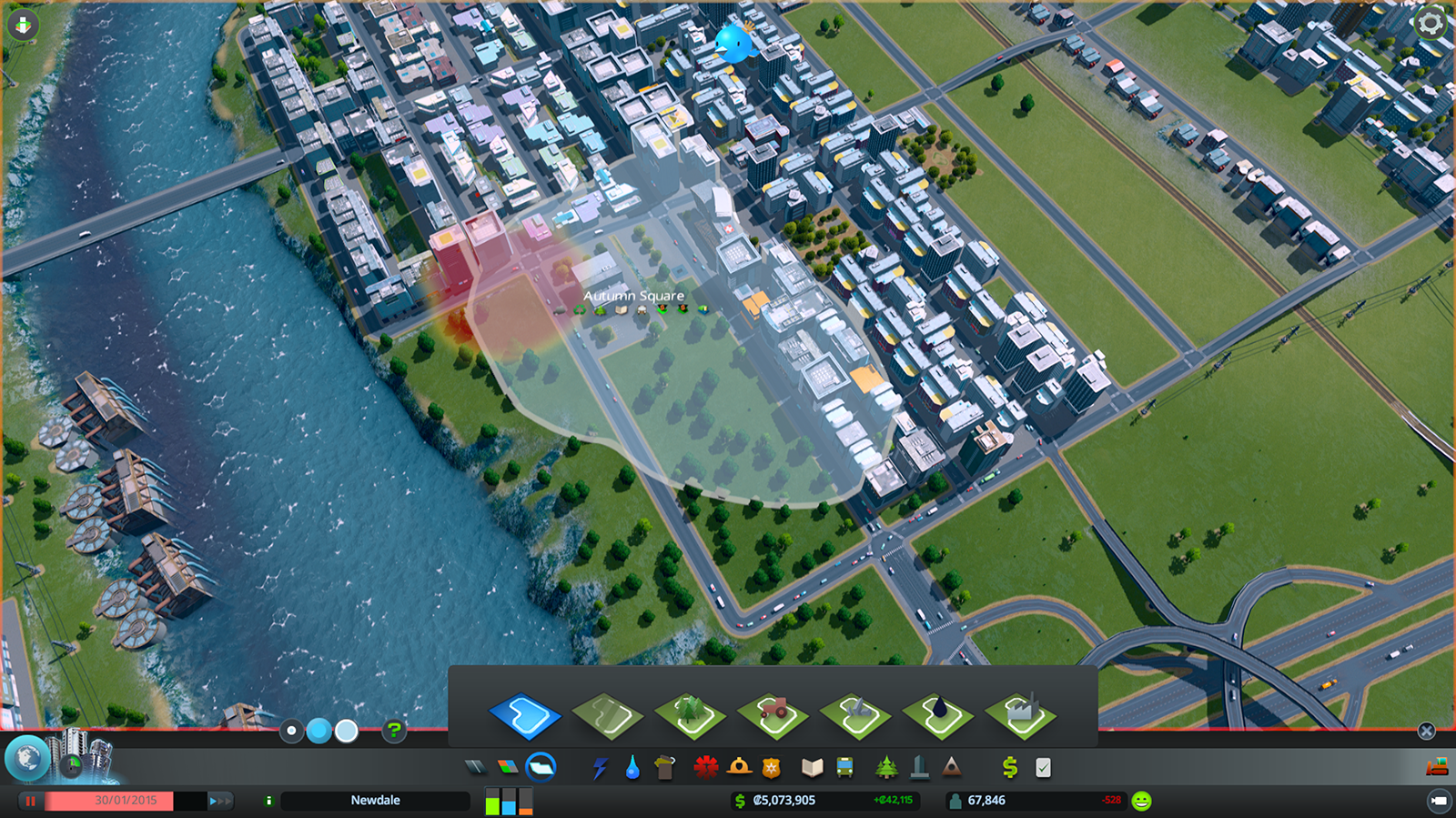
How does the districts painting work in cities skyline?

This is an example of what I am trying to ask So to be specific, here is the questions that I want to ask

-How does the brushed area work?

-How does the boarder of the painted area work?

-How is the area painted/filled with color?

Thank you !!
alt text

Comment
Add comment
10 |3000 characters needed characters left characters exceeded
▼
  • Viewable by all users
  • Viewable by moderators
  • Viewable by moderators and the original poster
  • Advanced visibility
Viewable by all users

1 Reply

· Add your reply
  • Sort: 
avatar image
1
Best Answer

Answer by sparkzbarca · Apr 02, 2015 at 09:08 PM

http://en.wikipedia.org/wiki/Boolean_operations_on_polygons

that describes how to add and subtract two polygons (shapes) together.

In this case what happens if you have the existing district which is object one.

you have the new object which is a collection of all vertices the selection tool has already gone over and you boolean addition them together to create a new polygon.

likewise you can use subtraction to make the district smaller.

the border is just a border.

convex edge selection is easy. Concave is more difficult. Perhaps they just did it the difficult way because it is just a 2d plane so it's quite possible they used brute force.

The alternative is they took the convex shape, convert it into N number of concave shapes and do edge selection on that. (i'd just do brute force unless it was too many vertices, I doubt this single shape is)

brute force basically means they go through each vertice on the plane, they select another one and then if all the other vertices are on one side of that line it's an edge. if there are vertices on both sides its not.

so either all vertices should be greater than the smallest of the two points x and greater than the smallest of the two ppoints y. or the opposite. should all be smaller than. it won't take too long because the moemnt you find one thats greater than and also one thats smaller than you stop cause thats not an edge.

if it is an edge you take the two points and draw a darker/lighter line over the top of them to create the border.

once you have the polygon just assign it a texture to fill it with color. Going into fill algorithms isn't needed. there is a way, but the graphics card takes care of that. you give it the polygon and the color and it'll do it for you.

Comment
Add comment · Show 1 · Share
10 |3000 characters needed characters left characters exceeded
▼
  • Viewable by all users
  • Viewable by moderators
  • Viewable by moderators and the original poster
  • Advanced visibility
Viewable by all users
avatar image aosome23 · Apr 14, 2015 at 03:54 AM 0
Share

How would you get the collections of verticies though? Using raycast?

Your answer

Hint: You can notify a user about this post by typing @username

Up to 2 attachments (including images) can be used with a maximum of 524.3 kB each and 1.0 MB total.

Follow this Question

Answers Answers and Comments

21 People are following this question.

avatar image avatar image avatar image avatar image avatar image avatar image avatar image avatar image avatar image avatar image avatar image avatar image avatar image avatar image avatar image avatar image avatar image avatar image avatar image avatar image avatar image

Related Questions

Fill Gradient color in the image portion 0 Answers

Plain-Color Voxel Game Lighting 0 Answers

Vehicle color select? 2 Answers

Painting materials onto meshes at runtime? 1 Answer

How can i paint texture on Mesh Runtime? 0 Answers


Enterprise
Social Q&A

Social
Subscribe on YouTube social-youtube Follow on LinkedIn social-linkedin Follow on Twitter social-twitter Follow on Facebook social-facebook Follow on Instagram social-instagram

Footer

  • Purchase
    • Products
    • Subscription
    • Asset Store
    • Unity Gear
    • Resellers
  • Education
    • Students
    • Educators
    • Certification
    • Learn
    • Center of Excellence
  • Download
    • Unity
    • Beta Program
  • Unity Labs
    • Labs
    • Publications
  • Resources
    • Learn platform
    • Community
    • Documentation
    • Unity QA
    • FAQ
    • Services Status
    • Connect
  • About Unity
    • About Us
    • Blog
    • Events
    • Careers
    • Contact
    • Press
    • Partners
    • Affiliates
    • Security
Copyright © 2020 Unity Technologies
  • Legal
  • Privacy Policy
  • Cookies
  • Do Not Sell My Personal Information
  • Cookies Settings
"Unity", Unity logos, and other Unity trademarks are trademarks or registered trademarks of Unity Technologies or its affiliates in the U.S. and elsewhere (more info here). Other names or brands are trademarks of their respective owners.
  • Anonymous
  • Sign in
  • Create
  • Ask a question
  • Spaces
  • Default
  • Help Room
  • META
  • Moderators
  • Explore
  • Topics
  • Questions
  • Users
  • Badges