
Wayback Machinekoobas.hobune.stream
May JUN Jul
Previous capture 13 Next capture
2021 2022 2023
1 capture
13 Jun 22 - 13 Jun 22
sparklines
Close Help
  • Products
  • Solutions
  • Made with Unity
  • Learning
  • Support & Services
  • Community
  • Asset Store
  • Get Unity

UNITY ACCOUNT

You need a Unity Account to shop in the Online and Asset Stores, participate in the Unity Community and manage your license portfolio. Login Create account
  • Blog
  • Forums
  • Answers
  • Evangelists
  • User Groups
  • Beta Program
  • Advisory Panel

Navigation

  • Home
  • Products
  • Solutions
  • Made with Unity
  • Learning
  • Support & Services
  • Community
    • Blog
    • Forums
    • Answers
    • Evangelists
    • User Groups
    • Beta Program
    • Advisory Panel

Unity account

You need a Unity Account to shop in the Online and Asset Stores, participate in the Unity Community and manage your license portfolio. Login Create account

Language

  • Chinese
  • Spanish
  • Japanese
  • Korean
  • Portuguese
  • Ask a question
  • Spaces
    • Default
    • Help Room
    • META
    • Moderators
    • Topics
    • Questions
    • Users
    • Badges
  • Home /
avatar image
0
Question by Fenuva · Oct 28, 2012 at 03:04 PM · cuberespawnfalling

Falling off respawn

Greetings, I am currently creating a game where you have to jump from one cube to another and not fall off. I was wondering if there was any way that I could make it so the player respawns at the original spawn point after falling a little distance. Does anyone have scripts for my request?gbbg
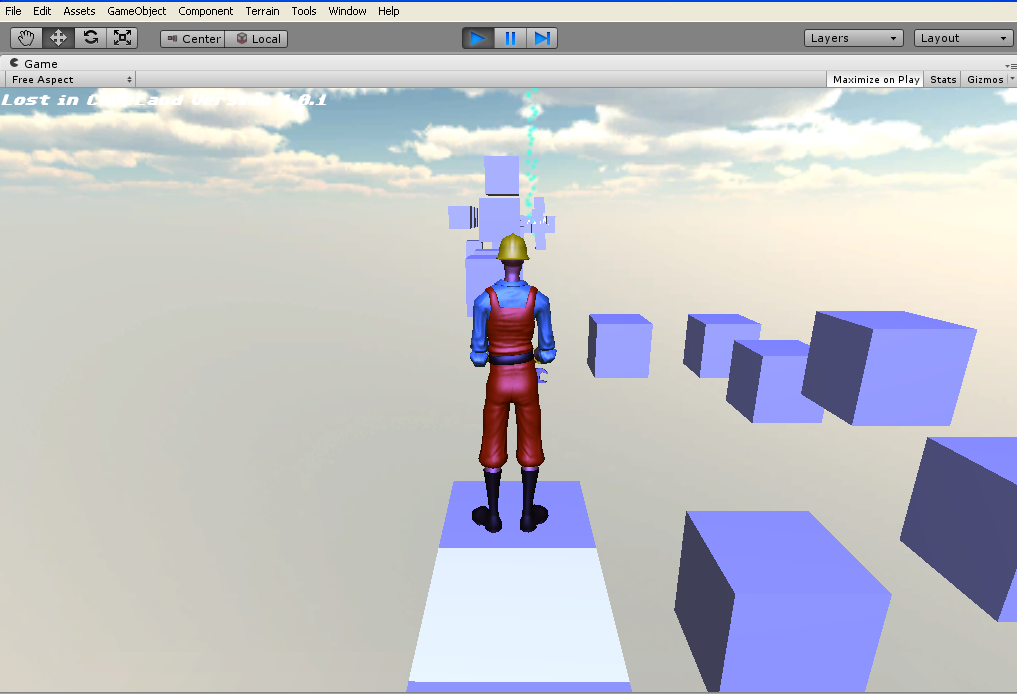
image.png (235.6 kB)
Comment
Add comment · Show 1
10 |3000 characters needed characters left characters exceeded
▼
  • Viewable by all users
  • Viewable by moderators
  • Viewable by moderators and the original poster
  • Advanced visibility
Viewable by all users
avatar image Dexter.Unity · Oct 28, 2012 at 04:27 PM 0
Share

By "after falling a little distance" do you mean relative to the last cube you where standing on or to a certain y height?

4 Replies

· Add your reply
  • Sort: 
avatar image
7

Answer by deltamish · Oct 28, 2012 at 03:35 PM

Yeah like he said Step1. Create a Cube scale it so that it covers the whole game arena then remove mehfilter nad mesh renderer component from it.

Add this script

 var Player:Transform;
   
 var spawn:Transform;
 function OnTriggerEnter(col:Collider) {
   
 if(col.tag =="Player"){
 //your death script
 Instantiate(Player,spawn.position,spawn.rotation):
 
 } 
 
 }

Read your comment All this does is checks if something collides with it,It checks wether it has the tag Player or not if it does then it respawns the player and if have a death code it kills the player

if you have no experience in scripting then how did you make the player to run,jump with anims

Note.This script is fixed and is in working condition

Comment
Add comment · Show 2 · Share
10 |3000 characters needed characters left characters exceeded
▼
  • Viewable by all users
  • Viewable by moderators
  • Viewable by moderators and the original poster
  • Advanced visibility
Viewable by all users
avatar image Fenuva · Oct 28, 2012 at 03:50 PM 0
Share

What scripting language is that? C#? Boo? Javascript?

avatar image deltamish · Oct 29, 2012 at 05:26 AM 0
Share

JavaScript

avatar image
0

Answer by Piflik · Oct 28, 2012 at 03:16 PM

I'd just place a collider somewhere below all the boxes, and when the player collides with it, he gets transported back to the spawn point.

Comment
Add comment · Show 2 · Share
10 |3000 characters needed characters left characters exceeded
▼
  • Viewable by all users
  • Viewable by moderators
  • Viewable by moderators and the original poster
  • Advanced visibility
Viewable by all users
avatar image Fenuva · Oct 28, 2012 at 03:26 PM 0
Share

How do I do that exactly?

avatar image Piflik · Oct 28, 2012 at 03:42 PM 0
Share

Take an Empty, add a box collider and scale it up until it covers the complete level, move it down to the depth at which you want the player to respawn, add a script to move the player to the spawnpoint OnTriggerEnter (either add this to the player or the collider...doesn't really matter). I would advise against destroying the player and instantiating a new one, since properties could have been changed and you might loose them.

Personally I would add a spawn-function to the player script, that I also use OnStart to initialize the player, and then just call that function when the player hits the trigger.

avatar image
0

Answer by Dexter.Unity · Oct 28, 2012 at 04:14 PM

I think you can also simple check your character's y position and if it is lower than your 'you died'.y it will respawn:

 var deathHeight : float = -5;
 
 if(transform.position.y <= deathHeight){
     Respawn();
 }
Comment
Add comment · Show 3 · Share
10 |3000 characters needed characters left characters exceeded
▼
  • Viewable by all users
  • Viewable by moderators
  • Viewable by moderators and the original poster
  • Advanced visibility
Viewable by all users
avatar image Fenuva · Oct 28, 2012 at 04:48 PM 0
Share

I am having a very hard time with this as I am quite new to Unity. $$anonymous$$ay you explain in detail exactly what I do to have the player respawn on the original spawn point after falling off? I already created a invisible large rectangle under the map so the player falls off and lands on it. Now what do I do after this? How do I make it so the player teleport to the spawn point after hitting the invisible platform?

avatar image Fenuva · Oct 28, 2012 at 08:25 PM 0
Share

All of these scripts are creating errors. Please help.

avatar image Fenuva · Oct 28, 2012 at 08:40 PM 0
Share

I have no prior experience with scripting and what you people are saying is very confusing to me.

avatar image
0

Answer by Dexter.Unity · Oct 28, 2012 at 05:10 PM

I am new too, haha so I'll give it a shot :)

If you place this script on your character you can probably use the following:

  • this is in JavaScript and untested --

    var deathHeight : float = -5; // The amount of meter's under your playing platform your character is allowed to be before it has to be respawned

    function Update () { // If the character is below or at the deathHeight -> respawn; if(transform.position.y <= deathHeight){ transform.position = Vector3(0, 0, 0); } }

This should place your character back at 0,0,0 when the charact's y position in the world has been -5 or lower than -5. Please tell me if it worked :)

Comment
Add comment · Show 2 · Share
10 |3000 characters needed characters left characters exceeded
▼
  • Viewable by all users
  • Viewable by moderators
  • Viewable by moderators and the original poster
  • Advanced visibility
Viewable by all users
avatar image Dexter.Unity · Oct 29, 2012 at 08:44 AM 0
Share

If you put the script you already have on here, it's probably easier to help. What is the error you are getting?

avatar image vinorodders · Apr 28, 2013 at 02:05 AM 0
Share

This did not work for me :( just went straight through it! Help?

Your answer

Hint: You can notify a user about this post by typing @username

Up to 2 attachments (including images) can be used with a maximum of 524.3 kB each and 1.0 MB total.

Follow this Question

Answers Answers and Comments

14 People are following this question.

avatar image avatar image avatar image avatar image avatar image avatar image avatar image avatar image avatar image avatar image avatar image avatar image avatar image avatar image

Related Questions

Respawn after falling off script? 2 Answers

Falling off respawn script 1 Answer

Checki f Player is within area? C# 1 Answer

How do you make a respawn and checkpoint script? 0 Answers

Respawning player not working 2 Answers


Enterprise
Social Q&A

Social
Subscribe on YouTube social-youtube Follow on LinkedIn social-linkedin Follow on Twitter social-twitter Follow on Facebook social-facebook Follow on Instagram social-instagram

Footer

  • Purchase
    • Products
    • Subscription
    • Asset Store
    • Unity Gear
    • Resellers
  • Education
    • Students
    • Educators
    • Certification
    • Learn
    • Center of Excellence
  • Download
    • Unity
    • Beta Program
  • Unity Labs
    • Labs
    • Publications
  • Resources
    • Learn platform
    • Community
    • Documentation
    • Unity QA
    • FAQ
    • Services Status
    • Connect
  • About Unity
    • About Us
    • Blog
    • Events
    • Careers
    • Contact
    • Press
    • Partners
    • Affiliates
    • Security
Copyright © 2020 Unity Technologies
  • Legal
  • Privacy Policy
  • Cookies
  • Do Not Sell My Personal Information
  • Cookies Settings
"Unity", Unity logos, and other Unity trademarks are trademarks or registered trademarks of Unity Technologies or its affiliates in the U.S. and elsewhere (more info here). Other names or brands are trademarks of their respective owners.
  • Anonymous
  • Sign in
  • Create
  • Ask a question
  • Spaces
  • Default
  • Help Room
  • META
  • Moderators
  • Explore
  • Topics
  • Questions
  • Users
  • Badges
