 koobas.hobune.stream


Magical Rigidbody/CharacterController free character...controller - Unity
Hi
So it seems a lot of people have spoken against the evils of using a rigidbody in Unity so I have been using a CharacterController which is about 99% of what I need. This was fine until I was asked to look into that 1% and see if anyone wouldn't mind sharing how they handle character's and collisions.
The player character we're using is a squarish shape so using the CharacterController's Capsule collider is a bit of a nuisance. I did try use a Box Collider but that resulted in 3 problems: 1 - Using RayCast means I would need to emit a ray from each corner when moving he character which means at least 4 rays but at most 12 per frame. Even so if an object could still pass through the centre of the character undetected. 2 - The OnCollision events only get triggered if a rigid body is attached to the object (which kinda defeats the purpose of all this effort) 3 - Physics.CheckSphere is not Physics.CheckCube... and Physics.CheckCube doesn't exist (nor does Physics.CheckSphere return a list of the colliders within the sphere for additional checking with collider.bounds.Intersects).
If you can please let me know what you use for your player's collisions (or if you do just use character controller too just say so too).
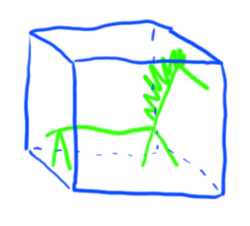
P.S I have attached a drawing of our punk rock horse character code named bob in the collision cube I'd like to use. (It's actually meant to be a zebra but now you see why the powers that be have me doing the programming)

$$anonymous$$aybe im saying something stupid, if so, im sorry. But when you say you want a cubed colision box on your character i imediatly think of adding a GameObject Box as a zebra's children(with a 'none' mesh), that would outomaticly add a box colider on it, I just dont know if the already existing "character controller" of the character would bypass the colisions of the box.

Let me say what i tried and what i settled on.. $$anonymous$$y situation is similar.. I use a secondary character (Horse, parented to the character controller). Adding rigidbody (kinematic trigger) on the secondary character was not very effective, and So, I tried raycasting from the 4 corners, (and teh centre point in teh direction i am moving) but still something could pass in between.. Then i went for checksphere & bound intersects, which worked O$$anonymous$$. (If you say checksphere doesn't return anything, then you have some issue.. 'coz it works for me) But bound works in Axis-Aligned.. So, unless you are aligned to teh world axis, or your character is a perfect cube, it would give a lot of space around it.
So at last, i settled for a ghost object.. A primitive cube resized to match the (extended) character size, with renderer turned off.. and move/rotate that ghost object and check for intersects. I make sure i recalculate the 8 corner vertices of teh ghost object as non axis-aligned, so that i can get pretty close without intersecting.
One more trick that helped me to detect intrusion is.. Ins$$anonymous$$d of raycasting outwards, i raycast towards teh other corner of the bounding box, (in both directions.. as teh raycast won't work if it is already inside a collider) , so that i can detect anything that intersects me.. I'm pretty much settled with my solution now.
@Aria, The problem is, if we just have a collider on our character, it will not detect any collisions with other colliders. We must have a rigidbody or a character controller..
Yes, i tried something on my own, i added a rigidbody to the box(children of the character) and the controler kept coliding with the box making the box just float around the character lol, where we want them to be the same thing or one over the other, maybe you could make a layer for the box and make the controler collider ignore the box layer, so that they can keep moving together.
To avoid that (i.e avoid the box getting bumped around), you need to mark it as $$anonymous$$inematic (Not respond to "normal" physics)
To ignore collision between two colliders, you don't need a layer. You can just use Physics.IgnoreCollision()


