
Wayback Machinekoobas.hobune.stream
May JUN Jul
Previous capture 13 Next capture
2021 2022 2023
1 capture
13 Jun 22 - 13 Jun 22
sparklines
Close Help
  • Products
  • Solutions
  • Made with Unity
  • Learning
  • Support & Services
  • Community
  • Asset Store
  • Get Unity

UNITY ACCOUNT

You need a Unity Account to shop in the Online and Asset Stores, participate in the Unity Community and manage your license portfolio. Login Create account
  • Blog
  • Forums
  • Answers
  • Evangelists
  • User Groups
  • Beta Program
  • Advisory Panel

Navigation

  • Home
  • Products
  • Solutions
  • Made with Unity
  • Learning
  • Support & Services
  • Community
    • Blog
    • Forums
    • Answers
    • Evangelists
    • User Groups
    • Beta Program
    • Advisory Panel

Unity account

You need a Unity Account to shop in the Online and Asset Stores, participate in the Unity Community and manage your license portfolio. Login Create account

Language

  • Chinese
  • Spanish
  • Japanese
  • Korean
  • Portuguese
  • Ask a question
  • Spaces
    • Default
    • Help Room
    • META
    • Moderators
    • Topics
    • Questions
    • Users
    • Badges
  • Home /
avatar image
0
Question by Beanalby · Mar 28, 2013 at 02:29 AM · audiosourcevolume

Why is this AudioClip quieter 2nd time played?

Try it here: http://beanalby.net/unityAnswers/audioBug.html

Project source: http://beanalby.net/unityAnswers/audioBug.zip

Video of what I hear: http://www.youtube.com/watch?v=4C6oGh8H8kQ

EDIT: Apparently this is just my desktop's onboard sound (Realtek ALC662); using my Logitech G330 USB headset doesn't have the problem. Happens in Unity editor, web player, and standalone build, and persists through reboot.

Play clip1, clip2, and then clip1 again - clip1 is quieter the 2nd time. Why? There's nothing in the script that does it:

 public void OnGUI() {
     if(GUI.Button(new Rect(0, 0, 300, 200), "Play1")) {
         source.clip = clip1;
         source.Play();
     }
     if(GUI.Button(new Rect(400, 0, 300, 200), "Play2")) {
         source.clip = clip2;
         source.Play();
     }
 }

Here's a waveform of the output. I did clip1, clip2, clip1, clip2.
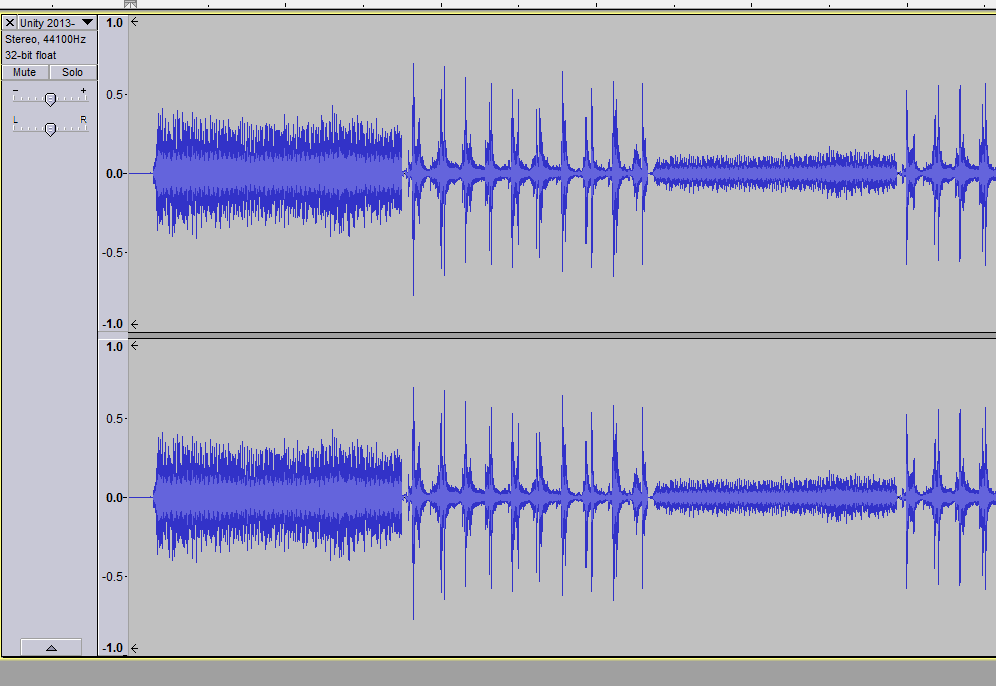
waveform showing problem

Comment
Add comment · Show 7
10 |3000 characters needed characters left characters exceeded
▼
  • Viewable by all users
  • Viewable by moderators
  • Viewable by moderators and the original poster
  • Advanced visibility
Viewable by all users
avatar image Unitraxx · Mar 28, 2013 at 02:45 AM 0
Share

Try putting Debug.Log(source.volume) before source.Play(). Also try setting source.volume = 1 explicitly.

avatar image Beanalby · Mar 28, 2013 at 02:54 AM 0
Share

Confirmed that source.volume is 1 throughout the program.

avatar image justinl · Mar 28, 2013 at 03:18 AM 0
Share

Are you sure it's actually quieter? Sounds the same to me. Perhaps because the second one is so much louder than the first clip that there's the illusion that it's quieter.

avatar image Beanalby · Mar 28, 2013 at 03:26 AM 0
Share

It's definitely quieter, the waveform image verifies it. It could be something specific to my desktop, though. I'll have to try it on another machine.

avatar image ByteSheep · Mar 28, 2013 at 03:27 AM 0
Share

Same here, can't tell any change in the volume of the clips..

Show more comments

0 Replies

· Add your reply
  • Sort: 

Your answer

Hint: You can notify a user about this post by typing @username

Up to 2 attachments (including images) can be used with a maximum of 524.3 kB each and 1.0 MB total.

Follow this Question

Answers Answers and Comments

13 People are following this question.

avatar image avatar image avatar image avatar image avatar image avatar image avatar image avatar image avatar image avatar image avatar image avatar image avatar image

Related Questions

Change variable value based on perceived audio volume 1 Answer

how is the volume of an audiosource computed? 1 Answer

How to duck a single audio channel? 0 Answers

Can't modify AudioSource volume via animation 0 Answers

child script and child source 1 Answer


Enterprise
Social Q&A

Social
Subscribe on YouTube social-youtube Follow on LinkedIn social-linkedin Follow on Twitter social-twitter Follow on Facebook social-facebook Follow on Instagram social-instagram

Footer

  • Purchase
    • Products
    • Subscription
    • Asset Store
    • Unity Gear
    • Resellers
  • Education
    • Students
    • Educators
    • Certification
    • Learn
    • Center of Excellence
  • Download
    • Unity
    • Beta Program
  • Unity Labs
    • Labs
    • Publications
  • Resources
    • Learn platform
    • Community
    • Documentation
    • Unity QA
    • FAQ
    • Services Status
    • Connect
  • About Unity
    • About Us
    • Blog
    • Events
    • Careers
    • Contact
    • Press
    • Partners
    • Affiliates
    • Security
Copyright © 2020 Unity Technologies
  • Legal
  • Privacy Policy
  • Cookies
  • Do Not Sell My Personal Information
  • Cookies Settings
"Unity", Unity logos, and other Unity trademarks are trademarks or registered trademarks of Unity Technologies or its affiliates in the U.S. and elsewhere (more info here). Other names or brands are trademarks of their respective owners.
  • Anonymous
  • Sign in
  • Create
  • Ask a question
  • Spaces
  • Default
  • Help Room
  • META
  • Moderators
  • Explore
  • Topics
  • Questions
  • Users
  • Badges
