 koobas.hobune.stream


The question is answered, right answer was accepted

Bomberman Bombs using OverlapSphere(1st Person)
Hi, I want to make a bomb explosion for a fps bomberman, I mean, there are obstacles in the map, and those obstacles block other obstacles, have a scheme of what I mean 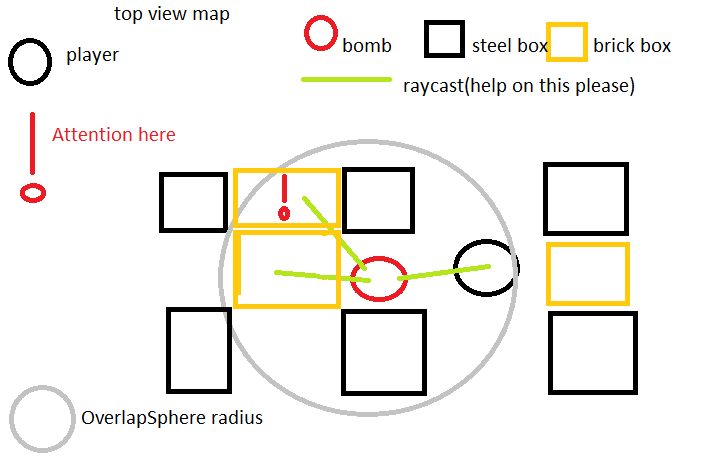
as you can see on the image the bomb uses a overlap sphere, I want to raycast to all objects inside of it tagged as "brick" or "player" (Quite easy to understand which one is which I guess), basically you can see on this video from SuperBossGames: http://www.youtube.com/watch?v=Y2C2Y3PiCM8, put the video at 1:30. So from that video is really easy to understand what I want, in the image I did I putted attention signal in one of the brick boxes because the raycast hits the other brick box instead, so that box shouldn't be affeced, just like the grenade from the video, if the raycast hits another object instead, you aren't affected.
Also you can see how is my script at the moment:
  #pragma strict

 var power : float = 100;
 var damage : int = 1;

 var radius : float = 3;
 var bombFuseLength : float = 3;
 private var startTime : float;
 private var actualTime : float;

 function Start ()
 {
     startTime = Time.time;
 }


 function Update ()
{
 actualTime = Time.time - startTime;


 if (actualTime > bombFuseLength)
 {
     Explode();
 }
}
 function Explode ()
 {
     GameObject.Find("First Person Controller").GetComponent(Player).bombs +=1;

 var colliders : Collider[] = Physics.OverlapSphere (transform.position, radius);
  for (var hit : Collider in colliders) {
     if (!hit)
         continue;

     if (hit.rigidbody)
         hit.rigidbody.AddExplosionForce(power, transform.position, radius, 3.0);

         Destroy (gameObject);
 }
}
 function OnDrawGizmos ()
 {
     Gizmos.color = Color(1,1,1,0.5);
     Gizmos.DrawSphere (transform.position, radius);
 }
it got kinda deformed when I putted it into unity awsers but it's readable and I think you can understand what I want to do. thanks in advance.
edit: Ok I looked at my script and I se I already have a little thing for that ( this script was made by a friend and it was some time ago), but I have no ideia on how to use it to do what I want, by the way, please tell me how to debug a ray is it on OnDrawGizmos also? I think it would be very helpful to see what will happen

@$$anonymous$$adJohny - back on 3/7 you asked an nearly identical question, and I posted some code to do the testing for you. Did that code not work?
http://answers.unity3d.com/questions/412675/sphere-cast-thing-help-please.html

I know, but that code was kinda confusing me, that code may be good, but I would like if you explain it a little bit, I also did this other question because I think this one is kinda easier to follow, it may be bigger, but it as an image, and you also can see my script, so if you don't $$anonymous$$d please explain me a bit of your script, and where to apply it on $$anonymous$$e. AAANNDD I didn't even knew what a array was in that time, I learned it yesterady to create a obstacle random spawner.

This is a much better asked question. I can immediately see what you want, and having the source tells me how to give you the answer.
If you look at the video, they don't simply test that the single position of the object is exposed, they test all eight corners of the bounding box around the object to see if any part of the object exposed. I rewrote the code I gave you earlier to Unityscript. The function Blocked now returns a value of 0 to 8 where 0 is completely blocked and 8 is a fully exposed object. Later you may want to vary either what you mean by exposed or how much something is damaged by how much it is exposed. The value 0-8 will give you a basis for making that change. Since I don't have your project, this is untested. So if it does not work (or only partly works), let me know how it does not work. I added Debug.Line() statements to show the Linecasts for 20 seconds, so you should be able to see what the code is trying to do.
 #pragma strict

 var power : float = 100;
 var damage : int = 1;

 var radius : float = 3;
 var bombFuseLength : float = 3;
 private var startTime : float;
 private var actualTime : float;

 function Start ()
 {
     startTime = Time.time;
 }


 function Update ()
 {

 actualTime = Time.time - startTime;


 if (actualTime > bombFuseLength)
 {
     Explode();
 }
 }

 function Explode ()
 {
     GameObject.Find("First Person Controller").GetComponent(Player).bombs +=1;

 var colliders : Collider[] = Physics.OverlapSphere (transform.position, radius);
  for (var hit : Collider in colliders) {
     if (Blocked(hit) != 0)
         continue;

     if (hit.rigidbody)
         hit.rigidbody.AddExplosionForce(power, transform.position, radius, 3.0);

         Destroy (gameObject);
 }
 }

 function OnDrawGizmos ()
 {
     Gizmos.color = Color(1,1,1,0.5);
     Gizmos.DrawSphere (transform.position, radius);
 }


 // Returns value 0 - 8.  0 means complete blocked, 8 means
 //  fully exposed.
 function Blocked(collider : Collider) : int {
         var v3Pos = transform.position;
         var bounds = collider.renderer.bounds;
         var iBlocked = 0;
         var v3Corner = Vector3.zero;
         var v3Center = bounds.center;
         var v3Extents = bounds.extents;
         var hit : RaycastHit ;

         v3Corner.Set(v3Center.x - v3Extents.x, v3Center.y + v3Extents.y, v3Center.z - v3Extents.z);  // Front top left corner
         Debug.DrawLine(v3Pos, v3Corner, Color.green, 20.0);
         if (Physics.Linecast (v3Pos, v3Corner, hit))
            if (hit.collider != collider) iBlocked++;
         v3Corner.Set(v3Center.x + v3Extents.x, v3Center.y + v3Extents.y, v3Center.z - v3Extents.z);  // Front top right corner
         Debug.DrawLine(v3Pos, v3Corner, Color.green, 20.0);
         if (Physics.Linecast (v3Pos, v3Corner, hit))
            if (hit.collider != collider) iBlocked++;
         v3Corner.Set(v3Center.x - v3Extents.x, v3Center.y - v3Extents.y, v3Center.z - v3Extents.z);  // Front bottom left corner
         Debug.DrawLine(v3Pos, v3Corner, Color.green, 20.0);
         if (Physics.Linecast (v3Pos, v3Corner, hit))
            if (hit.collider != collider) iBlocked++;
         v3Corner.Set(v3Center.x + v3Extents.x, v3Center.y - v3Extents.y, v3Center.z - v3Extents.z);  // Front bottom right corner
         Debug.DrawLine(v3Pos, v3Corner, Color.green, 20.0);
         if (Physics.Linecast (v3Pos, v3Corner, hit))
            if (hit.collider != collider) iBlocked++;
         v3Corner.Set(v3Center.x - v3Extents.x, v3Center.y + v3Extents.y, v3Center.z + v3Extents.z);  // Back top left corner
         Debug.DrawLine(v3Pos, v3Corner, Color.green, 20.0);
         if (Physics.Linecast (v3Pos, v3Corner, hit))
            if (hit.collider != collider) iBlocked++;
         v3Corner.Set(v3Center.x + v3Extents.x, v3Center.y + v3Extents.y, v3Center.z + v3Extents.z);  // Back top right corner
         Debug.DrawLine(v3Pos, v3Corner, Color.green, 20.0);
         if (Physics.Linecast (v3Pos, v3Corner, hit))
            if (hit.collider != collider) iBlocked++;
         v3Corner.Set(v3Center.x - v3Extents.x, v3Center.y - v3Extents.y, v3Center.z + v3Extents.z);  // Back bottom left corner
         Debug.DrawLine(v3Pos, v3Corner, Color.green, 20.0);
         if (Physics.Linecast (v3Pos, v3Corner, hit))
            if (hit.collider != collider) iBlocked++;
         v3Corner.Set(v3Center.x + v3Extents.x, v3Center.y - v3Extents.y, v3Center.z + v3Extents.z);  // Back bottom right corner
         Debug.DrawLine(v3Pos, v3Corner, Color.green, 20.0);
         if (Physics.Linecast (v3Pos, v3Corner, hit))
            if (hit.collider != collider) iBlocked++;

         return 8 - iBlocked;
     }
I only wanted or full damage or no damage since it's bomberman, is it easy to adjust?
I'll give you my project folders cause I can't get it, adn when I used your script I could put infinite bombs, the bombs didn't exploded so I hope you can fix that I will give you my full project.And btw I only want to ways of hit, 0 and 1, so 0 happens when the ray (Only need 1 ray to e send for the character for this project I guess) is hitting the player/brick box whitout problem, and 1 happens when it is blocked. Thanks in advance. I'll send it after this post because I couldn't get such a big file into unity awnsers, waste of time so... So I will upload it to dropbox and tell you when it finishes
edit: finnaly uploaded :) , hope this link is working : http://dl.dropbox.com/u/151460612/Bomber$$anonymous$$an%20first%20person.zip
I'm more than willing to work with you on the object detection code, but you need to spend the time to figure out why your bombs are not exploding. Or if you cannot figure it out, post a new questions with the correct scripts. When providing projects, don't put the project in a zip file. You link did not work, but even if it had, there is no guarantee I could load it. Ins$$anonymous$$d create a Unity package. Select everything and select "Export..." from the Assets menu. Here is another rewrite of your code. I have just a Single Physics.Linecast to detect rather than the bounding box check from the previous code. Again untested:
 #pragma strict

 var power : float = 100;
 var damage : int = 1;

 var radius : float = 3;
 var bombFuseLength : float = 3;
 private var startTime : float;
 private var actualTime : float;

 function Start ()
 {
     startTime = Time.time;
 }

 function Update ()
 {
     actualTime = Time.time - startTime;

     if (actualTime > bombFuseLength)
     {
         Explode();
     }
 }

 function Explode ()
 {
     GameObject.Find("First Person Controller").GetComponent(Player).bombs +=1;

     var colliders : Collider[] = Physics.OverlapSphere (transform.position, radius);
     Debug.Log("Count of colliders = "+colliders.Length);
      for (var collider : Collider in colliders)
      {
          if (collider.tag == "brick" || collider.tag == "player")
              {
              Debug.Log("Found brick or a player");
              var hit : RaycastHit;
              if (Physics.Linecast(transform.position, collider.transform.position, hit))
              {
                  if (hit.collider == collider)
                 {
                 Debug.Log("No obstructions");
                        if (hit.rigidbody)
                             hit.rigidbody.AddExplosionForce(power, transform.position, radius, 3.0);

                     Destroy (gameObject);
                 }
             }
         }
     }
 }
O$$anonymous$$ it seems to be working, but I noticed why I was able to put infinite bombs and bombs didn't exploded, you putted Destroy (gameObject); inside of
 if (Physics.Linecast(transform.position, collider.transform.position, hit))
     {
         if (hit.collider == collider)
       {
       Debug.Log("No obstructions");
             if (hit.rigidbody)
                     hit.rigidbody.AddExplosionForce(power, transform.position, radius, 3.0);

              Destroy (gameObject);
            }
         }
so it was only happenning a brick or a player was in the range and not obstructed
Thanks alot it worked, now I'm adjusting it to what I need. If I got more problems I hope there is no problem in talking to you again :)



