
Wayback Machinekoobas.hobune.stream
May JUN Jul
Previous capture 13 Next capture
2021 2022 2023
1 capture
13 Jun 22 - 13 Jun 22
sparklines
Close Help
  • Products
  • Solutions
  • Made with Unity
  • Learning
  • Support & Services
  • Community
  • Asset Store
  • Get Unity

UNITY ACCOUNT

You need a Unity Account to shop in the Online and Asset Stores, participate in the Unity Community and manage your license portfolio. Login Create account
  • Blog
  • Forums
  • Answers
  • Evangelists
  • User Groups
  • Beta Program
  • Advisory Panel

Navigation

  • Home
  • Products
  • Solutions
  • Made with Unity
  • Learning
  • Support & Services
  • Community
    • Blog
    • Forums
    • Answers
    • Evangelists
    • User Groups
    • Beta Program
    • Advisory Panel

Unity account

You need a Unity Account to shop in the Online and Asset Stores, participate in the Unity Community and manage your license portfolio. Login Create account

Language

  • Chinese
  • Spanish
  • Japanese
  • Korean
  • Portuguese
  • Ask a question
  • Spaces
    • Default
    • Help Room
    • META
    • Moderators
    • Topics
    • Questions
    • Users
    • Badges
  • Home /
avatar image
0
Question by leo_verza · Feb 24, 2021 at 09:41 PM · cameracollisionshootingmovement script

Why are my bullets acting as being deflected by the camera borders collider?

I have set up a very easy script to spawn bullets on a button press. The firing point is simply a transform attached to my player, basically in the center of a spaceship. (NB: Bullet is just an abstract class i use to manage different bullet types)

 using System.Collections;
 using System.Collections.Generic;
 using UnityEngine;
 
 public class BulletA_Basic : Bullet
 {   
 
     private void Update()
     {
     }
 
     public override void Shoot()
     {
         GameObject bullet = Instantiate(bulletPrefab, firingPoint);
         Rigidbody2D rb = bullet.GetComponent<Rigidbody2D>();
         rb.AddForce(firingPoint.up * bulletForce, ForceMode2D.Impulse);
     }
     
     public override void SpecialShoot(int n)
     {
         StartCoroutine(Special(n));
     }
     public IEnumerator Special(int n)
     {
         for (int i = 0; i < n; i++)
         {
             Shoot();
             yield return new WaitForSeconds(0.1f);
 
         }
     }
 }
 

I also set up on my player object a collider for the camera borders, so that the ship never crosses out of the screen since the camera is static.

 using System.Collections;
 using System.Collections.Generic;
 using UnityEngine;
 
 public class ScreenCollider : MonoBehaviour
 {
     public Camera MainCamera;
     private Vector2 screenCollider;
     private float objectWidth;
     private float objectHeight;
 
     
     void Start()
     {
         /*This projects the point at the top-right edge of the screen on worldspace, using a vector that starts from the camera.
          *The result is a new 2d vector with origin on the center of the screen (if camera is in center),
          *which means the boundaries have positive values on the right side and negative values on the left side */
 
         screenCollider = MainCamera.ScreenToWorldPoint(new Vector3(Screen.width, Screen.height, MainCamera.nearClipPlane));
 
         //This gets the boundaries of the sprite, starting from the center of the box
 
         objectHeight = transform.GetComponent<SpriteRenderer>().bounds.extents.y;
         objectWidth = transform.GetComponent<SpriteRenderer>().bounds.extents.x;
 
     }
 
     // LateUpdate is called once per frame, after all Update functions have been called.
     void LateUpdate()
     {
         //Takes the x and y position of the object and makes it impossible to go over the boundary values. 
         //NB: Ortographic and perspective cameras have inverted axis, so the - sign must be swapped between x and y
 
         Vector3 objectPosition = transform.position;
         objectPosition.x = Mathf.Clamp(objectPosition.x, -screenCollider.x + objectWidth, screenCollider.x - objectWidth);
         objectPosition.y = Mathf.Clamp(objectPosition.y, -screenCollider.y + objectHeight, screenCollider.y - objectHeight);
         transform.position = objectPosition;
     }
 }
 

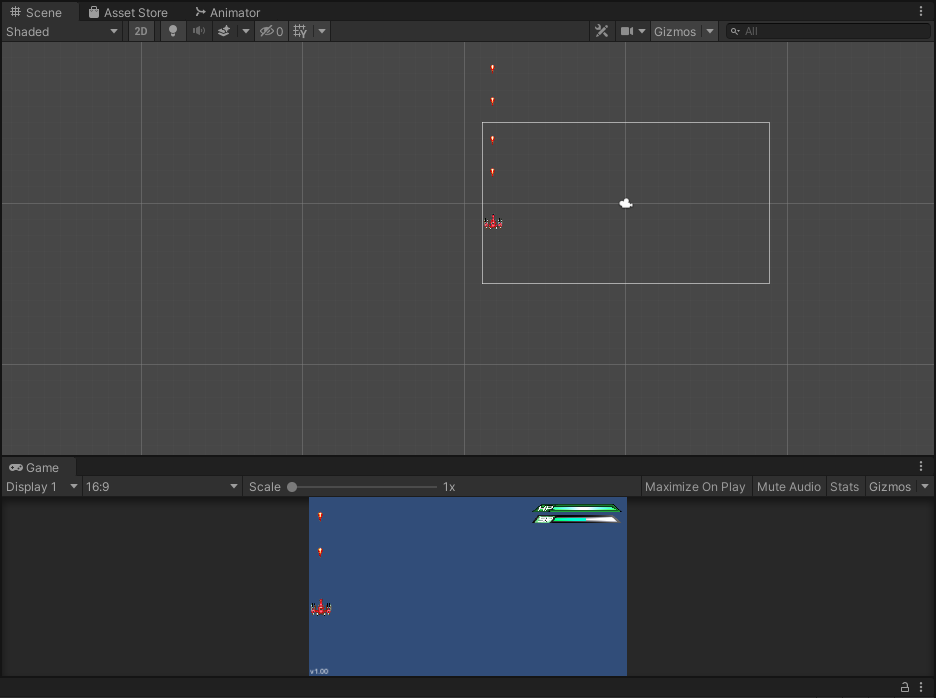
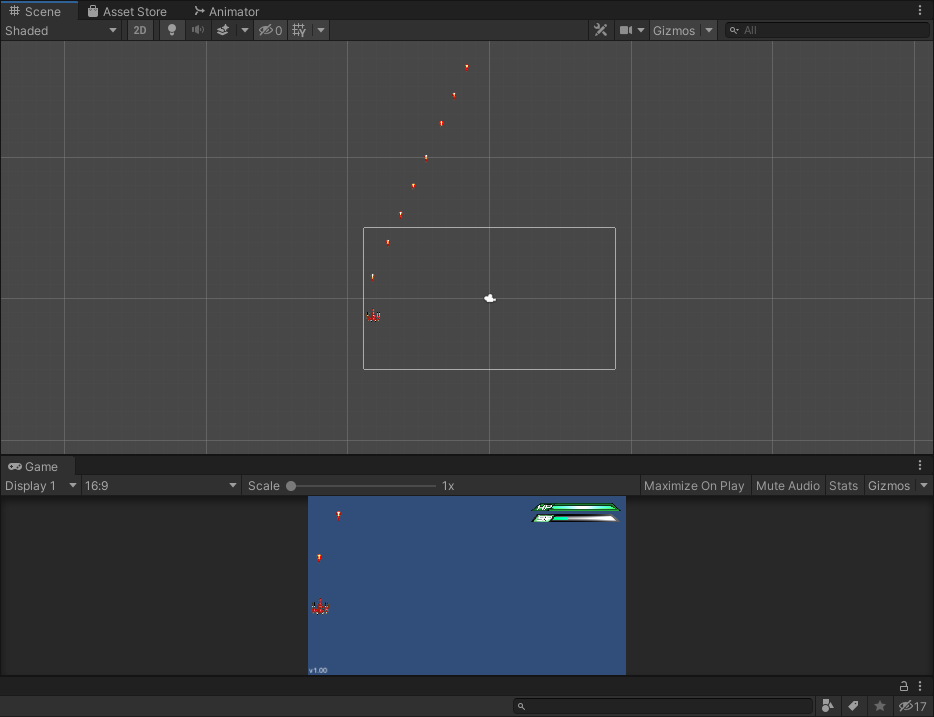
All of this is working great, except... if i move to the left or right edge of the screen and keep the movement key pressed and shoot at the same time, the bullet is "deflected" towards the middle of the screen, as if the player actually kept moving (i.e. changed coordinates) and the camera followed. Pictures are better than words:

On the edge while idle (shooting normally): alt text
On the edge while pressing the key to move left (shooting is deflected as if the ship was actually moving): alt text
Maybe it's something with my movement script (below)?

 using System.Collections;
 using System.Collections.Generic;
 using UnityEngine;
 
 public class PlayerMovement : MonoBehaviour
 {
     public float moveSpeed = 7f;
     public Rigidbody2D ship; //Could make rigidbody private as well since it only needs to refer to the ship. Whatever
     private Vector2 movement;
     private Animator animator;
 
     private void Start()
     {
         animator = GetComponent<Animator>(); //This must be done because animator is private, while rigidbody is not!
     }
 
     // Update is called once per frame
     void Update()
     {
         movement.x = Input.GetAxis("Horizontal");
         
         movement.y = Input.GetAxis("Vertical");
         if (movement.x != 0)
         {
             animator.SetFloat("Direction", movement.x); //This is just making the ship tilt
         }
         
     }
 
     private void FixedUpdate()
     {       
         ship.MovePosition(ship.position + movement * moveSpeed * Time.fixedDeltaTime);
     }
 }


badbullets1.png (41.5 kB)
badbullets2.png (50.2 kB)
Comment
Add comment
10 |3000 characters needed characters left characters exceeded
▼
  • Viewable by all users
  • Viewable by moderators
  • Viewable by moderators and the original poster
  • Advanced visibility
Viewable by all users

0 Replies

· Add your reply
  • Sort: 

Your answer

Hint: You can notify a user about this post by typing @username

Up to 2 attachments (including images) can be used with a maximum of 524.3 kB each and 1.0 MB total.

Follow this Question

Answers Answers and Comments

223 People are following this question.

avatar image avatar image avatar image avatar image avatar image avatar image avatar image avatar image avatar image avatar image avatar image avatar image avatar image avatar image avatar image avatar image avatar image avatar image avatar image avatar image avatar image avatar image avatar image avatar image avatar image avatar image avatar image avatar image avatar image avatar image avatar image avatar image avatar image avatar image avatar image avatar image avatar image avatar image avatar image avatar image avatar image avatar image avatar image avatar image avatar image avatar image avatar image avatar image avatar image avatar image avatar image avatar image avatar image avatar image avatar image avatar image avatar image avatar image avatar image avatar image avatar image avatar image avatar image avatar image avatar image avatar image avatar image avatar image avatar image avatar image avatar image avatar image avatar image avatar image avatar image avatar image avatar image avatar image avatar image avatar image avatar image avatar image avatar image avatar image avatar image avatar image avatar image avatar image avatar image avatar image avatar image avatar image avatar image avatar image avatar image avatar image avatar image avatar image avatar image avatar image avatar image avatar image avatar image avatar image avatar image avatar image avatar image avatar image avatar image avatar image avatar image avatar image avatar image avatar image avatar image avatar image avatar image avatar image avatar image avatar image avatar image avatar image avatar image avatar image avatar image avatar image avatar image avatar image avatar image avatar image avatar image avatar image avatar image avatar image avatar image avatar image avatar image avatar image avatar image avatar image avatar image avatar image avatar image avatar image avatar image avatar image avatar image avatar image avatar image avatar image avatar image avatar image avatar image avatar image avatar image avatar image avatar image avatar image avatar image avatar image avatar image avatar image avatar image avatar image avatar image avatar image avatar image avatar image avatar image avatar image avatar image avatar image avatar image avatar image avatar image avatar image avatar image avatar image avatar image avatar image avatar image avatar image avatar image avatar image avatar image avatar image avatar image avatar image avatar image avatar image avatar image avatar image avatar image avatar image avatar image avatar image avatar image avatar image avatar image avatar image avatar image avatar image avatar image avatar image avatar image avatar image avatar image avatar image avatar image avatar image avatar image avatar image avatar image avatar image avatar image avatar image avatar image avatar image avatar image avatar image avatar image avatar image avatar image

Related Questions

Moving Camera With 2 Players 3 Answers

Why isn't my move on collision script working? 0 Answers

Predict Collision 0 Answers

Is there a way to detect object collision detection based on camera perspective rather than direct polygonal collision in game space. 2 Answers

Camera up and down on TouchField 1 Answer


Enterprise
Social Q&A

Social
Subscribe on YouTube social-youtube Follow on LinkedIn social-linkedin Follow on Twitter social-twitter Follow on Facebook social-facebook Follow on Instagram social-instagram

Footer

  • Purchase
    • Products
    • Subscription
    • Asset Store
    • Unity Gear
    • Resellers
  • Education
    • Students
    • Educators
    • Certification
    • Learn
    • Center of Excellence
  • Download
    • Unity
    • Beta Program
  • Unity Labs
    • Labs
    • Publications
  • Resources
    • Learn platform
    • Community
    • Documentation
    • Unity QA
    • FAQ
    • Services Status
    • Connect
  • About Unity
    • About Us
    • Blog
    • Events
    • Careers
    • Contact
    • Press
    • Partners
    • Affiliates
    • Security
Copyright © 2020 Unity Technologies
  • Legal
  • Privacy Policy
  • Cookies
  • Do Not Sell My Personal Information
  • Cookies Settings
"Unity", Unity logos, and other Unity trademarks are trademarks or registered trademarks of Unity Technologies or its affiliates in the U.S. and elsewhere (more info here). Other names or brands are trademarks of their respective owners.
  • Anonymous
  • Sign in
  • Create
  • Ask a question
  • Spaces
  • Default
  • Help Room
  • META
  • Moderators
  • Explore
  • Topics
  • Questions
  • Users
  • Badges
