
Wayback Machinekoobas.hobune.stream
May JUN Jul
Previous capture 13 Next capture
2021 2022 2023
1 capture
13 Jun 22 - 13 Jun 22
sparklines
Close Help
  • Products
  • Solutions
  • Made with Unity
  • Learning
  • Support & Services
  • Community
  • Asset Store
  • Get Unity

UNITY ACCOUNT

You need a Unity Account to shop in the Online and Asset Stores, participate in the Unity Community and manage your license portfolio. Login Create account
  • Blog
  • Forums
  • Answers
  • Evangelists
  • User Groups
  • Beta Program
  • Advisory Panel

Navigation

  • Home
  • Products
  • Solutions
  • Made with Unity
  • Learning
  • Support & Services
  • Community
    • Blog
    • Forums
    • Answers
    • Evangelists
    • User Groups
    • Beta Program
    • Advisory Panel

Unity account

You need a Unity Account to shop in the Online and Asset Stores, participate in the Unity Community and manage your license portfolio. Login Create account

Language

  • Chinese
  • Spanish
  • Japanese
  • Korean
  • Portuguese
  • Ask a question
  • Spaces
    • Default
    • Help Room
    • META
    • Moderators
    • Topics
    • Questions
    • Users
    • Badges
  • Home /
avatar image
1
Question by JeppeNygaard · Jul 31, 2012 at 08:15 AM · draw callsocclussion culling

should I use single or multible meshes for my levels

I'm trying to optimize my scene as much as possible. I have a single snow-track (see image) which has been build from several smaller pieces all sharing the same map. I'm using beast lightmapping and experienced that if I tried to use the "combine Children" script my lightmap was removed.
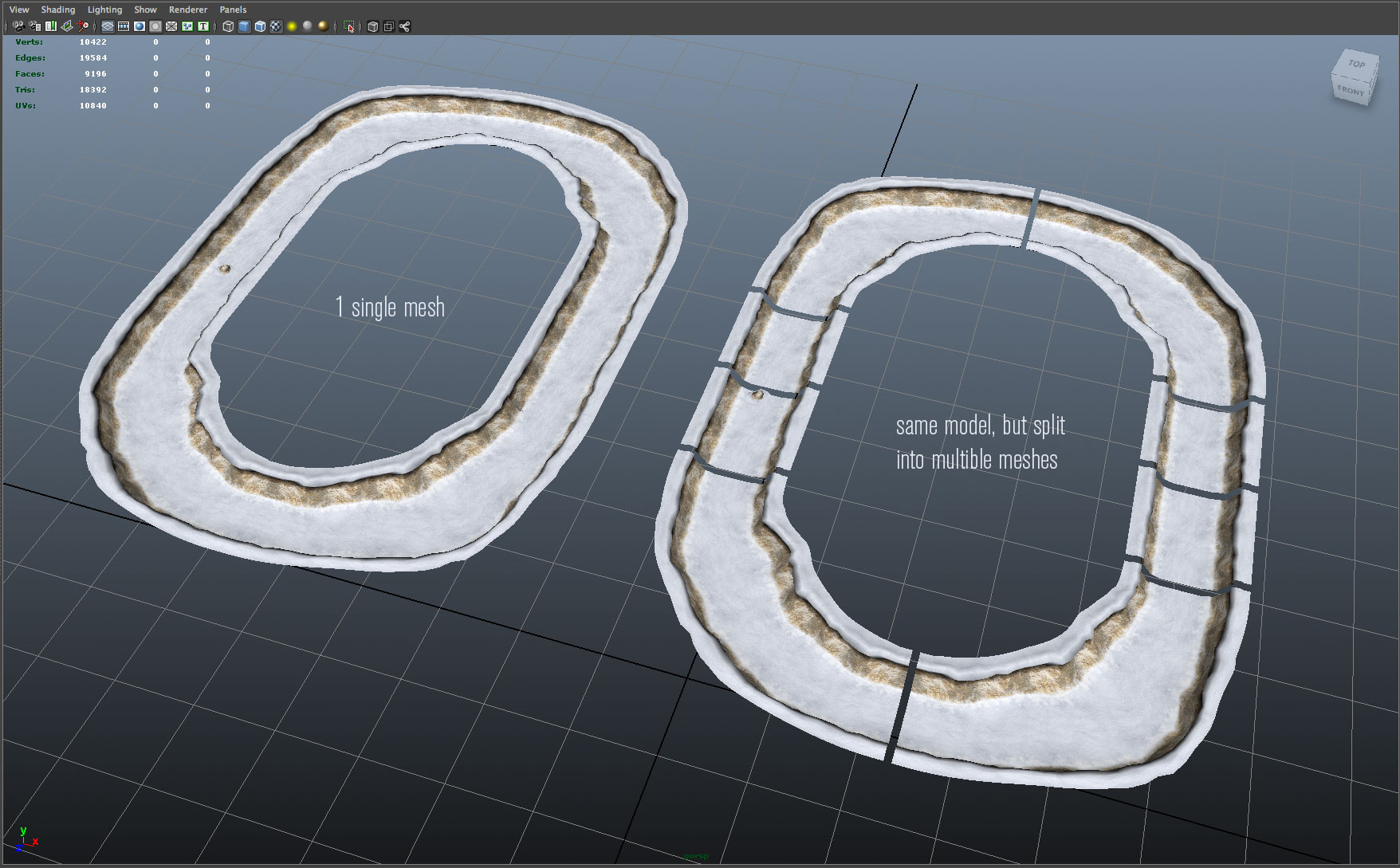
alt text

What I noticed is that if I combine the track in my 3d software instead of assembling the track within Unity I could keep my lightmap and my draw calls went down from 20 to 1, which I was very happy with. BUT, I guess I have now lost the option of occlusion culling.

Can someone tell me if it makes more sense to keep a level split up in subsection to allow for occlusion culling while risking a greater number of draw call or should I combine as much as possible as I should keep my draw calls to as few as possible?

Thanks!

Jeppe

meshes.jpg (284.3 kB)
Comment
Add comment
10 |3000 characters needed characters left characters exceeded
▼
  • Viewable by all users
  • Viewable by moderators
  • Viewable by moderators and the original poster
  • Advanced visibility
Viewable by all users

1 Reply

· Add your reply
  • Sort: 
avatar image
2
Best Answer

Answer by CHPedersen · Jul 31, 2012 at 08:48 AM

There is no "catch all" answer to that question. You have to assess the specific situation every time that question arises, and then try and determine what might yield the best performance for that particular case. Usually, the most straight-forward method is empirical testing.

In your case here, I'd say split them up. There's a good chance a lot of that track won't be visible all the time, so you incur a geometry overhead from pushing out-of-view polygons through the graphics card, because a smaller section of the same mesh happens to be inside the frustum.

Batching smaller meshes into a single draw call is usually only effective if you have lots of individual models which are clustered in a relatively small area (so most of them are visible simultaneously) and which do not need to move individually relative to each other, such as static terrain decorations, i.e. trees, rocks, etc. A larger track like this, I would keep split up.

Comment
Add comment · Show 3 · Share
10 |3000 characters needed characters left characters exceeded
▼
  • Viewable by all users
  • Viewable by moderators
  • Viewable by moderators and the original poster
  • Advanced visibility
Viewable by all users
avatar image JeppeNygaard · Jul 31, 2012 at 09:21 AM 0
Share

Christian, that makes really good sense - very helpful, Thanks

avatar image CHPedersen · Jul 31, 2012 at 09:24 AM 0
Share

You're very welcome. :) If the answer helped you, could I get you to mark it correct, please?

avatar image JeppeNygaard · Jul 31, 2012 at 09:26 AM 0
Share

Sure thing! ..

Your answer

Hint: You can notify a user about this post by typing @username

Up to 2 attachments (including images) can be used with a maximum of 524.3 kB each and 1.0 MB total.

Follow this Question

Answers Answers and Comments

7 People are following this question.

avatar image avatar image avatar image avatar image avatar image avatar image avatar image

Related Questions

Is it possible to change the colour of game objects without increasing the number of draw calls? 1 Answer

decrease draw call instantiated object 2 Answers

How come setting sprite tint/alpha does not increase draw calls? 0 Answers

How do you know if your materials are shared (in the context of reducing draw calls)? 1 Answer

How to reduce draw calls for efficient 3D model rendering 1 Answer


Enterprise
Social Q&A

Social
Subscribe on YouTube social-youtube Follow on LinkedIn social-linkedin Follow on Twitter social-twitter Follow on Facebook social-facebook Follow on Instagram social-instagram

Footer

  • Purchase
    • Products
    • Subscription
    • Asset Store
    • Unity Gear
    • Resellers
  • Education
    • Students
    • Educators
    • Certification
    • Learn
    • Center of Excellence
  • Download
    • Unity
    • Beta Program
  • Unity Labs
    • Labs
    • Publications
  • Resources
    • Learn platform
    • Community
    • Documentation
    • Unity QA
    • FAQ
    • Services Status
    • Connect
  • About Unity
    • About Us
    • Blog
    • Events
    • Careers
    • Contact
    • Press
    • Partners
    • Affiliates
    • Security
Copyright © 2020 Unity Technologies
  • Legal
  • Privacy Policy
  • Cookies
  • Do Not Sell My Personal Information
  • Cookies Settings
"Unity", Unity logos, and other Unity trademarks are trademarks or registered trademarks of Unity Technologies or its affiliates in the U.S. and elsewhere (more info here). Other names or brands are trademarks of their respective owners.
  • Anonymous
  • Sign in
  • Create
  • Ask a question
  • Spaces
  • Default
  • Help Room
  • META
  • Moderators
  • Explore
  • Topics
  • Questions
  • Users
  • Badges
