
Wayback Machinekoobas.hobune.stream
May JUN Jul
Previous capture 13 Next capture
2021 2022 2023
1 capture
13 Jun 22 - 13 Jun 22
sparklines
Close Help
  • Products
  • Solutions
  • Made with Unity
  • Learning
  • Support & Services
  • Community
  • Asset Store
  • Get Unity

UNITY ACCOUNT

You need a Unity Account to shop in the Online and Asset Stores, participate in the Unity Community and manage your license portfolio. Login Create account
  • Blog
  • Forums
  • Answers
  • Evangelists
  • User Groups
  • Beta Program
  • Advisory Panel

Navigation

  • Home
  • Products
  • Solutions
  • Made with Unity
  • Learning
  • Support & Services
  • Community
    • Blog
    • Forums
    • Answers
    • Evangelists
    • User Groups
    • Beta Program
    • Advisory Panel

Unity account

You need a Unity Account to shop in the Online and Asset Stores, participate in the Unity Community and manage your license portfolio. Login Create account

Language

  • Chinese
  • Spanish
  • Japanese
  • Korean
  • Portuguese
  • Ask a question
  • Spaces
    • Default
    • Help Room
    • META
    • Moderators
    • Topics
    • Questions
    • Users
    • Badges
  • Home /
avatar image
0
Question by zfsword · Mar 14, 2014 at 01:32 PM · cameradistancezoomfovfield of view

how to know the relationship between zoom ratio and field of view

I want to make a sinper game.I made zoom effect by adjust the field of view.And I know the default fov is 60 degree,and maximum is 179,minimum is 1.

I want to make 2x,4x,6x,8x,10x ... zoom effect,but I don't know how to adjust the field of view to correspond with the zoom radio.

For example the distance between camera and cube is 1000 meters ,and the cube size is (1,1,1),how to know the fov value when I zoom 2x scope ratio?and 4x? If the distance change to 600 ,how about the fov value,is it the same with 1000 meters?

Please help me,thanks.My english is poor,I don't know whether I make the question clear

Comment
Add comment
10 |3000 characters needed characters left characters exceeded
▼
  • Viewable by all users
  • Viewable by moderators
  • Viewable by moderators and the original poster
  • Advanced visibility
Viewable by all users

1 Reply

· Add your reply
  • Sort: 
avatar image
1
Best Answer

Answer by Dakwamine · Mar 14, 2014 at 01:43 PM

Having 2x zoom simply divides your normal FOV by 2, 4x zoom => FOV / 4, etc.

It is just simply as that. The zoom values magnifies what you see, so it divides the field of view...

Comment
Add comment · Show 1 · Share
10 |3000 characters needed characters left characters exceeded
▼
  • Viewable by all users
  • Viewable by moderators
  • Viewable by moderators and the original poster
  • Advanced visibility
Viewable by all users
avatar image zfsword · Mar 16, 2014 at 03:32 AM 0
Share

Thank you very much Dakwa$$anonymous$$e.I have made a test to caculate the zoom ratio,and the result is almost the same as you say.

here is the formula I test:
define defSize as object default size on screen(defFov == 60),and objSize as object zoom in size, 1<ZoomFov<60;
ZoomRatio=objSize/defSize;

FovRatio=defFov/ZoomFov;

the function caculate object size on screen reference screen render size

     public Rect BoundsToScreenRect(Bounds bounds)
     {
     // Get mesh origin and farthest extent (this works best with simple convex meshes)
     Vector3 origin = Camera.main.WorldToScreenPoint(new Vector3(bounds.$$anonymous$$.x, bounds.max.y, 0f));
     Vector3 extent = Camera.main.WorldToScreenPoint(new Vector3(bounds.max.x, bounds.$$anonymous$$.y, 0f));
      
     // Create rect in screen space and return - does not account for camera perspective
     return new Rect(origin.x, Screen.height - origin.y, extent.x - origin.x, origin.y - extent.y);
     }
  

Call the function when change zoom ratio:

 void Update ()
     {
         if(Input.Get$$anonymous$$ey($$anonymous$$eyCode.X)){
             Zoom ();
         }
 
         if(Input.Get$$anonymous$$ey($$anonymous$$eyCode.C)){
             defaultObjSize=BoundsToScreenRect(target.renderer.bounds);    
         }
     }

 public void Zoom(){
             Rect objSize=BoundsToScreenRect(target.renderer.bounds);

             print ("target size"+objSize+" fov ratio  "+60f/Camera.main.fieldOfView+" width radio: "+objSize.width/defaultObjSize.width+" height radio:"+ objSize.height/defaultObjSize.height);
         }
  

here is the result:alt text
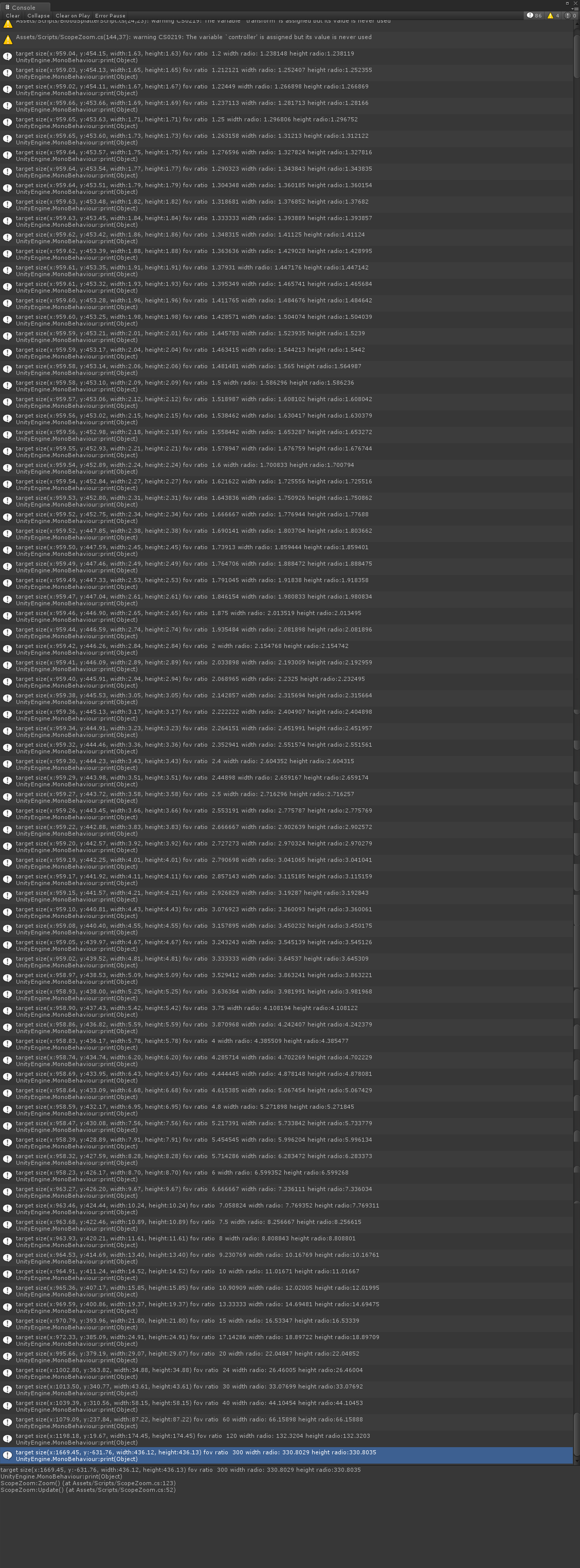
2014-03-16_unityzoomsizetest.png (426.9 kB)

Your answer

Hint: You can notify a user about this post by typing @username

Up to 2 attachments (including images) can be used with a maximum of 524.3 kB each and 1.0 MB total.

Follow this Question

Answers Answers and Comments

21 People are following this question.

avatar image avatar image avatar image avatar image avatar image avatar image avatar image avatar image avatar image avatar image avatar image avatar image avatar image avatar image avatar image avatar image avatar image avatar image avatar image avatar image avatar image

Related Questions

Lining up Fov's 0 Answers

Lens Effect 1 Answer

Mathematical relation between zoom and camera position 1 Answer

Make camera Zoom in or Zoom Out to focus all target objects 0 Answers

Zooming camera using move z position. 0 Answers


Enterprise
Social Q&A

Social
Subscribe on YouTube social-youtube Follow on LinkedIn social-linkedin Follow on Twitter social-twitter Follow on Facebook social-facebook Follow on Instagram social-instagram

Footer

  • Purchase
    • Products
    • Subscription
    • Asset Store
    • Unity Gear
    • Resellers
  • Education
    • Students
    • Educators
    • Certification
    • Learn
    • Center of Excellence
  • Download
    • Unity
    • Beta Program
  • Unity Labs
    • Labs
    • Publications
  • Resources
    • Learn platform
    • Community
    • Documentation
    • Unity QA
    • FAQ
    • Services Status
    • Connect
  • About Unity
    • About Us
    • Blog
    • Events
    • Careers
    • Contact
    • Press
    • Partners
    • Affiliates
    • Security
Copyright © 2020 Unity Technologies
  • Legal
  • Privacy Policy
  • Cookies
  • Do Not Sell My Personal Information
  • Cookies Settings
"Unity", Unity logos, and other Unity trademarks are trademarks or registered trademarks of Unity Technologies or its affiliates in the U.S. and elsewhere (more info here). Other names or brands are trademarks of their respective owners.
  • Anonymous
  • Sign in
  • Create
  • Ask a question
  • Spaces
  • Default
  • Help Room
  • META
  • Moderators
  • Explore
  • Topics
  • Questions
  • Users
  • Badges
