
Wayback Machinekoobas.hobune.stream
May JUN Jul
Previous capture 13 Next capture
2021 2022 2023
1 capture
13 Jun 22 - 13 Jun 22
sparklines
Close Help
  • Products
  • Solutions
  • Made with Unity
  • Learning
  • Support & Services
  • Community
  • Asset Store
  • Get Unity

UNITY ACCOUNT

You need a Unity Account to shop in the Online and Asset Stores, participate in the Unity Community and manage your license portfolio. Login Create account
  • Blog
  • Forums
  • Answers
  • Evangelists
  • User Groups
  • Beta Program
  • Advisory Panel

Navigation

  • Home
  • Products
  • Solutions
  • Made with Unity
  • Learning
  • Support & Services
  • Community
    • Blog
    • Forums
    • Answers
    • Evangelists
    • User Groups
    • Beta Program
    • Advisory Panel

Unity account

You need a Unity Account to shop in the Online and Asset Stores, participate in the Unity Community and manage your license portfolio. Login Create account

Language

  • Chinese
  • Spanish
  • Japanese
  • Korean
  • Portuguese
  • Ask a question
  • Spaces
    • Default
    • Help Room
    • META
    • Moderators
    • Topics
    • Questions
    • Users
    • Badges
  • Home /
avatar image
0
Question by adbourdages · Nov 27, 2012 at 11:42 PM · textureproject

What to do when Unity messes up your textures

So, Unity has been having problems working with textures recently. First, there was a single texture that got mangled. But only in the editor. Android and iOS builds with the same textures were OK. I supposed it was had to do with some bad memory and lived with it. Then NGUI started messing up the atlases. Hum. I though the atlas builder was having trouble and started using TexturePacker.

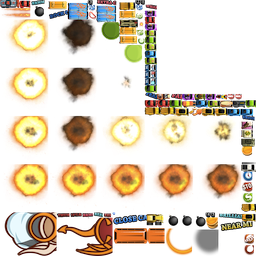
Finally today the last shoe dropped and PackTexture is giving me this kind of nonsense:
alt text

As you can imagine the sprites are not supposed to be cut in half like that. It looks as if unity thinks each sprite if larger that it actually is. Ho, and it also doesn't save to the proper size. A 2048 texture packed by PackTexture is 1024x.

I think the problem is with the project itself. Some corrupted cache files maybe? Reimporting All didn't do anything. Or emptying the Temp folder. Or rebooting the computer. Or upgrading to 3.5.6 (I'm using 3.5.5).

mcarsandeffects.png (112.9 kB)
Comment
Add comment
10 |3000 characters needed characters left characters exceeded
▼
  • Viewable by all users
  • Viewable by moderators
  • Viewable by moderators and the original poster
  • Advanced visibility
Viewable by all users

4 Replies

· Add your reply
  • Sort: 
avatar image
2

Answer by nicloay · May 12, 2015 at 06:47 PM

I've just faced similar problem. To fix this. try to close unity remove all files and folders in YOUR_PROJECT/Library folder and start unity.

It will reimport all of your assets.

Comment
Add comment · Show 1 · Share
10 |3000 characters needed characters left characters exceeded
▼
  • Viewable by all users
  • Viewable by moderators
  • Viewable by moderators and the original poster
  • Advanced visibility
Viewable by all users
avatar image or113 · Nov 29, 2016 at 07:53 AM 0
Share

USE HIS ANSWER! Thanks! :) I had to reopen the scene(freaked me out when I saw everything was gone)

avatar image
0

Answer by Bunny83 · Nov 27, 2012 at 11:57 PM

First of all Unity isn't messing up your textures. NGUI is a third party extension. The TexturePacker is a completely seperate software so it also has nothing to do with Unity. You might use the UV information the wrong way...

We can't help much since we have no idea where it goes wrong. We actually don't even know what the picture you've posted is. Is it a screenshot? Is it your atlas texture? If so how has it been generated?

Comment
Add comment · Share
10 |3000 characters needed characters left characters exceeded
▼
  • Viewable by all users
  • Viewable by moderators
  • Viewable by moderators and the original poster
  • Advanced visibility
Viewable by all users
avatar image
0

Answer by adbourdages · Nov 28, 2012 at 12:31 AM

I still don't know what went wrong, but in case someone else has the same problem, here is how I fixed it:

  • export your project as a package (Assets->Export Package...). Make sure to include everything.

  • create a new project

  • import the package

  • If you look at your scenes, you'll notice some errors with the layers: they will be blank and it crashes if you run it.

  • Close Unity

  • Copy the content of the folder "ProjectSettings" from your old project to the new one.

  • Restart Unity et voila!

Comment
Add comment · Share
10 |3000 characters needed characters left characters exceeded
▼
  • Viewable by all users
  • Viewable by moderators
  • Viewable by moderators and the original poster
  • Advanced visibility
Viewable by all users
avatar image
0

Answer by Nomibuilder · Sep 08, 2015 at 03:30 AM

If you are trying to change color of your textures then simply copy your atlas Png image and change it in photoshop and replace it in your project.

Comment
Add comment · Share
10 |3000 characters needed characters left characters exceeded
▼
  • Viewable by all users
  • Viewable by moderators
  • Viewable by moderators and the original poster
  • Advanced visibility
Viewable by all users

Your answer

Hint: You can notify a user about this post by typing @username

Up to 2 attachments (including images) can be used with a maximum of 524.3 kB each and 1.0 MB total.

Follow this Question

Answers Answers and Comments

14 People are following this question.

avatar image avatar image avatar image avatar image avatar image avatar image avatar image avatar image avatar image avatar image avatar image avatar image avatar image avatar image

Related Questions

Assigning UV Map to model at runtime 0 Answers

Projecting textures for enemy targeting 2 Answers

Webplayer Publishing Brightens Textures? 1 Answer

How do I project a texture onto an object? 0 Answers

Can Unity transfer UVs from a mesh to another at runtime? 0 Answers


Enterprise
Social Q&A

Social
Subscribe on YouTube social-youtube Follow on LinkedIn social-linkedin Follow on Twitter social-twitter Follow on Facebook social-facebook Follow on Instagram social-instagram

Footer

  • Purchase
    • Products
    • Subscription
    • Asset Store
    • Unity Gear
    • Resellers
  • Education
    • Students
    • Educators
    • Certification
    • Learn
    • Center of Excellence
  • Download
    • Unity
    • Beta Program
  • Unity Labs
    • Labs
    • Publications
  • Resources
    • Learn platform
    • Community
    • Documentation
    • Unity QA
    • FAQ
    • Services Status
    • Connect
  • About Unity
    • About Us
    • Blog
    • Events
    • Careers
    • Contact
    • Press
    • Partners
    • Affiliates
    • Security
Copyright © 2020 Unity Technologies
  • Legal
  • Privacy Policy
  • Cookies
  • Do Not Sell My Personal Information
  • Cookies Settings
"Unity", Unity logos, and other Unity trademarks are trademarks or registered trademarks of Unity Technologies or its affiliates in the U.S. and elsewhere (more info here). Other names or brands are trademarks of their respective owners.
  • Anonymous
  • Sign in
  • Create
  • Ask a question
  • Spaces
  • Default
  • Help Room
  • META
  • Moderators
  • Explore
  • Topics
  • Questions
  • Users
  • Badges
