
Wayback Machinekoobas.hobune.stream
May JUN Jul
Previous capture 12 Next capture
2021 2022 2023
1 capture
12 Jun 22 - 12 Jun 22
sparklines
Close Help
  • Products
  • Solutions
  • Made with Unity
  • Learning
  • Support & Services
  • Community
  • Asset Store
  • Get Unity

UNITY ACCOUNT

You need a Unity Account to shop in the Online and Asset Stores, participate in the Unity Community and manage your license portfolio. Login Create account
  • Blog
  • Forums
  • Answers
  • Evangelists
  • User Groups
  • Beta Program
  • Advisory Panel

Navigation

  • Home
  • Products
  • Solutions
  • Made with Unity
  • Learning
  • Support & Services
  • Community
    • Blog
    • Forums
    • Answers
    • Evangelists
    • User Groups
    • Beta Program
    • Advisory Panel

Unity account

You need a Unity Account to shop in the Online and Asset Stores, participate in the Unity Community and manage your license portfolio. Login Create account

Language

  • Chinese
  • Spanish
  • Japanese
  • Korean
  • Portuguese
  • Ask a question
  • Spaces
    • Default
    • Help Room
    • META
    • Moderators
    • Topics
    • Questions
    • Users
    • Badges
  • Home /
avatar image
0
Question by glenwatkinson · Dec 14, 2015 at 10:12 AM · assetbundleassetbundles

AssetBundleManager Shaders broken?

I’m working on an app which contains a main game and several minigames as well. I’m trying to separate the mini games each into their own asset bundle and store them on our server. I’ve downloaded Unity’s AssetBundleManager plugin for this task.

Each minigame is it’s own scene and I’ve built the asset bundles by allowing the AssetBundleManager to automatically select the dependencies. I’m building for iOS and I’ve uploaded the bundles to a server. Once I’ve built the game for my device (iPad 2) I load the assets using a script very similar to what’s included in LoadScenes.cs. It seems to download the assets and open the scene just fine.

The problem is that I believe many of my shaders are broken at this point. The terrain in one scene is broken and the standard shader also seems to not work in some instances. I’m seeing a few parts where the mesh is invisible and other parts where the mesh is that pink colour you see when the material doesn’t have a texture.

In the editor, I’ve tried opening the same scenes after downloading from the server and although they were broken at first, I was able to fix them by simply adding the relevant shaders to my “always included shaders” and rebuilding the assets. When they didn’t work I was able to see the correct textures and shader name in the inspector window on an impacted model. When I reselected the shader, the model loaded fine.

I also should point out that everything works fine on my iPad 2 when I load these scenes normally and not from an asset bundle I am trying to get my build size down though.
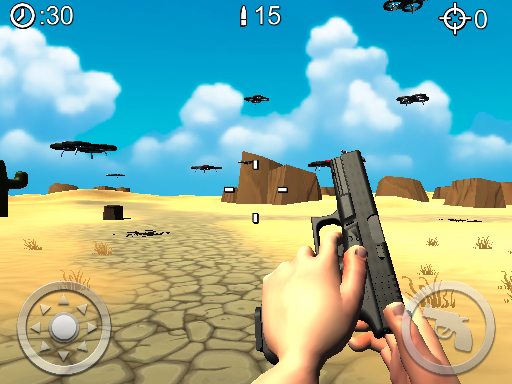
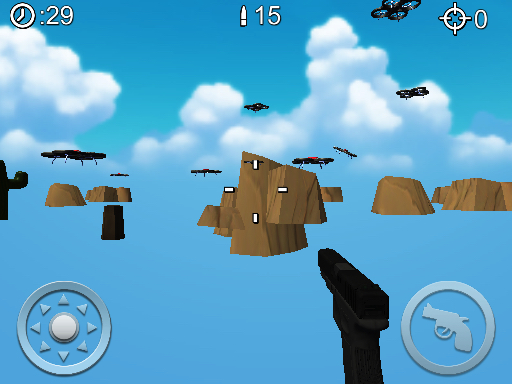
alt textalt text

-droneshooter1.jpeg (256.8 kB)
-droneshooter2.jpeg (181.3 kB)
Comment
Add comment
10 |3000 characters needed characters left characters exceeded
▼
  • Viewable by all users
  • Viewable by moderators
  • Viewable by moderators and the original poster
  • Advanced visibility
Viewable by all users

2 Replies

· Add your reply
  • Sort: 
avatar image
0
Best Answer

Answer by _creatio_ · Dec 14, 2015 at 07:20 PM

Looks like your problem appears because you are using the same set of shaders for all your materials. At the AssetBundles build time, you have to move them into a separate AB which will be a dependency for all the other ABs and will have to be loaded prior to all the other asset bundles and assets.

Comment
Add comment · Show 4 · Share
10 |3000 characters needed characters left characters exceeded
▼
  • Viewable by all users
  • Viewable by moderators
  • Viewable by moderators and the original poster
  • Advanced visibility
Viewable by all users
avatar image glenwatkinson · Dec 15, 2015 at 12:57 AM 0
Share

I'm a little hesitant to go ahead and download a new copy of all of Unity's default shaders, reapply them to every mesh, then separate that out into it's own asset bundle. I understand that it's a best practice to avoid doubling up on the assets but I'm not really making the connection to it fixing my issue.

All of these are default shaders. The gun, and the arms both use the same shader...

avatar image _creatio_ · Dec 15, 2015 at 04:54 PM 0
Share

@glenwatkinson, you will not have to reapply anything dynamically. You just have to download the AB with shaders (and load it), prior to instantiation of the objects, that are in your current AB. Everything will link automatically.

Just a guess. The issue appears because the instances of the shaders with the same internal IDs prevent them from instantiation for the second time (as same ID is already appears used), during the load time of the AB, and it breaks loading sequence.

avatar image glenwatkinson · Dec 15, 2015 at 06:22 PM 0
Share

@_creatio I didn't mean to imply anything about writing a script to dynamically link shaders at run-time. In a perfect world I'd like to just leave the shaders on the main build and have all the asset bundles link from there. Ins$$anonymous$$d, it seems I have to download a new copy of the Unity default shaders, create a new asset bundle from them, change the textures in my $$anonymous$$igame asset bundles to reference the new copies of the shaders, then set the shader bundle as a dependency for my $$anonymous$$igame asset bundles.

I think your guess is absolutely correct btw.

avatar image _creatio_ · Dec 18, 2015 at 02:33 PM 0
Share

@glenwatkinson, yes, Unity is not ideal, but it works :) Btw, I've used the described scenario in my game, so it works for sure. I'm not sure if there are any other way to do it better.

avatar image
0

Answer by glenwatkinson · Dec 15, 2015 at 08:57 AM

While I'm sure that conflicting shaders is what caused my problem, I'm able to get everything to look fine by unchecking "Strip Engine Code" in the build settings.

Comment
Add comment · Share
10 |3000 characters needed characters left characters exceeded
▼
  • Viewable by all users
  • Viewable by moderators
  • Viewable by moderators and the original poster
  • Advanced visibility
Viewable by all users

Your answer

Hint: You can notify a user about this post by typing @username

Up to 2 attachments (including images) can be used with a maximum of 524.3 kB each and 1.0 MB total.

Follow this Question

Answers Answers and Comments

4 People are following this question.

avatar image avatar image avatar image avatar image

Related Questions

AssetBundles - depend on asset already included in executable 0 Answers

Loading GameObject with the Script Attached from the AssetBundle. 0 Answers

Addressable Assets Cache 0 Answers

Missing shader variants/features in asset bundles 2 Answers

Asset Bundle Prefabs missing textures & materials, but have geometry 1 Answer


Enterprise
Social Q&A

Social
Subscribe on YouTube social-youtube Follow on LinkedIn social-linkedin Follow on Twitter social-twitter Follow on Facebook social-facebook Follow on Instagram social-instagram

Footer

  • Purchase
    • Products
    • Subscription
    • Asset Store
    • Unity Gear
    • Resellers
  • Education
    • Students
    • Educators
    • Certification
    • Learn
    • Center of Excellence
  • Download
    • Unity
    • Beta Program
  • Unity Labs
    • Labs
    • Publications
  • Resources
    • Learn platform
    • Community
    • Documentation
    • Unity QA
    • FAQ
    • Services Status
    • Connect
  • About Unity
    • About Us
    • Blog
    • Events
    • Careers
    • Contact
    • Press
    • Partners
    • Affiliates
    • Security
Copyright © 2020 Unity Technologies
  • Legal
  • Privacy Policy
  • Cookies
  • Do Not Sell My Personal Information
  • Cookies Settings
"Unity", Unity logos, and other Unity trademarks are trademarks or registered trademarks of Unity Technologies or its affiliates in the U.S. and elsewhere (more info here). Other names or brands are trademarks of their respective owners.
  • Anonymous
  • Sign in
  • Create
  • Ask a question
  • Spaces
  • Default
  • Help Room
  • META
  • Moderators
  • Explore
  • Topics
  • Questions
  • Users
  • Badges