 koobas.hobune.stream


Unity 4.6: How to swap childs (without detaching them)?
The problem of switching childs came up to me because in Unity 4.6 the way your childs are listed determines which gets rendered first and I don't think I will find a quick answer to it myself.
Reason why I want to solve this is to have easy control of which gui element will get rendered on top without making multiple canvases or having to make complicated detachments.
To solve this problem I would have to do something like this (swap both childs under the same parent):
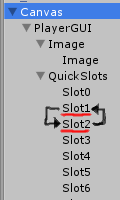
Is it possible to do it without detaching any childs?

Are you trying to move it to the same spot in another parent or just swap positions under the current parent?

Just like it's presented: swap under current. It woudn't really make sense to do your other proposition. At-least I am not sure what this would accomplish.
Ok sadly I accidently solved this one too. I had a feeling this function exists, but I've overlooked it:
transform.SetSiblingIndex(int index);
and there are couple more "sibling" related functions to solve my problem.



