 koobas.hobune.stream


How can I get the attenuation value of a spotlight in a shader?
Hello all.
I have attempted many ways to get the proper attenuation value of a spotlight in my forward additive pass of my shader. I'm currently using the UNITY_LIGHT_ATTENUATION found in AutoLight.cginc, which should, based on how it's defined, return the value of the actual attenuation and any cookie texture as well. However, nothing happens, and the spotlight remains square.
Shader below:
 Shader "NOXV/TerrainShader" {
     Properties {
         _Color            ("Main Color", Color)        = (1,1,1,1)
         _MainTex        ("Base (RGB)", 2D)            = "white" {}
         _TextureScale    ("Texture Scale", float)    = 1
     }
     SubShader {
         Tags { "RenderType"="Opaque" }
         LOD 200

         CGINCLUDE
         #include "UnityCG.cginc"
         #include "Lighting.cginc"
         #include "AutoLight.cginc"

         fixed4        _Color;
         sampler2D    _MainTex;
         float        _TextureScale;
         float        _BlendSharpness;
         ENDCG

         Pass {
             Name "FORWARD"
             Tags { "LightMode" = "ForwardBase" }

             CGPROGRAM
             #pragma vertex vert
             #pragma fragment frag
             #pragma multi_compile_fwdbase

             struct v2f {
                 float4 pos        :SV_POSITION;
                 fixed3 norm        :NORMAL;
                 float3 uv        :TEXCOORD0;
                 float3 viewDir    :TEXCOORD1;
                 float3 lightDir    :TEXCOORD2;
                 LIGHTING_COORDS(3,4)
             };

             v2f vert(appdata_base i) {
                 v2f o;

                 o.pos        = mul(UNITY_MATRIX_MVP, i.vertex);
                 o.norm        = i.normal;
                 o.uv        = i.vertex;

                 o.viewDir    = normalize(ObjSpaceViewDir(i.vertex));
                 o.lightDir    = normalize(ObjSpaceLightDir(i.vertex));

                 TRANSFER_SHADOW(o);
                 TRANSFER_VERTEX_TO_FRAGMENT(o);

                 return o;
             }

             fixed4 frag(v2f i) :SV_Target {
                 ///////////////////////////////////////////////////////////////////////////
                 // Texturing
                 ///////////////////////////////////////////////////////////////////////////
                 half2 xUV, yUV, zUV;
                 half3 xTex, yTex, zTex, blendWeights, texMix;

                 xUV = i.uv.zy;
                 yUV = i.uv.xz;
                 zUV = i.uv.xy;

                 xTex = tex2D(_MainTex, xUV / _TextureScale);
                 yTex = tex2D(_MainTex, yUV / _TextureScale);
                 zTex = tex2D(_MainTex, zUV / _TextureScale);

                 blendWeights = abs(i.norm);
                 blendWeights = blendWeights / (blendWeights.x + blendWeights.y + blendWeights.z);

                 texMix = xTex*blendWeights.x + yTex*blendWeights.y + zTex*blendWeights.z;

                 ///////////////////////////////////////////////////////////////////////////
                 // Lighting
                 ///////////////////////////////////////////////////////////////////////////
                 fixed3    diffLight, light;

                 UNITY_LIGHT_ATTENUATION(atten, i, i.pos);

                 diffLight = saturate(dot(i.norm, i.lightDir)) * _LightColor0.rgb;

                 light = (UNITY_LIGHTMODEL_AMBIENT.rgb + diffLight) * _Color * atten;

                 return fixed4(texMix * light, 1);
             }

             ENDCG
         }
         Pass {
             Name "FORWARDADD"
             Tags { "LightMode" = "ForwardAdd" }
             Blend One One

             CGPROGRAM
             #pragma vertex vert
             #pragma fragment frag
             #pragma multi_compile_fwd

             struct v2f {
                 float4 pos        :SV_POSITION;
                 fixed3 norm        :NORMAL;
                 float3 viewDir    :TEXCOORD0;
                 float3 lightDir    :TEXCOORD1;
                 LIGHTING_COORDS(3,4)
             };

             v2f vert(appdata_base i) {
                 v2f o;

                 o.pos        = mul(UNITY_MATRIX_MVP, i.vertex);
                 o.norm        = i.normal;

                 o.viewDir    = normalize(ObjSpaceViewDir(i.vertex));
                 o.lightDir    = normalize(ObjSpaceLightDir(i.vertex));

                 TRANSFER_SHADOW(o);
                 TRANSFER_VERTEX_TO_FRAGMENT(o);

                 return o;
             }

             fixed4 frag(v2f i) :SV_Target {
                 ///////////////////////////////////////////////////////////////////////////
                 // Lighting
                 ///////////////////////////////////////////////////////////////////////////
                 fixed3    diffLight, light, cookieAtten;

                 UNITY_LIGHT_ATTENUATION(atten, i, i.pos);

                 diffLight = saturate(dot(i.norm, i.lightDir)) * _LightColor0.rgb;

                 light = diffLight * atten;

                 return fixed4(light, 1);
             }

             ENDCG
         }
         Pass {
             Name "SHADOWCASTER"
             Tags { "LightMode" = "ShadowCaster" }

             CGPROGRAM
             #pragma vertex vert
             #pragma fragment frag
             #pragma multi_compile_shadowcaster

             struct v2f {
                 V2F_SHADOW_CASTER;
             };

             v2f vert(appdata_base v) {
                 v2f o;

                 TRANSFER_SHADOW_CASTER_NORMALOFFSET(o)

                 return o;
             }

             fixed4 frag(v2f i) :SV_Target {
                 SHADOW_CASTER_FRAGMENT(i)
             }

             ENDCG
         }
     }
 }
Below is a cube showing the correct result and my terrain object showing the non-working attenuation
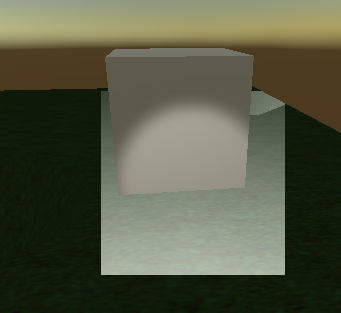
Any help would be greatly appreciated.
Thanks, jimmio92
EDIT 20150531: I attempted to use another macro: LIGHT_ATTENUATION with identical results. I think it may be position/UV of the lookup texture related. Any ideas?



