 koobas.hobune.stream


Gun Turret will not Shoot.
So not sure where to start. My problem is the Turret will not shoot at targets, He will aim at the target and that is it. I need help making him shoot at the target. Here is my script:
 var myProjectile : GameObject;
 var reloadTime : float = 1f;
 var turnSpeed : float = 5f;
 var firePauseTime : float = .25f;
 var muzzleEffect : GameObject;
 var errorAmount : float = .001;
 var myTarget : Transform;
 var muzzlePositions : Transform[];
 var turretBall : Transform;

 private var nextFireTime : float;
 private var nextMoveTime : float;
 private var desiredRotation : Quaternion;
 private var aimError : float;


 function Start ()
 {


 }
 function Update ()
 {
     if(myTarget)
 {
     if(Time.time >= nextMoveTime)
 {
 CalculateAimPosition(myTarget.position);
 turretBall.rotation = Quaternion.Lerp(turretBall.rotation, desiredRotation, Time.deltaTime*turnSpeed);

 }

 if(Time.time >= nextFireTime)
 {
    FireProjectile();

 }
 }
 }

 function OnTriggerEnter(other : Collider)
 {
 if(other.gameObject.tag == "Enemy")
 {
 nextFireTime = Time.time+(reloadTime*.5);
 myTarget = other.gameObject.transform;
 }
 }

 function OnTriggerExit(other : Collider)
 {
 if(other.gameObject.transform == myTarget)
 {
 myTarget = null;
 }
 }

 function CalculateAimPosition(targetPos : Vector3)
 {
 var aimPoint = Vector3(targetPos.x-transform.position.x+aimError, targetPos.y-transform.position.y+aimError, targetPos.z-transform.position.z+aimError);
 desiredRotation = Quaternion.LookRotation(aimPoint);
 }

 function CalculateAimError()
 {
 aimError= Random.Range(-errorAmount, errorAmount);
 }
 function FireProjectile(){

     audio.Play();
     nextFireTime = Time.time+reloadTime;
     nextMoveTime = Time.time+firePauseTime;
     CalculateAimError();

 for(theMuzzlePos in muzzlePositions)
 {
 Instantiate(myProjectile, theMuzzlePos.position, theMuzzlePos.rotation);
 Instantiate(muzzleEffect, theMuzzlePos.position, theMuzzlePos.rotation);
 }
 }
Here is the image of how I have set up. Please help me. Thank you for your time. I am still really new so please dumb it down the best you can, Thank you. 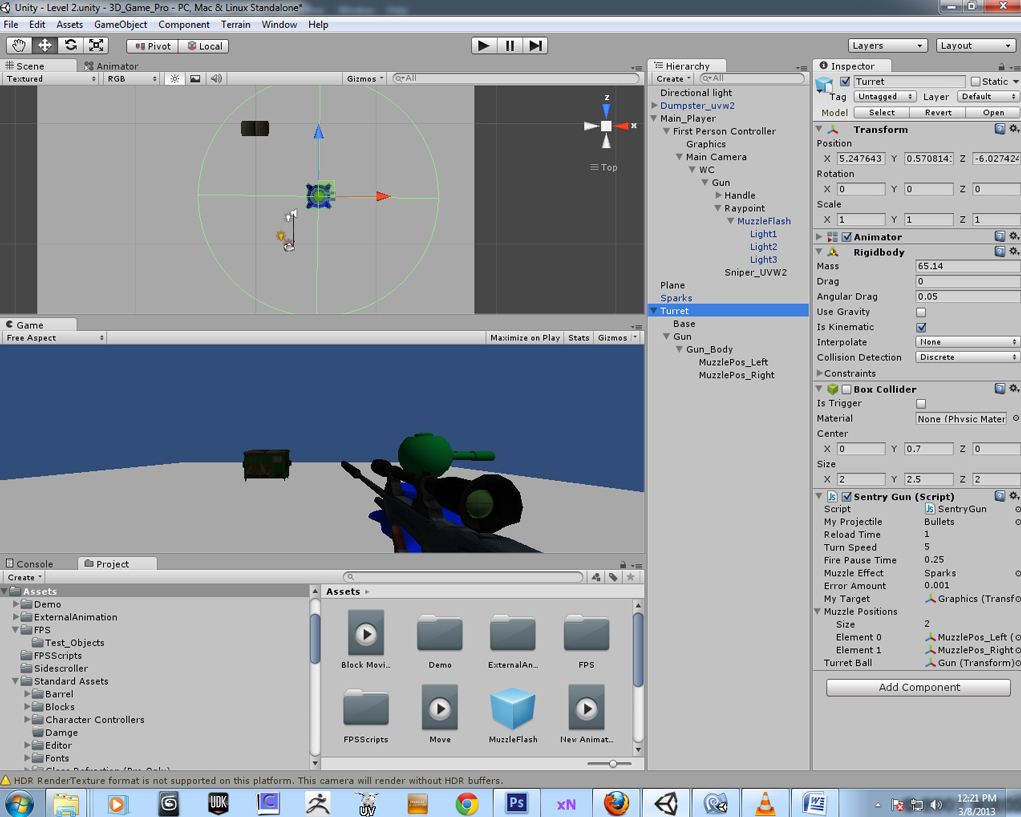

You don't add any force to your projectile. Assuming it is aimed the correct way, you would do something like:
 var go  = Instantiate(myProjectile, theMuzzlePos.position, theMuzzlePos.rotation);
 go.rigidbody.AddRelativeForce(Vector3.forward * 2000);
or
go.rigidbody.AddForce(Transform.forward * 2000);

Not sure where to add that, I added it to FireProjectile function and gave me some errors, Just saying $$anonymous$$ identifier the$$anonymous$$uzzlePos, so I fix it to my Variable up top as muzzlePositions and this is the code:
 function FireProjectile(){

       var go = Instantiate(myProjectile, muzzlePositions.position, muzzlePositions.rotation);
     go.rigidbody.AddRelativeForce(Vector3.forward * 2000);

     audio.Play();
     nextFireTime = Time.time+reloadTime;
     next$$anonymous$$oveTime = Time.time+firePauseTime;
     CalculateAimError();
But still didn’t worked, I add that code in the for (the$$anonymous$$uzzlePos in muzzlePositions), because that’s what it look like it was written for, code as follows:
 for(the$$anonymous$$uzzlePos in muzzlePositions)
 {

     var go = Instantiate(myProjectile, the$$anonymous$$uzzlePos.position, the$$anonymous$$uzzlePos.rotation);
     go.rigidbody.AddRelativeForce(Vector3.forward * 2000);

 Instantiate(myProjectile, the$$anonymous$$uzzlePos.position, the$$anonymous$$uzzlePos.rotation);
 Instantiate(muzzleEffect, the$$anonymous$$uzzlePos.position, the$$anonymous$$uzzlePos.rotation);
 }
 }
Still nothing... . .

The two lines would replace line 7:
Instantiate(myProjectile, the$$anonymous$$uzzlePos.position, the$$anonymous$$uzzlePos.rotation);
$$anonymous$$ake sure your spawn point is in front of your muzzle. There may be other problems with your script. Are you getting any Console errors.
@robertbu Ok, We got bullets !!!!! Thank you so much it worked like a charm. Now I am going to work on the damage script. It does seem not to readjust its aim after it hits an objects and it moves it (for example my dumpster that is the enemy). But works fine on my FPS. Thank you for the fast response.



