 koobas.hobune.stream


tank-tower rotation works unexpected
hey guys! i would like to have a tank-tower controll like in world of tanks. that means, you have a tower ontop of your tank which can rotate around the y-axis. and you have a gun that rotates with the tower and on the z-axis i think. 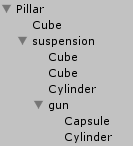
(pillar has the script and gun is the verticalObj and suspension the horizontal) and here is my script:
 using UnityEngine;
 using System.Collections;

 public class WeaponMover : MonoBehaviour
 {
     public Transform target;
     public GameObject verticalRotateObj;
     public GameObject horizontalRotateObj;

     public float maxVerticalRotationSpeed = 2.0f;
     public float maxHorizontalRotationSpeed = 1.0f;

     public float maxVerticalRotation = 30.0f;
     public float maxHorizontalRotation = 135.0f;

     private Vector3 m_newHorEuler;
     private Vector3 m_newVerEuler;
     private Vector2 m_currPos;
     private Vector2 m_targetPos;
     private float m_conversion = 0.0f;
     private float m_minVertAngle;
     private float m_maxVertAngle;
     private float m_minHorAngle;
     private float m_maxHorAngle;
     private float m_targetHorAngle;
     private float m_targetVertAngle;

     // Use this for initialization
     void Start()
     {
         m_conversion = 180/Mathf.PI;
         m_newHorEuler = Vector3.zero;
         m_newVerEuler = Vector3.zero;
         m_currPos = Vector2.zero;
         m_targetPos = Vector2.zero;
     }

     // Update is called once per frame
     void Update()
     {
         m_currPos.x = horizontalRotateObj.transform.position.x;
         m_currPos.y = horizontalRotateObj.transform.position.z;
         m_targetPos.x = target.transform.position.x;
         m_targetPos.y = target.transform.position.z;
         m_targetHorAngle = AngleToTarget(m_currPos, m_targetPos);
         m_newHorEuler.y = m_targetHorAngle + 90.0f;
         horizontalRotateObj.transform.eulerAngles = m_newHorEuler;

         m_currPos.x = verticalRotateObj.transform.position.y;
         m_currPos.y = verticalRotateObj.transform.position.x;
         m_targetPos.x = target.transform.position.y;
         m_targetPos.y = target.transform.position.x;
         m_targetVertAngle = AngleToTarget(m_currPos, m_targetPos);
         m_newVerEuler.z = m_targetVertAngle + 180.0f;
          m_newVerEuler.y = m_newHorEuler.y;
         verticalRotateObj.transform.eulerAngles = m_newVerEuler;
     }

     private float AngleToTarget(Vector2 objectPos, Vector2 targetPos)
     {
         return (Mathf.Atan2(objectPos.x - targetPos.x, objectPos.y - targetPos.y) * m_conversion);
     }
 }
works ok but the problem is, if the target moves over a certain line, the gun gets flipped 180° on z-axis. i have no idea why... ;( every help is welcome!!!
update:
     void Update()
 {
         Vector3 angle = Quaternion.LookRotation(target.position - horizontalRotateObj.transform.position).eulerAngles;
         angle.x = horizontalRotateObj.transform.eulerAngles.x;
         angle.z = horizontalRotateObj.transform.eulerAngles.z;
         angle.y -= 90.0f;
         horizontalRotateObj.transform.eulerAngles = angle;

         angle = Quaternion.LookRotation(target.position - verticalRotateObj.transform.position).eulerAngles;
         angle.x = verticalRotateObj.transform.eulerAngles.x;
         angle.y -= 90.0f;
         verticalRotateObj.transform.eulerAngles = angle;
     }

This is a 2D game? I'm confused about the Vector2 for objectPos and targetPos

no, its 3d. but for a rotation on one axis you need only two vector positions...

You'd be better off using the pivot point where the gun barrel attaches to the turret - then use
var angles = Quaternion.LookRotation(targetPosition - attachmentPosition).eulerAngles;
You can then ignore the X rotation that you don't care about and use just Y and Z. Rotate the turret by the Y angle and elevate the gun by the Z angle - presuming that you aren't accounting for gravity in the projectile's path that should be a direct point.
i made a update. the problem is that the gun doesn´t rotate in the z axis any more... -__-
So Debug.Log the Quaternion you get from the rotation to make sure you are getting reasonable values for the rotations. It's probably just not applying them to the right axes.
holy shit, i think it works. not sure what happens if i move the tank, yet...
Vector3 angle = Quaternion.LookRotation(target.position - horizontalRotateObj.transform.position).eulerAngles; angle.x = horizontalRotateObj.transform.eulerAngles.x; angle.z = horizontalRotateObj.transform.eulerAngles.z; angle.y -= 90.0f; horizontalRotateObj.transform.eulerAngles = angle;
angle = Quaternion.LookRotation(target.position - verticalRotateObj.transform.position).eulerAngles; angle.y -= 90.0f; angle.z = -angle.x; angle.x = verticalRotateObj.transform.eulerAngles.x; verticalRotateObj.transform.eulerAngles = angle;
you should answer the question and i give you the thumb =) the problem now: if the tank rotates in a diffrent axis. and i am not sure how to rotate it with a max speed... :|
i dont get it. how can i add a rotation speed or something like that? a tower can´t rotate instant...!
So rather than setting the angle create a new Quaternion and Slerp to it:
    var verticalTarget = Quaternion.Euler(angle);
    verticalRotateObj.transform.rotation = Quaternion.Slerp(verticalRotateObj.transform.rotation, verticalTarget, Time.deltaTime * someSpeedFactor);
You might find this tutorial useful.
lol. i am just reading it right now, because i checked your profile =)



