
Wayback Machinekoobas.hobune.stream
May JUN Jul
Previous capture 13 Next capture
2021 2022 2023
1 capture
13 Jun 22 - 13 Jun 22
sparklines
Close Help
  • Products
  • Solutions
  • Made with Unity
  • Learning
  • Support & Services
  • Community
  • Asset Store
  • Get Unity

UNITY ACCOUNT

You need a Unity Account to shop in the Online and Asset Stores, participate in the Unity Community and manage your license portfolio. Login Create account
  • Blog
  • Forums
  • Answers
  • Evangelists
  • User Groups
  • Beta Program
  • Advisory Panel

Navigation

  • Home
  • Products
  • Solutions
  • Made with Unity
  • Learning
  • Support & Services
  • Community
    • Blog
    • Forums
    • Answers
    • Evangelists
    • User Groups
    • Beta Program
    • Advisory Panel

Unity account

You need a Unity Account to shop in the Online and Asset Stores, participate in the Unity Community and manage your license portfolio. Login Create account

Language

  • Chinese
  • Spanish
  • Japanese
  • Korean
  • Portuguese
  • Ask a question
  • Spaces
    • Default
    • Help Room
    • META
    • Moderators
    • Topics
    • Questions
    • Users
    • Badges
  • Home /
avatar image
0
Question by Mz3D · Jan 13, 2013 at 03:54 PM · colorlerpvalueshue

mantain color brightness and change only hue

Hello everyone! I have a self illuminated material. I want to change its hue value but keep its brightness always at the same value at runtime. I attach the color scheme to better explain myself: i need the white circle to stay always at that position and only the color slider on the right to go up and down over time, choosing random values every bunch of seconds. How can i code this?
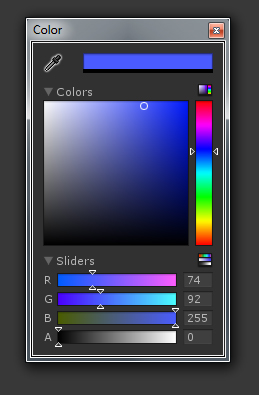
alt text

colors.jpg (63.9 kB)
Comment
Add comment
10 |3000 characters needed characters left characters exceeded
▼
  • Viewable by all users
  • Viewable by moderators
  • Viewable by moderators and the original poster
  • Advanced visibility
Viewable by all users

5 Replies

· Add your reply
  • Sort: 
avatar image
2
Best Answer

Answer by robertbu · Jan 13, 2013 at 04:49 PM

There are several snippets of code on the web for HSL translations. Typically they are called TransformHSL or TransformHSV. When I needed to do an HSL translation I based my code on the information and sample code (towards the bottom) in this web page: HSV color transforms

Comment
Add comment · Show 5 · Share
10 |3000 characters needed characters left characters exceeded
▼
  • Viewable by all users
  • Viewable by moderators
  • Viewable by moderators and the original poster
  • Advanced visibility
Viewable by all users
avatar image Wolfram · Jan 13, 2013 at 05:13 PM 0
Share

Note that this link deals with perceptual color transformations, not with the "HSV" color model, which is just a (perception independent) different representation of an RGB color. Furthermore, that webpage uses the YIQ color model, which is a perceptual color model based on the NTSC standard, and therefore ideally for TV broadcasting. It will usually not yield very good results for computer monitors and such, and will distort the colors.

For a simple RGB<->HSV transformation, you don't need any 3x3 color space transformation matrix.

On the other hand, if you really are interested in a perceptually "correct" hue transformation, you would need a calibrated color space in the first place, which is an entirely different concept than the "RGB" colors everybody uses.

avatar image Mz3D · Jan 13, 2013 at 05:46 PM 0
Share

Ok, i've used the HSBColor.cs from Unify Community and imported in /Plugins folder. Now how can i access to saturation and brightness values of the object so i can block them at a certain value?

avatar image Wolfram · Jan 13, 2013 at 05:49 PM 1
Share

Use the functions provided in that class (C# example):

 // example 1
 HSBColor hsbCol1=new HSBColor(renderer.material.color);
 // example 2
 HSBColor hsbCol2=HSBColor.FromColor(renderer.material.color);
 
 // example: clamp saturation
 if(hsbCol2.s>0.5f)
     hsbCol2.s=0.5;

 // convert back to Color, assign
 renderer.material.color=hsbCol2.ToColor();
avatar image robertbu · Jan 13, 2013 at 09:28 PM 0
Share

Thanks for the info wolfram! I'll go back and revisit my code.

avatar image Wolfram · Jan 13, 2013 at 11:15 PM 0
Share

(little color conversion discourse)

I should mention the code you linked to is not wrong, it just does a different thing. Sometimes this is what you need, but sometimes this can lead to artifacts. The simple "hue bar" of the color picker uses the straight-forward HSV-conversion mentioned in the other answers (and HSBColor.cs). Once you envolve perception dependent color models such as YIQ, things will get more complicated. You might get a better result for hue animations and so on, but you might get clipping, as mentioned in the article, for example by trying to convert a bright green towards blue or red, since the algorithm tries to keep perceived brightness constant, which is not possible in this case, since blue and red are perceived much darker than green.

For a worst-case example, changing the hue from RGB blue (0,0,255) to green using HSBColor.cs or RGB<->HSV conversion results in (0,255,0). When using the YIQ conversion, the result is (-66,108,-129), which a) needs to be clipped, and which is much "darker" (0,108,0) than "full" green.

The other worst-case is to convert (0,255,0) to "blue" by assu$$anonymous$$g a standard hue rotation of 120 degrees, which results in (152,89,457). Simply clipping this to (152,89,255) results in a pale pink ins$$anonymous$$d of the probably expected bright blue. Trying to achieve a really blue color in this case requires a rotation by only 106 degrees, which results in (110,112,448). Clipping this results in (110,112,255), which is a very unsaturated blue.

avatar image
1

Answer by tomekkie2 · Jan 13, 2013 at 04:33 PM

You just need to manipulate with hue value in a HSV color model and then convert the color to RGB.

You can find some conversion scripts for that

http://pastebin.com/683Gk9xZ

Comment
Add comment · Share
10 |3000 characters needed characters left characters exceeded
▼
  • Viewable by all users
  • Viewable by moderators
  • Viewable by moderators and the original poster
  • Advanced visibility
Viewable by all users
avatar image
1

Answer by Wolfram · Jan 13, 2013 at 04:43 PM

If you want this for the Color chooser in the Editor, just click on the little striped square just above the 4 numbers seen in your snapshot, then the sliders change to HSV.

To do this via script, you'll need a RGB<->HSV conversion, for example here: http://pastebin.com/A16q3tbU

EDIT: woops, I see @tomekkie2 already answered this, but as a comment.

Comment
Add comment · Share
10 |3000 characters needed characters left characters exceeded
▼
  • Viewable by all users
  • Viewable by moderators
  • Viewable by moderators and the original poster
  • Advanced visibility
Viewable by all users
avatar image
1

Answer by felipedejesus145 · Jul 29, 2014 at 05:39 PM

hi there, old post, but if anyone is wondering how to do a hue slider, use this (js):

 public var SkyColor : Color = Color.white;
 public var hSliderValue : float = 120.0;
 public var cSliderValue : float = 0;
 
 function Update() {
 SkyColor = EditorGUIUtility.HSVToRGB(cSliderValue/360,hSliderValue/180,1);
 }
 function OnGUI() {
 hSliderValue = GUI.HorizontalSlider (Rect (822, 196+(Mathf.Sin(hSliderValue*-.0175)*30), 243, 39), hSliderValue, 0.0, 180.0);
 }

Comment
Add comment · Share
10 |3000 characters needed characters left characters exceeded
▼
  • Viewable by all users
  • Viewable by moderators
  • Viewable by moderators and the original poster
  • Advanced visibility
Viewable by all users
avatar image
0

Answer by Sjael · Sep 21, 2016 at 08:13 PM

Here's a nice package for easy HSV blending, which is what you're looking for. Basically just change Color.Lerp() to Colorx.Slerp().

http://wiki.unity3d.com/index.php/Colorx

Comment
Add comment · Share
10 |3000 characters needed characters left characters exceeded
▼
  • Viewable by all users
  • Viewable by moderators
  • Viewable by moderators and the original poster
  • Advanced visibility
Viewable by all users

Your answer

Hint: You can notify a user about this post by typing @username

Up to 2 attachments (including images) can be used with a maximum of 524.3 kB each and 1.0 MB total.

Follow this Question

Answers Answers and Comments

13 People are following this question.

avatar image avatar image avatar image avatar image avatar image avatar image avatar image avatar image avatar image avatar image avatar image avatar image avatar image

Related Questions

Lerp color of verts with position bigger than 1 1 Answer

Lerp Color doesn't work 2 Answers

Adjusting hue/tint for material color? 1 Answer

How can I change the color of a light over time? 3 Answers

How do I loop a Color32.Lerp? 3 Answers


Enterprise
Social Q&A

Social
Subscribe on YouTube social-youtube Follow on LinkedIn social-linkedin Follow on Twitter social-twitter Follow on Facebook social-facebook Follow on Instagram social-instagram

Footer

  • Purchase
    • Products
    • Subscription
    • Asset Store
    • Unity Gear
    • Resellers
  • Education
    • Students
    • Educators
    • Certification
    • Learn
    • Center of Excellence
  • Download
    • Unity
    • Beta Program
  • Unity Labs
    • Labs
    • Publications
  • Resources
    • Learn platform
    • Community
    • Documentation
    • Unity QA
    • FAQ
    • Services Status
    • Connect
  • About Unity
    • About Us
    • Blog
    • Events
    • Careers
    • Contact
    • Press
    • Partners
    • Affiliates
    • Security
Copyright © 2020 Unity Technologies
  • Legal
  • Privacy Policy
  • Cookies
  • Do Not Sell My Personal Information
  • Cookies Settings
"Unity", Unity logos, and other Unity trademarks are trademarks or registered trademarks of Unity Technologies or its affiliates in the U.S. and elsewhere (more info here). Other names or brands are trademarks of their respective owners.
  • Anonymous
  • Sign in
  • Create
  • Ask a question
  • Spaces
  • Default
  • Help Room
  • META
  • Moderators
  • Explore
  • Topics
  • Questions
  • Users
  • Badges
