
Wayback Machinekoobas.hobune.stream
May JUN Jul
Previous capture 13 Next capture
2021 2022 2023
1 capture
13 Jun 22 - 13 Jun 22
sparklines
Close Help
  • Products
  • Solutions
  • Made with Unity
  • Learning
  • Support & Services
  • Community
  • Asset Store
  • Get Unity

UNITY ACCOUNT

You need a Unity Account to shop in the Online and Asset Stores, participate in the Unity Community and manage your license portfolio. Login Create account
  • Blog
  • Forums
  • Answers
  • Evangelists
  • User Groups
  • Beta Program
  • Advisory Panel

Navigation

  • Home
  • Products
  • Solutions
  • Made with Unity
  • Learning
  • Support & Services
  • Community
    • Blog
    • Forums
    • Answers
    • Evangelists
    • User Groups
    • Beta Program
    • Advisory Panel

Unity account

You need a Unity Account to shop in the Online and Asset Stores, participate in the Unity Community and manage your license portfolio. Login Create account

Language

  • Chinese
  • Spanish
  • Japanese
  • Korean
  • Portuguese
  • Ask a question
  • Spaces
    • Default
    • Help Room
    • META
    • Moderators
    • Topics
    • Questions
    • Users
    • Badges
  • Home /
avatar image
0
Question by jkh13 · May 23, 2015 at 05:10 PM · shader3deffecthex

Hex grid effects

I am currently working on a hex based strategy game and I want to improve the hex system I have currently implemented but there are some things I do not currently know how to achieve yet, some guidance about my approach would be appreciated.

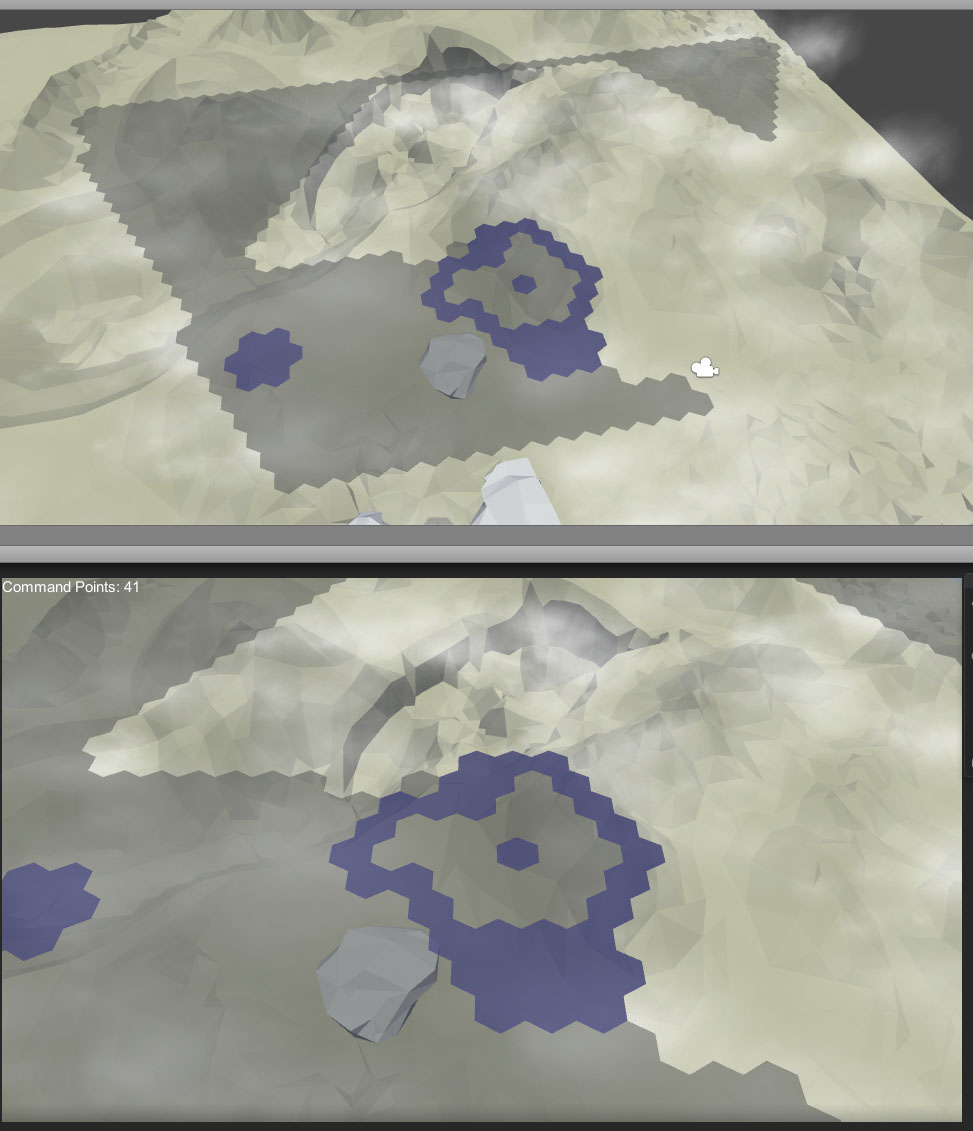
Currently my hex system clones a model for each hex on a grid visible by the camera and colors the material of each model appropriately based on the game logic. This is what it looks like at the moment:
alt text

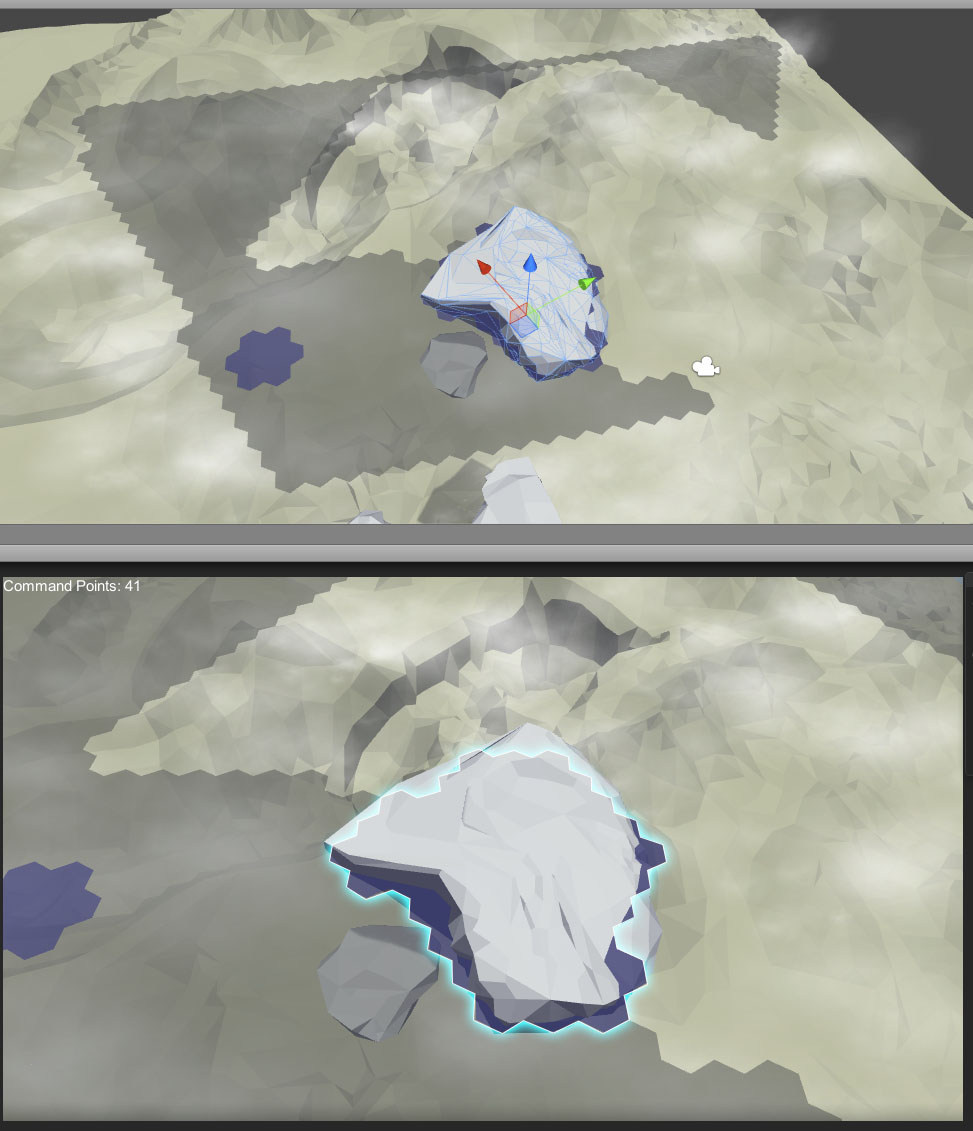
What I want to be able to do is to add effects to continuous segments of the hex grid. For instance I want to have the group of blue hexes have a glowing outline. I realized that I would firstly need to redesign how the hex models work. My first step is to define continuous segments of the grid as a single model which is created programatically. In the example above I would have 5 segments (3 blue, 2 grey). I hope to also increase performance by doing this as it seems like my render thread is taking 2.6ms as opposed to 0.7ms when not rendering hexes.

The bit I am stuck on is how to apply a glow effect to the models. I want this glow effect to be displayed on the screen over any entity models/terrain that may be covering the hex grid. In my mind the following set of steps could achieve it.

1) Copy and scale hex model slightly larger across the hex grid plane using vertex shader, fragment shader will color this white. Copy this white render to a texture.

2) Make a black copy of the hex model and render this to another texture.

3) Write a full screen effect that blurs the texture outputted in 1 and masks the pixels using the black parts of the texture created in 2.

4) Apply color tint.

5) Compose final textures onto the hex grid in the game view.

I am not experienced at all with writing shaders but I think I can learn it, the issue I am facing is how to actually set this all up.

Can you limit visibility of models to certain cameras? Do I need multiple cameras, one for each render to texture needed? Is the above approach the best way or even doable?

This is an example I put together in photoshop of what I want to achieve.
alt text

fe.jpg (138.4 kB)
exa.jpg (142.2 kB)
Comment
Add comment
10 |3000 characters needed characters left characters exceeded
▼
  • Viewable by all users
  • Viewable by moderators
  • Viewable by moderators and the original poster
  • Advanced visibility
Viewable by all users

0 Replies

· Add your reply
  • Sort: 

Your answer

Hint: You can notify a user about this post by typing @username

Up to 2 attachments (including images) can be used with a maximum of 524.3 kB each and 1.0 MB total.

Follow this Question

Answers Answers and Comments

22 People are following this question.

avatar image avatar image avatar image avatar image avatar image avatar image avatar image avatar image avatar image avatar image avatar image avatar image avatar image avatar image avatar image avatar image avatar image avatar image avatar image avatar image avatar image avatar image

Related Questions

Old TV Set post effect 2 Answers

How to make a nice shockwave ? 1 Answer

Creating this light effect 1 Answer

3D Texture and normals 0 Answers

Alpha Texture Deserves a Separate File? 1 Answer


Enterprise
Social Q&A

Social
Subscribe on YouTube social-youtube Follow on LinkedIn social-linkedin Follow on Twitter social-twitter Follow on Facebook social-facebook Follow on Instagram social-instagram

Footer

  • Purchase
    • Products
    • Subscription
    • Asset Store
    • Unity Gear
    • Resellers
  • Education
    • Students
    • Educators
    • Certification
    • Learn
    • Center of Excellence
  • Download
    • Unity
    • Beta Program
  • Unity Labs
    • Labs
    • Publications
  • Resources
    • Learn platform
    • Community
    • Documentation
    • Unity QA
    • FAQ
    • Services Status
    • Connect
  • About Unity
    • About Us
    • Blog
    • Events
    • Careers
    • Contact
    • Press
    • Partners
    • Affiliates
    • Security
Copyright © 2020 Unity Technologies
  • Legal
  • Privacy Policy
  • Cookies
  • Do Not Sell My Personal Information
  • Cookies Settings
"Unity", Unity logos, and other Unity trademarks are trademarks or registered trademarks of Unity Technologies or its affiliates in the U.S. and elsewhere (more info here). Other names or brands are trademarks of their respective owners.
  • Anonymous
  • Sign in
  • Create
  • Ask a question
  • Spaces
  • Default
  • Help Room
  • META
  • Moderators
  • Explore
  • Topics
  • Questions
  • Users
  • Badges
