
Wayback Machinekoobas.hobune.stream
May JUN Jul
Previous capture 12 Next capture
2021 2022 2023
1 capture
12 Jun 22 - 12 Jun 22
sparklines
Close Help
  • Products
  • Solutions
  • Made with Unity
  • Learning
  • Support & Services
  • Community
  • Asset Store
  • Get Unity

UNITY ACCOUNT

You need a Unity Account to shop in the Online and Asset Stores, participate in the Unity Community and manage your license portfolio. Login Create account
  • Blog
  • Forums
  • Answers
  • Evangelists
  • User Groups
  • Beta Program
  • Advisory Panel

Navigation

  • Home
  • Products
  • Solutions
  • Made with Unity
  • Learning
  • Support & Services
  • Community
    • Blog
    • Forums
    • Answers
    • Evangelists
    • User Groups
    • Beta Program
    • Advisory Panel

Unity account

You need a Unity Account to shop in the Online and Asset Stores, participate in the Unity Community and manage your license portfolio. Login Create account

Language

  • Chinese
  • Spanish
  • Japanese
  • Korean
  • Portuguese
  • Ask a question
  • Spaces
    • Default
    • Help Room
    • META
    • Moderators
    • Topics
    • Questions
    • Users
    • Badges
  • Home /
avatar image
0
Question by Red7silence · May 05, 2020 at 04:09 AM · camerascene

Scene Camera continues to move after letting go of W

So I'm trying to move my camera in the scene, and then I let go of my W and D Key, and the camera keeps moving. Keeps speeding up. All of a sudden I have no control of Unity for like 5-10 seconds, and now I'm like 500x the distance away from my scene. I have no clue what's going on, but I literally can't turn my camera 90 degrees without it glitching out. It's literally impossible to work right now.

Here is a short video of the issue. https://streamable.com/duuvki

Comment
Add comment · Show 5
10 |3000 characters needed characters left characters exceeded
▼
  • Viewable by all users
  • Viewable by moderators
  • Viewable by moderators and the original poster
  • Advanced visibility
Viewable by all users
avatar image chrisf112233 · May 06, 2020 at 03:43 AM 1
Share

Can you post the part of the code that is altering the camera position/rotation, I don't think anyone can help without it

avatar image Red7silence chrisf112233 · May 06, 2020 at 05:34 AM 0
Share

I'm not sure what you're talking about. This is the scene view. A camera shouldn't affect anything in regards to moving around the scene.

avatar image EyadThedevelopingBoi Red7silence · May 06, 2020 at 02:31 PM 0
Share

We want the script that controls the camera, Since for example the only thing I know that causes this is adding force to a rigidbody every frame which causes it to accelerate fast and do to low linear drag, it keeps going.

Show more comments
Show more comments

2 Replies

· Add your reply
  • Sort: 
avatar image
0

Answer by Noblauch · May 06, 2020 at 06:50 PM

Did you check your viewport camera settings for crazy values? alt text Seems like your scene is very huge, maybe you turned it up to jupiter. But your machine seems to be at its limit too. Other thing could be editor scripts that control the camera. Try to make a new scene with a few objects and check the behaviour.
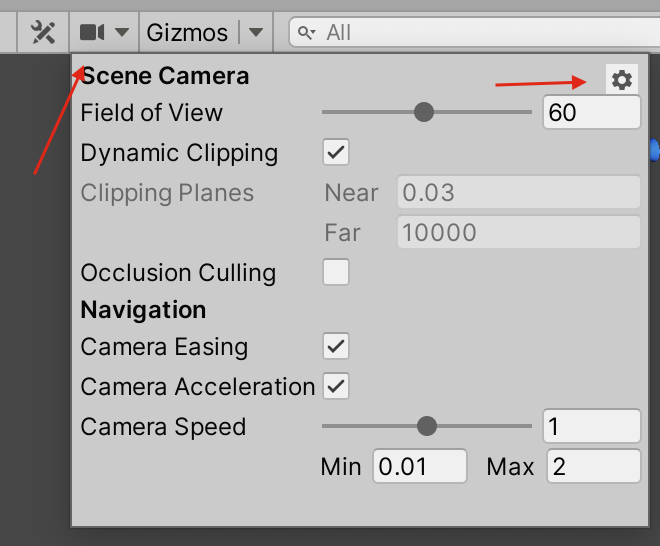

camsettings.png (81.0 kB)
Comment
Add comment · Share
10 |3000 characters needed characters left characters exceeded
▼
  • Viewable by all users
  • Viewable by moderators
  • Viewable by moderators and the original poster
  • Advanced visibility
Viewable by all users
avatar image
0

Answer by Red7silence · May 06, 2020 at 07:23 PM

So I Reset the Scene Camera settings, still same issue. It isn't my computer either. I have an 8 core, 3.8 ghz, 64 gigs of RAM at 3000mhz, and a 1080 Video Card. So my computer isn't lagging at all. It's just this one scene. Starting a new project does make the issue go away. That being said, I need to figure out what is causing this issue, so it doesn't happen later on.

I did do some troubleshooting and determined that it is Gaia that is causing the lag. I'm not sure why, or what to look for now that I know it's Gaia that's creating this issue, but could use some more assistance. Thanks for your guys' help.

Comment
Add comment · Show 1 · Share
10 |3000 characters needed characters left characters exceeded
▼
  • Viewable by all users
  • Viewable by moderators
  • Viewable by moderators and the original poster
  • Advanced visibility
Viewable by all users
avatar image Noblauch · May 06, 2020 at 10:57 PM 1
Share

What is Gaia? You could take a look at the Profiler and see what Unity is doing every frame: Window -> Analysis -> Profiler then in the profiler tab click the dropdown that says playmode beneath the little record button and select Editor. Record a few seconds while the editor is behaving weird and then try to find some function calls or rendering that causes your machine to freak out. Since in that scene it looks like your computer can't handle it, something must be wrong there.

Your answer

Hint: You can notify a user about this post by typing @username

Up to 2 attachments (including images) can be used with a maximum of 524.3 kB each and 1.0 MB total.

Follow this Question

Answers Answers and Comments

208 People are following this question.

avatar image avatar image avatar image avatar image avatar image avatar image avatar image avatar image avatar image avatar image avatar image avatar image avatar image avatar image avatar image avatar image avatar image avatar image avatar image avatar image avatar image avatar image avatar image avatar image avatar image avatar image avatar image avatar image avatar image avatar image avatar image avatar image avatar image avatar image avatar image avatar image avatar image avatar image avatar image avatar image avatar image avatar image avatar image avatar image avatar image avatar image avatar image avatar image avatar image avatar image avatar image avatar image avatar image avatar image avatar image avatar image avatar image avatar image avatar image avatar image avatar image avatar image avatar image avatar image avatar image avatar image avatar image avatar image avatar image avatar image avatar image avatar image avatar image avatar image avatar image avatar image avatar image avatar image avatar image avatar image avatar image avatar image avatar image avatar image avatar image avatar image avatar image avatar image avatar image avatar image avatar image avatar image avatar image avatar image avatar image avatar image avatar image avatar image avatar image avatar image avatar image avatar image avatar image avatar image avatar image avatar image avatar image avatar image avatar image avatar image avatar image avatar image avatar image avatar image avatar image avatar image avatar image avatar image avatar image avatar image avatar image avatar image avatar image avatar image avatar image avatar image avatar image avatar image avatar image avatar image avatar image avatar image avatar image avatar image avatar image avatar image avatar image avatar image avatar image avatar image avatar image avatar image avatar image avatar image avatar image avatar image avatar image avatar image avatar image avatar image avatar image avatar image avatar image avatar image avatar image avatar image avatar image avatar image avatar image avatar image avatar image avatar image avatar image avatar image avatar image avatar image avatar image avatar image avatar image avatar image avatar image avatar image avatar image avatar image avatar image avatar image avatar image avatar image avatar image avatar image avatar image avatar image avatar image avatar image avatar image avatar image avatar image avatar image avatar image avatar image avatar image avatar image avatar image avatar image avatar image avatar image avatar image avatar image avatar image avatar image avatar image avatar image avatar image avatar image avatar image avatar image avatar image avatar image

Related Questions

Close objects in scene view are cut 2 Answers

How to re-create this built-in RP setup with URP? 0 Answers

how to make my camera follow the character to the scene where my character transported? 1 Answer

How can I switch back to 1st-person-cam mode in Scene? (right-click + Arrows) 2 Answers

Tags not working 1 Answer


Enterprise
Social Q&A

Social
Subscribe on YouTube social-youtube Follow on LinkedIn social-linkedin Follow on Twitter social-twitter Follow on Facebook social-facebook Follow on Instagram social-instagram

Footer

  • Purchase
    • Products
    • Subscription
    • Asset Store
    • Unity Gear
    • Resellers
  • Education
    • Students
    • Educators
    • Certification
    • Learn
    • Center of Excellence
  • Download
    • Unity
    • Beta Program
  • Unity Labs
    • Labs
    • Publications
  • Resources
    • Learn platform
    • Community
    • Documentation
    • Unity QA
    • FAQ
    • Services Status
    • Connect
  • About Unity
    • About Us
    • Blog
    • Events
    • Careers
    • Contact
    • Press
    • Partners
    • Affiliates
    • Security
Copyright © 2020 Unity Technologies
  • Legal
  • Privacy Policy
  • Cookies
  • Do Not Sell My Personal Information
  • Cookies Settings
"Unity", Unity logos, and other Unity trademarks are trademarks or registered trademarks of Unity Technologies or its affiliates in the U.S. and elsewhere (more info here). Other names or brands are trademarks of their respective owners.
  • Anonymous
  • Sign in
  • Create
  • Ask a question
  • Spaces
  • Default
  • Help Room
  • META
  • Moderators
  • Explore
  • Topics
  • Questions
  • Users
  • Badges
