 koobas.hobune.stream


Problems with Spring Joint 2D
Greetings. I'm making a 2D pinball type game in Unity3d. I used the Spring Joint 2D function for the trigger of the ball but it is unstable. When do the pulling motion with the mouse or the keyboard the object is oscillating. He does not make a smooth movement. Is going up and down several times. Below the script to control with the mouse:
 #pragma strict

 var click : boolean = false;
 var PosAnt : Vector3;

 function Start ()
 {

 }

 function Update ()
 {
     if (Input.GetMouseButtonUp(0))
     {
         click = false;
     }

     if (click == true)
     {
 //          guiTexture.pixelInset.x += Input.mousePosition.x - PosAnt.x;
           transform.position.y += Input.mousePosition.y - PosAnt.y;
           PosAnt = Input.mousePosition;
     }
 }

 function OnMouseOver(){

      if (Input.GetMouseButton(0))
      {
           click = true;
           PosAnt = Input.mousePosition;
      }
 }
How can I solve this problem? Thank you for your attention.
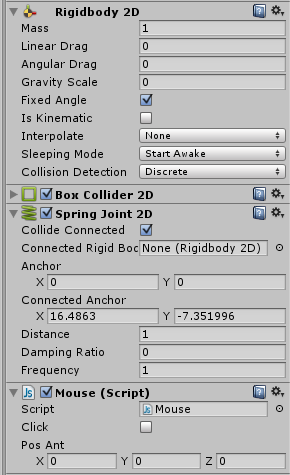

Play around with the rigidbody's mass, it can do wonders!

Have tested various mass settings without satisfactory results. The problem is that the object that I pull is unstable. He does not make a continuous motion.
I managed to adjust the Spring Joint 2D but need to set it via script. I need to use the command SpringJoint2D.frequency however I am unable to develop the script. Need to adjust to 0 when I click and 2 when released the button. I do not understand how to enter commands in the script.

In new version of Unity they added option 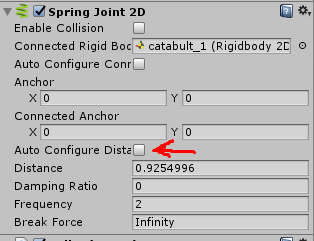 of Auto Configure Distance. that is the reason Just Disable Auto Configure Distance in Spring Joint 2D component and its DONE




